

When we use OSPF for IPv4 we are using OSPFv2. OSPF has been updated for IPv6 and is now called OSPFv3. These are two different routing protocols and in this lesson I’ll show you how to configure OSPFv3 so that you can route IPv6 traffic. Here’s the topology we’ll use:
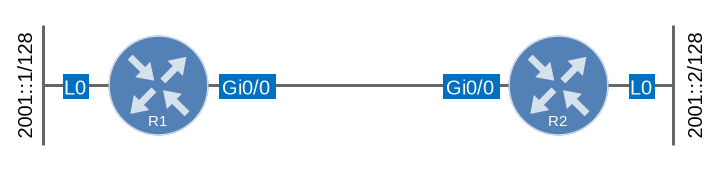
Let’s start with the configuration of the interfaces and the IPv6 addresses. We don’t have to configure any global unicast IPv6 addresses on the GigabitEthernet interfaces because OSPFv3 uses link-local addresses for the neighbor adjacency and sending LSAs. I’m using Cisco IOSv 15.9(3)M9 routers. The interface between R1 and R2 is GigabitEthernet0/0. It was shut down, so I enabled it with no shutdown first. Here’s the configuration:
R1(config)#ipv6 unicast-routing
R1(config)#interface loopback 0
R1(config-if)#ipv6 address 2001::1/128R2(config)#ipv6 unicast-routing
R2(config)#interface loopback 0
R2(config-if)#ipv6 address 2001::2/128Don’t forget to enable ipv6 unicast-routing, otherwise no routing protocol will work for IPv6. Let’s check the interfaces:
R1#show ipv6 interface brief
GigabitEthernet0/0     [up/up]
    unassigned
Loopback0              [up/up]
    FE80::5054:FF:FEB6:E5D7
2001::1R2#show ipv6 interface brief
GigabitEthernet0/0 [up/up]
unassigned
Loopback0 [up/up]
FE80::5054:FF:FE1E:936F
2001::2After configuring the IPv6 addresses on the loopback interface, you can see the global unicast and the link-local IPv6 addresses. There is no link-local address on the GigabitEthernet interfaces, however, so we’ll have to fix this:
R1(config)#interface gigabitEthernet 0/0
R1(config-if)#ipv6 enableR2(config)#interface gigabitEthernet 0/0
R2(config-if)#ipv6 enableR1#show ipv6 interface brief
GigabitEthernet0/0 [up/up]
FE80::5054:FF:FEB6:E5D7
Loopback0 [up/up]
FE80::5054:FF:FEB6:E5D7
2001::1R2#show ipv6 interface brief
GigabitEthernet0/0 [up/up]
FE80::5054:FF:FE1E:936F
Loopback0 [up/up]
FE80::5054:FF:FE1E:936F
2001::2Now we can configure OSPFv3:
R1(config)#ipv6 router ospf 1
R1(config-rtr)#router-id 1.1.1.1
R1(config-rtr)#exit
R1(config)#interface gigabitEthernet 0/0
R1(config-if)#ipv6 ospf 1 area 0
R1(config-if)#exit
R1(config)#interface loopback 0
R1(config-if)#ipv6 ospf 1 area 0R2(config)#ipv6 router ospf 1
R2(config-rtr)#router-id 2.2.2.2
R2(config-rtr)#exit
R2(config)#interface gigabitEthernet 0/0
R2(config-if)#ipv6 ospf 1 area 0
R2(config-if)#exit
R2(config)#interface loopback 0
R2(config-if)#ipv6 ospf 1 area 0Just like OSPFv2, you need to start a process and specify a process ID. For OSPFv3, we have to use the ipv6 router ospf command. Just like EIGRP for IPv6, we need a router ID if we don’t have any IPv4 addresses configured on our router. Finally, go to the interface and use the ipv6 ospf 1 area 0 command to enable OSPFv3, and select the correct area. Let’s see if we have neighbors:
R1#show ipv6 ospf neighbor

            OSPFv3 Router with ID (1.1.1.1) (Process ID 1)

Neighbor ID     Pri   State           Dead Time   Interface ID    Interface
2.2.2.2 1 FULL/DR 00:00:37 2 GigabitEthernet0/0R2#show ipv6 ospf neighbor
OSPFv3 Router with ID (2.2.2.2) (Process ID 1)
Neighbor ID Pri State Dead Time Interface ID Interface
1.1.1.1 1 FULL/BDR 00:00:39 2 GigabitEthernet0/0Use show ipv6 ospf neighbor to see your neighbors. It’s funny to see a neighbor ID that looks like an IPv4 address even though we only route IPv6 here. The router ID is still a 32-bit value written in dotted-decimal. OSPFv3 can also route IPv4 with address families, but the ipv6 router ospf process we use here only does IPv6. Let’s check the routing tables:
R1#show ipv6 route ospf
IPv6 Routing Table - default - 3 entries
Codes: C - Connected, L - Local, S - Static, U - Per-user Static route
       B - BGP, HA - Home Agent, MR - Mobile Router, R - RIP
       H - NHRP, I1 - ISIS L1, I2 - ISIS L2, IA - ISIS interarea
       IS - ISIS summary, D - EIGRP, EX - EIGRP external, NM - NEMO
       ND - ND Default, NDp - ND Prefix, DCE - Destination, NDr - Redirect
       RL - RPL, O - OSPF Intra, OI - OSPF Inter, OE1 - OSPF ext 1
       OE2 - OSPF ext 2, ON1 - OSPF NSSA ext 1, ON2 - OSPF NSSA ext 2
       la - LISP alt, lr - LISP site-registrations, ld - LISP dyn-eid
       lA - LISP away, a - Application
O   2001::2/128 [110/1]
via FE80::5054:FF:FE1E:936F, GigabitEthernet0/0R2#show ipv6 route ospf
IPv6 Routing Table - default - 3 entries
Codes: C - Connected, L - Local, S - Static, U - Per-user Static route
B - BGP, HA - Home Agent, MR - Mobile Router, R - RIP
H - NHRP, I1 - ISIS L1, I2 - ISIS L2, IA - ISIS interarea
IS - ISIS summary, D - EIGRP, EX - EIGRP external, NM - NEMO
ND - ND Default, NDp - ND Prefix, DCE - Destination, NDr - Redirect
RL - RPL, O - OSPF Intra, OI - OSPF Inter, OE1 - OSPF ext 1
OE2 - OSPF ext 2, ON1 - OSPF NSSA ext 1, ON2 - OSPF NSSA ext 2
la - LISP alt, lr - LISP site-registrations, ld - LISP dyn-eid
lA - LISP away, a - Application
O 2001::1/128 [110/1]
via FE80::5054:FF:FEB6:E5D7, GigabitEthernet0/0In our routing table, we find the fresh OSPFv3 route. That’s it! This is a fairly simple example, but it should help you to get going with OSPFv3 for IPv6.
Hi Rene,
Do areas work the same way ON IPV6 as on OSPF v2?
Hi Alfredo,
The areas are still the same, basically OSPFv2 and OSPFv3 operate in the same way but there are some differences when it comes to LSAs, building the LSDB, addressing, etc.
I’ll cover this in another lesson if you are interested.
Rene
I will be interested.
Thanks
Hey,
Why we use global Unicast address? isn’t it public address? I understand when its local communication we can get away with link local address and when we require routing we use Global Unicast or Unique local, right? Can we use unique local address in above example instead of Global unicast? implied we are not going to route outside it is just going to be site and inter-site based routing, so in that case we can use Unique local?
Thanks,
AD
Also, please show how to assign a unique local address?
Thanks,