

OSPF LSA Types Explained

OSPF uses eleven different LSA types (Link State Advertisements) to build its LSDB (Link State Database) and share routing information between routers. Each LSA type has a specific purpose and flooding scope where it is flooded only within or between areas. In this lesson, we’ll look at the different LSA types, and I’ll show you how to identify them on Cisco IOS routers. We’ll focus on OSPFv2 because OSPFv3 uses a different set/format for LSAs.

I’m currently in the middle of upgrading this lesson (12 February 2026). Adding router outputs and packet captures for every type.


LSA Types Overview

Let’s start with an overview of all LSA types:

LSA Type Name Generated By Flooding Scope
1 Router LSA Every router Within the area
2 Network LSA DR Within the area
3 Summary LSA ABR Into other areas
4 Summary ASBR LSA ABR Into other areas
5 External LSA ASBR Entire OSPF domain
6 Multicast LSA N/A N/A (not used)
7 NSSA External LSA ASBR (in NSSA) Within the NSSA only
8 External attribute LSA for BGP N/A N/A (not used)
9 Opaque LSA (link-local) Router Link-local scope
10 Opaque LSA (area-local) Router Within the area
11 Opaque LSA (AS-wide) Router Entire OSPF domain

For many students, visualizing helps them understand and remember. I like to visualize OSPF LSAs as jigsaw puzzle pieces. One jigsaw means nothing, but all of them together give us the total picture…for OSPF, this is the LSDB.

LSA Type 1

Here’s the first LSA Type:
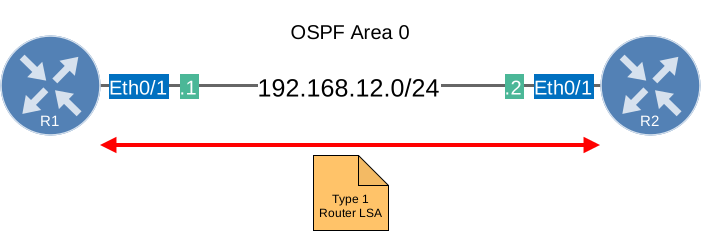
Ospf Type 1 Router Lsa Two Routers

Each router within the area will flood a type 1 router LSA within the area. In this LSA, you will find a list of all the directly connected links of this router. How do we identify a link?

  • The IP prefix on an interface.
  • The link type. There are 4 different link types:
Link Type Description Link ID
1 Point-to-point connection to another router. Neighbor router ID
2 Connection to transit network. IP address of DR
3 Connection to stub network. IP Network
4 Virtual Link Neighbor router ID

Here is a short explanation of what each of these are:

  • Point-to-point (type 1): Used for serial point-to-point connections like PPP, HDLC, or Frame Relay point-to-point sub-interfaces.
  • Transit network (type 2): A multi-access network (like Ethernet) where there is more than one OSPF neighbor, requiring a DR/BDR election.
  • Stub network (type 3): A network segment with only one OSPF router, such as a loopback interface or an Ethernet interface with no OSPF neighbors. This has nothing to do with stub areas.
  • Virtual link (type 4): Used for OSPF virtual links.

The router LSA always stays within the area.

Point-to-point

Let’s see what this looks like on a real router. If you want to see for yourself, here is the topology. We’ll take a look at all type 1 LSAs that R1 generates:

R1#show ip ospf database router self-originate

            OSPF Router with ID (1.1.1.1) (Process ID 1)

                Router Link States (Area 0)

  LS age: 74
  Options: (No TOS-capability, DC)
  LS Type: Router Links
  Link State ID: 1.1.1.1
  Advertising Router: 1.1.1.1
  LS Seq Number: 80000006
  Checksum: 0x5DB2
  Length: 48
  Number of Links: 2

    Link connected to: another Router (point-to-point)
     (Link ID) Neighboring Router ID: 2.2.2.2
     (Link Data) Router Interface address: 192.168.12.1
      Number of MTID metrics: 0
       TOS 0 Metrics: 10

    Link connected to: a Stub Network
     (Link ID) Network/subnet number: 192.168.12.0
     (Link Data) Network Mask: 255.255.255.0
      Number of MTID metrics: 0
       TOS 0 Metrics: 10

Let me break down what we see here. There are two items that can be confusing at first:

Link connected to: another Router (point-to-point)
 (Link ID) Neighboring Router ID: 2.2.2.2
 (Link Data) Router Interface address: 192.168.12.1
  TOS 0 Metrics: 10

This tells OSPF which neighbor it is, in this case, 2.2.2.2 (R2). The link ID shows that IP address, and the link data shows 192.168.12.1, which is the IP address of R1. This information is used to build the SPF topology. The other item we see is:

Link connected to: a Stub Network
 (Link ID) Network/subnet number: 192.168.12.0
 (Link Data) Network Mask: 255.255.255.0
  TOS 0 Metrics: 10

This is the router LSA for link type 3, so you get to see it right along with link type 1. This tells OSPF what subnet is reachable on this link. In this case, it’s 192.168.12.0 with a subnet mask of 255.255.255.0. This information is what a router uses to install 192.168.12.0/24 in its routing table. Here’s what this LSA looks like in a packet capture:

Frame 18: Packet, 110 bytes on wire (880 bits), 110 bytes captured (880 bits) on interface eth1, id 0
Ethernet II, Src: aa:bb:cc:00:02:10 (aa:bb:cc:00:02:10), Dst: aa:bb:cc:00:01:10 (aa:bb:cc:00:01:10)
Internet Protocol Version 4, Src: 192.168.12.2, Dst: 192.168.12.1
Open Shortest Path First
    OSPF Header
    LS Update Packet
        Number of LSAs: 1
        LSA-type 1 (Router-LSA), len 48
            .000 0001 1110 0010 = LS Age (seconds): 482
            0... .... .... .... = Do Not Age Flag: 0
            Options: 0x22, (DC) Demand Circuits, (E) External Routing
            LS Type: Router-LSA (1)
            Link State ID: 2.2.2.2
            Advertising Router: 2.2.2.2
            Sequence Number: 0x80000006
            Checksum: 0xfc0e
            Length: 48
            Flags: 0x00
            Number of Links: 2
            Type: PTP      ID: 1.1.1.1         Data: 192.168.12.2    Metric: 10
            Type: Stub     ID: 192.168.12.0    Data: 255.255.255.0   Metric: 10

You can see the same two links as we saw on the router.

LSA Type 2

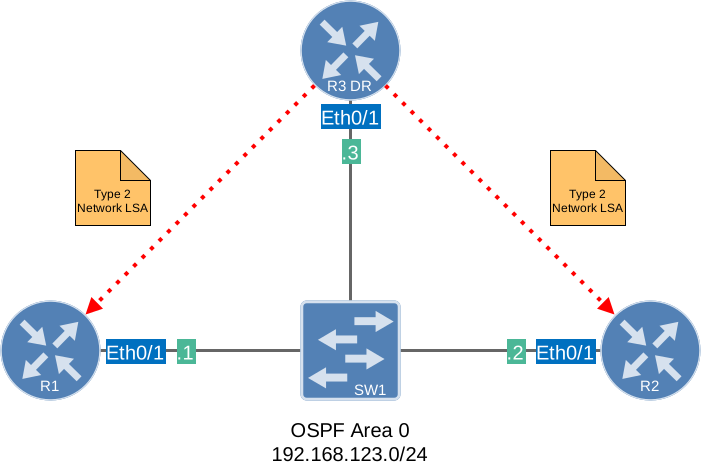
The second LSA type (network LSA) is created for multi-access networks:
OSPF LSA Type 2

The network LSA, or type 2, is created for each multi-access network. Remember the OSPF network types? The broadcast and non-broadcast network types require a DR/BDR. If this is the case, you will see these network LSAs being generated by the DR. You won’t see them when you use a different network type such as point-point or point-to-multipoint (non-broadcast). In this LSA, we will find all the routers that are connected to the multi-access network, the DR, and, of course, the prefix and subnet mask.

In my example above we will find R1, R2 and the DR in the network LSA. We will also see the prefix 192.168.123.0 /24 in this LSA. Last thing to mention: the network LSA always stays within the area.

LSA Type 3

Let’s look at the third LSA type:

OSPF LSA Type 3

Type 1 router LSAs always stay within the area. OSPF however works with multiple areas and you probably want full connectivity within all of the areas. R1 is flooding a router LSA within the area so R2 will store this in its LSDB. R3 and R4 also need to know about the networks in Area 2.

R2 is going to create a Type 3 summary LSA and flood it into area 0. This LSA will spread throughout the rest of our OSPF network. This way, all the routers in other areas will know about the prefixes from other areas. 

The LSA type 3 generated by R2 is not flooded by R3 into area 51 but regenerated. Each ABR will regenerate the LSA type 3.

The name “summary” LSA is very misleading. By default OSPF is not going to summarize anything for you. There is however a command that let you summarize inter-area routes. Take a look at my OSPF summarization lessonif you are interested. If you are looking at the routing table of an OSPF router and see some O IA entries, you are looking at LSA type 3 summary LSAs. Those are your inter-area prefixes!

LSA Type 4

Time for the fourth LSA type:

OSPF LSA Type 4In this example, R1 redistributes information from the RIP router into OSPF. This makes R1 an ASBR (Autonomous System Border Router). R1 will flip a bit in the router LSA to identify itself as an ASBR. When R2, who is an ABR, receives this router LSA, it will create a type 4 summary ASBR LSA and flood it into area 0. This LSA will also be flooded in all other areas and is required so that all OSPF routers know where to find the ASBR.

The type 4 LSA is only needed for routers in areas other than the ASBR. Routers in the same area can locate the ASBR directly from the type 1 LSA. Stub areas don’t receive type 5, so they also don’t need or receive type 4.

LSA Type 5

What about LSA type 5? Let’s check it out:

OSPF LSA Type 5

Same topology, but I’ve added a prefix (5.5.5.0/24) on our RIP router. This prefix will be redistributed into OSPF. R1 (our ASBR) will take care of this and create a type 5 external LSA for this. Don’t forget we still need the type 4 summary ASBR LSA to locate R1. If you ever tried redistribution with OSPF, you might have seen O E1 or O E2 entries. Those are the external prefixes and our type 5 LSAs. E2 is the default, which only uses the external cost set by the ASBR. The internal OSPF cost to reach the ASBR is not added. With the E1, we use the external cost plus the internal OSPF cost to reach the ASBR.

LSA Type 6

What about OSPF LSA type 6? Type 6 multicast ospf LSA I can skip because it’s not being used. Cisco does not even support it. We use PIM (Protocol Independent Multicast) for multicast configurations.

If you are studying the LSA types for CCNA R&S then you don’t have to worry about LSA type 7. These are used for a special area type called NSSA.

LSA Type 7

Let’s look at LSA type 7:

OSPF LSA Type 7

NSSA areas do not allow type 5 external LSAs. In my picture, R1 is still our ASBR redistributing information from RIP into OSPF.

Since type 5 is not allowed, we have to think of something else. That’s why we have a type 7 external LSA that carries the exact same information but is not blocked within the NSSA area. R2 (ABR) will translate this type 7 into a type 5 and flood it into the other areas. These have the same logic as the O E1 and O E2 routes:

  • N1 translates to E1
  • N2 translates to E2.

LSA Type 8

Type 8 External Attribute LSA was designed to carry BGP attributes across OSPF domains. However, like Type 6, it is rarely implemented in practice and is not supported by most vendors, including Cisco. Modern networks use MP-BGP for carrying extended attributes instead.

LSA Type 9

LSA type 9 is an opaque LSA. The word “opaque” means that OSPF itself doesn’t interpret the data inside these LSAs. Instead, they act as containers that carry information for other applications or extensions. What makes each opaque type unique is its flooding scope. A type 9 Opaque LSA has a link-local flooding scope.

Type 9 LSAs are used when information only needs to be shared between directly connected neighbors. One example is OSPF Graceful Restart (also called non-stop forwarding). When a router is about to restart its OSPF process, it sends a type 9 Opaque LSA called a Grace LSA to its directly connected neighbors. This tells them: “I’m restarting, please don’t remove me from the topology.” The neighbors don’t need to flood this information any further since only the directly connected routers need to act on it.

LSA Type 10

A type 10 Opaque LSA has an area-local flooding scope. In that sense, its flooding scope is similar to type 1 and type 2 LSAs.

Type 10 is the most commonly seen Opaque LSA. Its main use case is MPLS Traffic Engineering (MPLS TE). MPLS is a complex topic, and MPLS TE is even more so. Don’t worry about this one if you are new to OSPF. When you enable MPLS TE, routers need to share additional link information that standard LSAs don’t carry, such as:

  • Available bandwidth per priority level
  • Maximum reservable bandwidth
  • Interface color/affinity (admin-group)
  • TE metric

This extra information is flooded within the area using type 10 Opaque LSAs. OSPF doesn’t interpret this data itself. Instead, the TE process on each router reads it and builds a separate Traffic Engineering Database (TED) that RSVP uses to compute label-switched paths.

Another common use is Segment Routing. When you enable Segment Routing with OSPF, the SID (Segment ID) information for each prefix and adjacency is distributed through type 10 Opaque LSAs.

If you have MPLS TE or Segment Routing enabled, you will see entries here. On a plain OSPF setup without these features, this section will typically be empty.

LSA Type 11

A type 11 Opaque LSA has an AS-wide flooding scope. It is flooded throughout the entire OSPF domain, across all areas, similar to how a type 5 external LSA is flooded. Just like type 5 LSAs, type 11 LSAs are not flooded into stub and NSSA areas.

Type 11 was originally intended for applications that need to distribute opaque information to every router in the OSPF domain. In practice, however, type 11 Opaque LSAs are rarely seen in production networks. Most OSPF extensions that use Opaque LSAs (like MPLS TE and Segment Routing) only need area-local scope, so they use type 10 instead.

Configuration

We can see the OSPF types in the LSDB. To demonstrate this, I will use the following topology:

OSPF Two Areas 3 routers

It’s a simple setup with three routers and two areas. I’ve added a couple of loopbacks, so we have prefixes to look at. Here’s the configuration:

R1(config)#router ospf 1
R1(config-router)#network 192.168.12.0 0.0.0.255 area 0
R1(config-router)#network 1.1.1.0 0.0.0.255 area 0
R2(config)#router ospf 1
R2(config-router)#network 192.168.12.0 0.0.0.255 area 0
R2(config-router)#network 192.168.23.0 0.0.0.255 area 1
R3(config)#router ospf 1
R3(config-router)#network 192.168.23.0 0.0.0.255 area 1
R3(config-router)#network 3.3.3.0 0.0.0.255 area 1

Let’s start by looking at the LSDB of R1:

R1#show ip ospf database 

            OSPF Router with ID (1.1.1.1) (Process ID 1)

                Router Link States (Area 0)

Link ID         ADV Router      Age         Seq#       Checksum Link count
1.1.1.1         1.1.1.1         30          0x80000003 0x004CD9 2
2.2.2.2         2.2.2.2         31          0x80000002 0x0048E9 1

                Net Link States (Area 0)

Link ID         ADV Router      Age         Seq#       Checksum
192.168.12.2    2.2.2.2         31          0x80000001 0x008F1F

                Summary Net Link States (Area 0)

Link ID         ADV Router      Age         Seq#       Checksum
3.3.3.3         2.2.2.2         17          0x80000001 0x00D650
192.168.23.0    2.2.2.2         66          0x80000001 0x00A70C

By using the show ip ospf database we can look at the LSDB and we can see the type 1 router LSAs, type 2 network LSAs and the type 3 summary LSAs here. What else do we find here?

  • Link ID: This is what identifies each LSA.
  • ADV router: the router that is advertising this LSA.
  • Age: The maximum age counter in seconds. The maximum is 3600 seconds or 1 hour.
  • Seq#: Here you see the sequence number which starts at 0x80000001 and will increase by 1 for each update.
  • Checksum: There is a checksum for each LSA.
  • Link count: This will show the total number of directly connected links and is only used for the router LSA.

So that’s LSA type 1,2 and 3. To show you number 4 and 5 I have to make some changes:

OSPF Two Areas 3 routers ABR ASBRTo accomplish this I will redistribute something on R1 into OSPF.

R1(config)#interface loopback 1
R1(config-if)#ip address 11.11.11.11 255.255.255.0
R1(config-if)#exit
R1(config)#router ospf 1
R1(config-router)#redistribute connected subnets

I created an additional loopback interface and configured an IP address. Then I’m telling OSPF to redistribute the directly connected interfaces into OSPF. Let’s look at the LSDB of R2 and R3:

R2#show ip ospf database | begin Type-5
		Type-5 AS External Link States

Link ID         ADV Router      Age         Seq#       Checksum Tag
11.11.11.0      1.1.1.1     36          0x80000001 0x000F44 0

Here you can see the type 5 external LSA in the LSDB of R2. Let’s look at R3:

R3#show ip ospf database | begin Summary
		Summary Net Link States (Area 1)

Link ID         ADV Router      Age         Seq#       Checksum
1.1.1.1         2.2.2.2         149         0x80000001 0x0033FB
192.168.12.0    2.2.2.2         195         0x80000001 0x00219D

		Summary ASB Link States (Area 1)

Link ID         ADV Router      Age         Seq#       Checksum
1.1.1.1         2.2.2.2         62          0x80000001 0x004DB9

		Type-5 AS External Link States

Link ID         ADV Router      Age         Seq#       Checksum Tag
11.11.11.0      1.1.1.1         68          0x80000001 0x000F44 0

R3 is in another area than R1 so it needs to know where to find the ASBR. In the LSDB you can see the type 5 external LSA but also the type 4 summary ASBR LSA which is the address of R1. Because of this LSA, R3 knows how to reach the ASBR. This type 4 LSA is being generated by R2 which is the ABR.

There’s only one more LSA type to show you and that’s number 7. I’ll have to use the NSSA area type for this:

Unlock This Lesson for Free - No Credit Card Needed!

If you like to keep on reading, register now!

  • Learn CCNA, CCNP and CCIE R&S. Explained As Simple As Possible.
  • Get Instant Access to this Full Lesson, Completely for Free!
  • Unlock More to Read. More Lessons Added Every Week!
  • Content created by Rene Molenaar (CCIE #41726)
2354 Sign Ups in the last 30 days

Tags:


Forum Replies

  1. Great job,your example are very smooth to learn .

  2. very concise exlanation! :slight_smile:

  3. I have to tell you that I have seen different videos and took CCNP Training and never understood completely the Area Types but you explain it so easy that I understand now.
    Thanks

  4. In the above topology, when I redistribute connected on R2 and R3, R1 sees only one LSA type 4. It’s for R2 showing how to get to R3. Why don’t we also see an LSA type 4 for R2’s redistributed routes? Does a directly connected router not generate an LSA type 4 for its redistributed routes? Whew!

  5. Hi,

    In your explanation about LSA type 5, you wrote :
    “Here you can see the type 5 external LSA in the LSDB. Keep in mind that router R2 and R3 both are in area 0.”

    But, in the design, we can see that there are in area 1 ?

    Regards.

186 more replies! Ask a question or join the discussion by visiting our Community Forum