

Lesson Contents
OSPFv2 LSA type 9 is a link-local scoped opaque LSA. Routers will flood it on the local link, add it to their LSDB, but won’t reflood it on other links. The “classic” OSPF LSAs are mostly used for two things:
- Reachability: so routers know what the topology looks like.
- Metrics: so they know how far away each destination is.
Newer LSA types are used to add newer capabilities, such as traffic engineering or signaling. LSA type 9 is used for a couple of things, such as OSPF graceful restart. In this lesson, we’ll take a look at LSA type 9 during an OSPF graceful restart.
Configuration
To test OSPF graceful restart, we need something that can do failover. On a single router, you might be able to configure graceful restart, but it won’t work because if you clear the OSPF process, it just takes down the entire OSPF process, and it won’t do a graceful restart.
We can test this with a pair of ASAs, which we configure in failover mode. This is a simple way to test it. One ASA will be the active, the other one is standby. If you enable OSPF graceful restart and reload the active ASA, it will trigger a graceful restart.
Here is the topology:
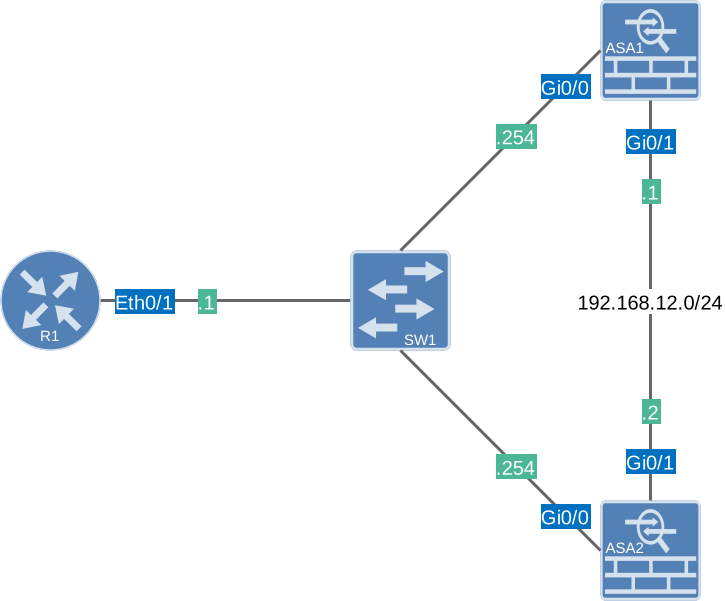
Here are the images I use:
- Cisco Adaptive Security Appliance Software Version 9.23(1)
- Cisco IOS Software [Dublin], Linux Software (X86_64BI_LINUX-ADVENTERPRISEK9-M), Version 17.12.1, RELEASE SOFTWARE (fc5)
Configurations
Want to take a look for yourself? Here you will find the configuration of each device.
ASA Active
hostname ASA1
!
interface GigabitEthernet0/0
 description INSIDE
 nameif INSIDE
 security-level 100
 ip address 192.168.1.254 255.255.255.0 standby 192.168.1.253
!
interface GigabitEthernet0/1
 description LAN/STATE Failover Interface
!
failover
failover lan unit primary
failover lan interface FAILOVER GigabitEthernet0/1
failover link FAILOVER GigabitEthernet0/1
failover interface ip FAILOVER 192.168.12.1 255.255.255.0 standby 192.168.12.2
!
router ospf 1
 router-id 2.2.2.2
 network 192.168.1.0 255.255.255.0 area 0
 nsf ietf restart-interval 300
 log-adj-changes
!
: end
ASA Standby
hostname ASA1
!
interface GigabitEthernet0/0
 description INSIDE
 nameif INSIDE
 security-level 100
 ip address 192.168.1.254 255.255.255.0 standby 192.168.1.253
!
interface GigabitEthernet0/1
 description LAN/STATE Failover Interface
!
failover
failover lan unit secondary
failover lan interface FAILOVER GigabitEthernet0/1
failover link FAILOVER GigabitEthernet0/1
failover interface ip FAILOVER 192.168.12.1 255.255.255.0 standby 192.168.12.2
!
router ospf 1
 router-id 2.2.2.2
 network 192.168.1.0 255.255.255.0 area 0
 nsf ietf restart-interval 300
 log-adj-changes
!
: end
R1
hostname R1
!
ip cef
!
interface Ethernet0/1
 ip address 192.168.1.1 255.255.255.0
!
router ospf 1
 router-id 1.1.1.1
 network 192.168.1.0 0.0.0.255 area 0
!
end
Verification
Let’s check the configurations. Here is ASA1:
ASA1#show run router ospf
router ospf 1
 router-id 2.2.2.2
 network 192.168.1.0 255.255.255.0 area 0
 nsf ietf restart-interval 300
 log-adj-changes
The nsf ietf restart-interval command does two things:
- Enable OSPF graceful restart using IETF mode (the other option is Cisco).
- Set the restart interval to 300 seconds.
ASA1 is currently the active failover device:
ASA1#show failover | include This host
        This host: Primary - Active
Let’s check R1:
R1#show running-config | begin router ospf
router ospf 1
 router-id 1.1.1.1
 network 192.168.1.0 0.0.0.255 area 0
This is a plain OSPF configuration, and it doesn’t tell anything about the graceful restart helper mode. That’s because that is the default. Helper mode maintains the data plane while the control plane neighbor adjacency is gone. You can see it here:
R1#show running-config all | begin router ospf
router ospf 1
 router-id 1.1.1.1
 priority 64
 queue-depth update 200
 queue-depth hello unlimited
 compatible rfc1583
 no compatible rfc1587
 compatible rfc5243
 no interface-id snmp-if-index
 no ignore lsa mospf
 adjacency stagger 300 300
 event-log size 1000
 log-adjacency-changes
 discard-route external 254 internal 110
 no local-rib-criteria
 auto-cost reference-bandwidth 100
 max-lsa 50000 75 ignore-time 5 reset-time 10 ignore-count 5
 limit retransmissions dc 24 non-dc 24
 no shutdown
 no prefix-suppression
 nsf cisco helper
 nsf ietf helper
 capability opaque
 capability lls
 capability transit
 no multicast-intact
 no area 0 authentication
 area 0 default-cost 1
 timers throttle spf 50 200 5000
 timers throttle lsa 50 200 5000
 timers lsa arrival 100
 timers pacing lsa-group 240
 timers pacing flood 33
 timers pacing retransmission 66
 timers nsf flush 60
 timers nsf wait 20
 redistribute maximum-prefix 10240 75
 network 192.168.1.0 0.0.0.255 area 0
 maximum-paths 4
 default-metric 20
 distance 110
 no bfd all-interfaces
Helper mode is enabled for both IETF and Cisco modes, so this router is ready to go. To see graceful restart in action, let’s enable a debug:
R1#debug ip ospf nsf detail
OSPF non-stop forwarding debugging is on with detail
When the ASAs do a graceful restart, we’ll be able to see it in real-time. Right now, there are no type 9 LSAs in the LSDB:
R1#show ip ospf database opaque-link

OSPF Router with ID (1.1.1.1) (Process ID 1)Let’s reload the active ASA:
ASA1# reload
Proceed with reload? [confirm]
On R1 we’ll see this:
R1#
OSPF-1 NSF_I Et0/1: Received grace LSA from 2.2.2.2
OSPF-1 NSF_I Et0/1: Validate grace LSA from nbr 2.2.2.2
OSPF-1 NSF_I Et0/1: Process grace LSA from nbr 2.2.2.2, age 1, grace period 300, graceful ip address 192.168.1.254
OSPF-1 NSF_I Et0/1:   Graceful restart reason - Switch to redundant control processor
OSPF-1 NSF_I Et0/1: Helper interface count+: 1 (area 0)
OSPF-1 NSF_I Et0/1: Enter graceful restart helper mode for 2.2.2.2 for 299 seconds (requested 300 sec)
This tells us we received LSA type 9, and it also tells us the reason and for how long we need to be in helper mode.
Let’s check the LSDB:
R1#show ip ospf database opaque-link

            OSPF Router with ID (1.1.1.1) (Process ID 1)

                Type-9 Opaque Link Local Link States (Area 0)

  LS age: 2
  Options: (No TOS-capability, DC)
  LS Type: Opaque Link-Local Link
  Link State ID: 3.0.0.0
  Opaque Type: 3 (Graceful Restart)
  Opaque ID: 0
  Advertising Router: 2.2.2.2
  LS Seq Number: 80000001
  Checksum: 0xF67E
  Length: 44
  Associate Interface: Ethernet0/1
  Grace period       : 300 seconds
  Restart reason     : Switch to redundant control processor
  IP Address         : 192.168.1.254
Here it is. It shows that this LSA is for graceful restart. We see the grace period and the restart reason. After a short while, we see some more debug information:
R1#
OSPF-1 NSF_I Et0/1: GR resync from Nbr 2.2.2.2 192.168.1.254
OSPF-1 NSF_I Et0/1: Starting GR resync with 2.2.2.2 address 192.168.1.254
%OSPF-5-ADJCHG: Process 1, Nbr 2.2.2.2 on Ethernet0/1 from LOADING to FULL, Loading Done
OSPF-1 NSF_I Et0/1: Received grace LSA from 2.2.2.2
OSPF-1 NSF_I Et0/1: Validate grace LSA from nbr 2.2.2.2
OSPF-1 NSF_I Et0/1: Process grace LSA from nbr 2.2.2.2, age 3600, grace period 300, graceful ip address 192.168.1.254
OSPF-1 NSF_I Et0/1:   Graceful restart reason - Switch to redundant control processor
OSPF-1 NSF_I Et0/1: Exiting graceful restart helper mode for 2.2.2.2 with 270064 msecs remaining
OSPF-1 NSF_I Et0/1: Helper interface count-: 0 (area 0)
We receive a graceful restart resync from the second ASA, and we establish an OSPF neighbor adjacency. This second ASA tells R1 that we can now exit graceful restart helper mode because we are finished. R1 will delete LSA type 9 from its LSDB:
R1#show ip ospf database opaque-link

OSPF Router with ID (1.1.1.1) (Process ID 1)
That’s it.
Packet Capture
We can also see the entire graceful restart process in detail by examining OSPF packets carrying LSA type 9.
If you want to follow along, here is the capture file:
Packet Capture: OSPFv2 LSA Type 9
Here is the first packet:
Frame 36: Packet, 106 bytes on wire (848 bits), 106 bytes captured (848 bits) on interface eth1, id 0
Ethernet II, Src: aa:c1:ab:09:57:8a (aa:c1:ab:09:57:8a), Dst: IPv4mcast_05 (01:00:5e:00:00:05)
Internet Protocol Version 4, Src: 192.168.1.254, Dst: 224.0.0.5
Open Shortest Path First
    OSPF Header
    LS Update Packet
        Number of LSAs: 1
        LSA-type 9 (Opaque LSA, Link-local scope), len 44
            .000 0000 0000 0001 = LS Age (seconds): 1
            0... .... .... .... = Do Not Age Flag: 0
            Options: 0x20, (DC) Demand Circuits
            LS Type: Opaque LSA, Link-local scope (9)
            Link State ID Opaque Type: Grace-LSA (3)
            Link State ID Opaque ID: 0
            Advertising Router: 2.2.2.2
            Sequence Number: 0x80000001
            Checksum: 0xf67e
            Length: 44
            Grace Period: 300 seconds
                TLV Type: Grace-LSA Grace Period (1)
                TLV Length: 4
                Grace Period: 300s
            Restart Reason: Processor Switchover (3)
                TLV Type: Grace-LSA Restart Reason (2)
                TLV Length: 1
                Restart Reason: Processor Switchover (3)
                Pad Bytes: 000000
            Restart IP: 192.168.1.254
                TLV Type: Grace-LSA Restart IP (3)
                TLV Length: 4
                Restart IP: 192.168.1.254
This is the kickoff to the graceful restart process. Right as you hit the reload command, the active ASA is going down for a failover. Right before the reload, it sends this LSA to the multicast address to tell its neighbors that it is going offline. It’s basically telling them to keep their routes for 300 seconds. You can see it in these items:
- Grace Period: 300 seconds (matching the
nsf ietf restart-interval 300configured). - Restart Reason: Processor Switchover (3).
- Restart IP: 192.168.1.254.
Almost immediately, we see a second packet from the ASA:
Frame 38: Packet, 106 bytes on wire (848 bits), 106 bytes captured (848 bits) on interface eth1, id 0
Ethernet II, Src: aa:c1:ab:09:57:8a (aa:c1:ab:09:57:8a), Dst: IPv4mcast_05 (01:00:5e:00:00:05)
Internet Protocol Version 4, Src: 192.168.1.254, Dst: 224.0.0.5
Open Shortest Path First
    OSPF Header
    LS Update Packet
        Number of LSAs: 1
        LSA-type 9 (Opaque LSA, Link-local scope), len 44
            .000 0000 0000 0011 = LS Age (seconds): 3
            0... .... .... .... = Do Not Age Flag: 0
            Options: 0x20, (DC) Demand Circuits
            LS Type: Opaque LSA, Link-local scope (9)
            Link State ID Opaque Type: Grace-LSA (3)
            Link State ID Opaque ID: 0
            Advertising Router: 2.2.2.2
            Sequence Number: 0x80000001
            Checksum: 0xf67e
            Length: 44
            Grace Period: 300 seconds
                TLV Type: Grace-LSA Grace Period (1)
                TLV Length: 4
                Grace Period: 300s
            Restart Reason: Processor Switchover (3)
                TLV Type: Grace-LSA Restart Reason (2)
                TLV Length: 1
                Restart Reason: Processor Switchover (3)
                Pad Bytes: 000000
            Restart IP: 192.168.1.254
                TLV Type: Grace-LSA Restart IP (3)
                TLV Length: 4
                Restart IP: 192.168.1.254
This is the same LSA from the ASA, but it has a different LS Age field of 3 seconds. This is a retransmission because R1 hadn’t responded with an acknowledgment yet. We can tell because everything is the same except for the higher LS age field. The sequence number and checksum are the same.