

Lesson Contents
OSPFv2 LSA type 10 is an area-scoped opaque LSA. Routers flood it throughout the entire OSPF area, add it to their LSDB, but won’t flood it beyond area boundaries. Opaque means the OSPF process itself doesn’t care about the payload contents of these LSAs. The “application” that uses the information in these LSAs parses and understands it. An example of an application is MPLS TE.
The “classic” OSPF LSAs are mostly used for two things:
- Reachability: so routers know what the topology looks like.
- Metrics: so they know how far away each destination is.
Newer LSA types add newer capabilities, such as traffic engineering or signaling. LSA type 10 is used primarily for MPLS Traffic Engineering (MPLS-TE). It carries TE-specific link attributes like bandwidth, administrative weight, link affinity, and more that OSPF wouldn’t otherwise advertise. CSPF (Constrained Shortest Path First) uses this information to compute paths for TE tunnels.
In this lesson, we’ll take a look at LSA type 10 as generated by MPLS-TE on two Cisco routers. To follow this, you should have a good understanding of the MPLS TE configuration.
Configuration
To see LSA type 10 in action, MPLS-TE must be enabled in an OSPF area. I’ll use the simplest topology required to generate LSA type 10. We only need two routers that are configured with OSPF and MPLS TE. R1 has a tunnel interface to R2. Here is the topology:
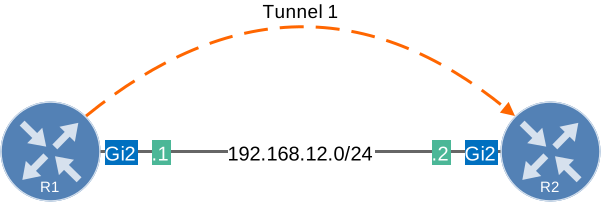
The image I use on both routers is Cisco IOS XE Software, C8000V, Version 17.13.01a.
Configurations
Want to take a look for yourself? Here you will find the startup configuration of each device.
R1
hostname R1
!
interface Loopback0
 ip address 1.1.1.1 255.255.255.255
!
interface Tunnel1
 ip unnumbered Loopback0
 tunnel mode mpls traffic-eng
 tunnel destination 2.2.2.2
 tunnel mpls traffic-eng priority 7 7
 tunnel mpls traffic-eng bandwidth 750
 tunnel mpls traffic-eng path-option 1 dynamic
!
interface GigabitEthernet2
 ip address 192.168.12.1 255.255.255.0
 mpls ip
 mpls traffic-eng tunnels
 ip rsvp bandwidth 1000000
!
router ospf 1
 router-id 1.1.1.1
 network 1.1.1.1 0.0.0.0 area 0
 network 192.168.12.0 0.0.0.255 area 0
 mpls traffic-eng router-id Loopback0
 mpls traffic-eng area 0
!
mpls traffic-eng tunnels
mpls ldp router-id Loopback0 force
R2
hostname R2
!
interface Loopback0
 ip address 2.2.2.2 255.255.255.255
!
interface GigabitEthernet2
 ip address 192.168.12.2 255.255.255.0
 mpls ip
 mpls traffic-eng tunnels
 ip rsvp bandwidth 1000000
!
router ospf 1
 router-id 2.2.2.2
 network 2.2.2.2 0.0.0.0 area 0
 network 192.168.12.0 0.0.0.255 area 0
 mpls traffic-eng router-id Loopback0
 mpls traffic-eng area 0
!
mpls traffic-eng tunnels
mpls ldp router-id Loopback0 force
Verification
Let’s check the OSPF configuration on R1:
R1#show running-config | begin router ospf
router ospf 1
 router-id 1.1.1.1
 network 1.1.1.1 0.0.0.0 area 0
 network 192.168.12.0 0.0.0.255 area 0
 mpls traffic-eng router-id Loopback0
 mpls traffic-eng area 0
The two key TE-related commands are:
mpls traffic-eng router-id Loopback0tells OSPF which router ID to advertise in the TE router address TLV inside the LSA type 10.mpls traffic-eng area 0enables LSA type 10 generation and flooding in area 0.
We have a tunnel from R1 to R2:
R1#show running-config interface Tunnel1

interface Tunnel1
 ip unnumbered Loopback0
 tunnel mode mpls traffic-eng
 tunnel destination 2.2.2.2
 tunnel mpls traffic-eng priority 7 7
 tunnel mpls traffic-eng bandwidth 750
 tunnel mpls traffic-eng path-option 1 dynamic
end
Let’s check R2:
R2#show running-config | begin router ospf
router ospf 1
 router-id 2.2.2.2
 network 2.2.2.2 0.0.0.0 area 0
 network 192.168.12.0 0.0.0.255 area 0
 mpls traffic-eng router-id Loopback0
 mpls traffic-eng area 0
Same configuration on R2, but we don’t need a tunnel interface. Let’s verify the OSPF neighbor adjacency:
R1#show ip ospf neighbor

Neighbor ID     Pri   State           Dead Time   Address         Interface
2.2.2.2           1   FULL/DR         00:00:35    192.168.12.2    GigabitEthernet2
R1 and R2 are fully adjacent. Now let’s look at the full OSPF LSDB to see what LSA types are present:
R1#show ip ospf database

            OSPF Router with ID (1.1.1.1) (Process ID 1)

		Router Link States (Area 0)

Link ID         ADV Router      Age         Seq#       Checksum Link count
1.1.1.1         1.1.1.1         315         0x8000002E 0x00F505 2
2.2.2.2         2.2.2.2         462         0x8000002E 0x00E508 2

		Net Link States (Area 0)

Link ID         ADV Router      Age         Seq#       Checksum
192.168.12.2    2.2.2.2         462         0x80000029 0x003F47

		Type-10 Opaque Area Link States (Area 0)

Link ID         ADV Router      Age         Seq#       Checksum Opaque ID
1.0.0.0         1.1.1.1         315         0x80000029 0x0008F9 0
1.0.0.0         2.2.2.2         462         0x80000029 0x000CED 0
1.0.0.2         1.1.1.1         315         0x8000002A 0x0078CE 2
1.0.0.2         2.2.2.2         462         0x80000029 0x006AE3 2
You can see four Type 10 Opaque Area Link State entries, two per router. Each router originates:
- Opaque ID 0 (Link ID 1.0.0.0): The TE router node LSA carrying the router’s TE router ID.
- Opaque ID 2 (Link ID 1.0.0.2): The TE link LSA carrying the bandwidth and metric details for GigabitEthernet2.
Now let’s look at these in detail:
R1#show ip ospf database opaque-area

            OSPF Router with ID (1.1.1.1) (Process ID 1)

		Type-10 Opaque Area Link States (Area 0)

  LS age: 315
  Options: (No TOS-capability, DC)
  LS Type: Opaque Area Link
  Link State ID: 1.0.0.0
  Opaque Type: 1 (Traffic Engineering)
  Opaque ID: 0
  Advertising Router: 1.1.1.1
  LS Seq Number: 80000029
  Checksum: 0x8F9
  Length: 28
  Fragment number : 0

    MPLS TE router ID : 1.1.1.1

    Number of Links : 0

  LS age: 462
  Options: (No TOS-capability, DC)
  LS Type: Opaque Area Link
  Link State ID: 1.0.0.0
  Opaque Type: 1 (Traffic Engineering)
  Opaque ID: 0
  Advertising Router: 2.2.2.2
  LS Seq Number: 80000029
  Checksum: 0xCED
  Length: 28
  Fragment number : 0

    MPLS TE router ID : 2.2.2.2

    Number of Links : 0

  LS age: 315
  Options: (No TOS-capability, DC)
  LS Type: Opaque Area Link
  Link State ID: 1.0.0.2
  Opaque Type: 1 (Traffic Engineering)
  Opaque ID: 2
  Advertising Router: 1.1.1.1
  LS Seq Number: 8000002A
  Checksum: 0x78CE
  Length: 124
  Fragment number : 2

    Link connected to Broadcast network
      Link ID : 192.168.12.2
      Interface Address : 192.168.12.1
      Admin Metric : 1
      Maximum bandwidth : 125000000
      Maximum reservable bandwidth : 125000000
      Number of Priority : 8
      Priority 0 : 125000000    Priority 1 : 125000000
      Priority 2 : 125000000    Priority 3 : 125000000
      Priority 4 : 125000000    Priority 5 : 125000000
      Priority 6 : 125000000    Priority 7 : 124906248
      Affinity Bit : 0x0
      IGP Metric : 1

    Number of Links : 1

  LS age: 462
  Options: (No TOS-capability, DC)
  LS Type: Opaque Area Link
  Link State ID: 1.0.0.2
  Opaque Type: 1 (Traffic Engineering)
  Opaque ID: 2
  Advertising Router: 2.2.2.2
  LS Seq Number: 80000029
  Checksum: 0x6AE3
  Length: 124
  Fragment number : 2

    Link connected to Broadcast network
      Link ID : 192.168.12.2
      Interface Address : 192.168.12.2
      Admin Metric : 1
      Maximum bandwidth : 125000000
      Maximum reservable bandwidth : 125000000
      Number of Priority : 8
      Priority 0 : 125000000    Priority 1 : 125000000
      Priority 2 : 125000000    Priority 3 : 125000000
      Priority 4 : 125000000    Priority 5 : 125000000
      Priority 6 : 125000000    Priority 7 : 125000000
      Affinity Bit : 0x0
      IGP Metric : 1

    Number of Links : 1
Let’s break down what we’re seeing.
TE Router Node LSA (Opaque ID 0)
The first two entries are the TE router node LSAs. R1 and R2 each advertise one. These are short (28 bytes) and only have a single TLV: the TE router ID. This tells other routers in the area that the originating router is TE-capable and its router ID.
- R1 advertises
MPLS TE router ID: 1.1.1.1 - R2 advertises
MPLS TE router ID: 2.2.2.2
These match the mpls traffic-eng router-id Loopback0 configuration on each router.
TE Link LSA (Opaque ID 2)
The next two entries (Opaque ID 2, one per router) are the TE Link LSAs. Each router advertises its TE attributes for the GigabitEthernet2 link.
Packet Capture
We can also take a look at a packet capture:
Packet Capture: OSPFv2 LSA Type 10 MPLS TE
Here you can see the two type 10 LSAs from R1:
Frame 66: Packet, 262 bytes on wire (2096 bits), 262 bytes captured (2096 bits) on interface eth1, id 0
Ethernet II, Src: 0c:00:25:e8:dc:01 (0c:00:25:e8:dc:01), Dst: IPv4mcast_05 (01:00:5e:00:00:05)
Internet Protocol Version 4, Src: 192.168.12.1, Dst: 224.0.0.5
    0100 .... = Version: 4
    .... 0101 = Header Length: 20 bytes (5)
    Differentiated Services Field: 0xc0 (DSCP: CS6, ECN: Not-ECT)
    Total Length: 248
    Identification: 0x106f (4207)
    000. .... = Flags: 0x0
    ...0 0000 0000 0000 = Fragment Offset: 0
    Time to Live: 1
    Protocol: OSPF IGP (89)
    Header Checksum: 0xfacf [validation disabled]
    [Header checksum status: Unverified]
    Source Address: 192.168.12.1
    Destination Address: 224.0.0.5
    [Stream index: 3]
Open Shortest Path First
    OSPF Header
    LS Update Packet
        Number of LSAs: 3
        LSA-type 1 (Router-LSA), len 48
        LSA-type 10 (Opaque LSA, Area-local scope), len 28
            .000 1110 0001 0000 = LS Age (seconds): 3600
            0... .... .... .... = Do Not Age Flag: 0
            Options: 0x20, (DC) Demand Circuits
            LS Type: Opaque LSA, Area-local scope (10)
            Link State ID Opaque Type: Traffic Engineering LSA (1)
            Link State ID TE-LSA Reserved: 0
            Link State ID TE-LSA Instance: 0
            Advertising Router: 1.1.1.1
            Sequence Number: 0x8000002a
            Checksum: 0x06fa
            Length: 28
            MPLS Traffic Engineering LSA
                Router Address: 1.1.1.1
                    TLV Type: 1 - Router Address
                    TLV Length: 4
                    MPLS/TE Router ID: 1.1.1.1
        LSA-type 10 (Opaque LSA, Area-local scope), len 124
            .000 1110 0001 0000 = LS Age (seconds): 3600
            0... .... .... .... = Do Not Age Flag: 0
            Options: 0x20, (DC) Demand Circuits
            LS Type: Opaque LSA, Area-local scope (10)
            Link State ID Opaque Type: Traffic Engineering LSA (1)
            Link State ID TE-LSA Reserved: 0
            Link State ID TE-LSA Instance: 2
            Advertising Router: 1.1.1.1
            Sequence Number: 0x8000002b
            Checksum: 0x76cf
            Length: 124
            MPLS Traffic Engineering LSA
                Link Information
                    TLV Type: 2 - Link Information
                    TLV Length: 100
                    Link Type: 2 - Multi-access
                        TLV Type: 1: Link Type
                        TLV Length: 1
                        MPLS/TE Link Type: Multi-access (2)
                    Link ID: 192.168.12.2
                        TLV Type: 2: Link ID
                        TLV Length: 4
                        MPLS/TE Link ID: 192.168.12.2
                    Local Interface IP Address: 192.168.12.1
                        TLV Type: 3: Local Interface IP Address
                        TLV Length: 4
                        MPLS/TE Local Interface Address: 192.168.12.1
                    Traffic Engineering Metric: 1
                        TLV Type: 5: Traffic Engineering Metric
                        TLV Length: 4
                        Traffic Engineering Metric: 1
                    Maximum Bandwidth: 125000000 bytes/s (1000000000 bits/s)
                        TLV Type: 6: Maximum Bandwidth
                        TLV Length: 4
                        Maximum Bandwidth: 125000000 bytes/s (1000000000 bits/s)
                    Maximum Reservable Bandwidth: 125000000 bytes/s (1000000000 bits/s)
                        TLV Type: 7: Maximum Reservable Bandwidth
                        TLV Length: 4
                        Maximum Reservable Bandwidth: 125000000 bytes/s (1000000000 bits/s)
                    Unreserved Bandwidth
                        TLV Type: 8: Unreserved Bandwidth
                        TLV Length: 32
                        Pri (or TE-Class) 0: 125000000 bytes/s (1000000000 bits/s)
                        Pri (or TE-Class) 1: 125000000 bytes/s (1000000000 bits/s)
                        Pri (or TE-Class) 2: 125000000 bytes/s (1000000000 bits/s)
                        Pri (or TE-Class) 3: 125000000 bytes/s (1000000000 bits/s)
                        Pri (or TE-Class) 4: 125000000 bytes/s (1000000000 bits/s)
                        Pri (or TE-Class) 5: 125000000 bytes/s (1000000000 bits/s)
                        Pri (or TE-Class) 6: 125000000 bytes/s (1000000000 bits/s)
                        Pri (or TE-Class) 7: 124906248 bytes/s (999249984 bits/s)
                    Resource Class/Color: 0x00000000
                        TLV Type: 9: Resource Class/Color
                        TLV Length: 4
                        MPLS/TE Link Resource Class/Color: 0x00000000
                    Unknown Link sub-TLV: 32770 (For Experimental Use)
                        TLV Type: 32770: Unknown sub-TLV (For Experimental Use)
                        TLV Length: 4
                        TLV Value: 00000001
Let’s walk through what we see here:
- LSA-type 10 (Opaque LSA, Area-local scope), len 28
- This is the first LSA, 28 bytes in length. It carries a single TLV:
- Router Address: 1.1.1.1
- This is the TE router ID sourced from the loopback0 interface.
- This is the first LSA, 28 bytes in length. It carries a single TLV:
- LSA-type 10 (Opaque LSA, Area-local scope), len 124
- This is the full link LSA for GigabitEthernet2. It carries the Link Information TLV (type 2), which contains all the sub-TLVs that CSPF needs to make path decisions:
- Link Type: Multi-access (2)
- GigabitEthernet2 is a broadcast segment, so the link type is multi-access rather than point-to-point.
- Link ID: 192.168.12.2
- The IP address of the DR on the segment is R2.
- Local Interface IP Address: 192.168.12.1
- R1’s own address on this link.
- Traffic Engineering Metric: 1
- This is the TE metric advertised for this link. It is separate from the IGP metric and can be set independently to influence CSPF path selection without affecting normal SPF.
- Maximum Bandwidth: 125,000,000 bytes/s (1 Gbps)
- The physical capacity of the interface.
- Maximum Reservable Bandwidth: 125,000,000 bytes/s
- The total bandwidth RSVP is allowed to reserve on this link, configured with
ip rsvp bandwidth 1000000.
- The total bandwidth RSVP is allowed to reserve on this link, configured with
- Unreserved Bandwidth Priority 7: 124,906,248 bytes/s
- Priorities 0 through 6 show the full 125,000,000 bytes/s, but priority 7 is reduced because Tunnel1 has a 750 kbps reservation at that priority. This is the same value we saw in
show ip ospf database opaque-area.
- Priorities 0 through 6 show the full 125,000,000 bytes/s, but priority 7 is reduced because Tunnel1 has a 750 kbps reservation at that priority. This is the same value we saw in
- Resource Class/Color: 0x00000000
- The affinity bits for this link are all zero, meaning no administrative constraints have been applied. TE tunnels with affinity requirements use this field to include or exclude specific links from path computation.
- Unknown sub-TLV: 32770 (For Experimental Use)
- This is a vendor-specific or experimental sub-TLV that Wireshark does not recognize. It falls outside the standard RFC 3630 definition and can be safely ignored for this lesson.
- Link Type: Multi-access (2)
- This is the full link LSA for GigabitEthernet2. It carries the Link Information TLV (type 2), which contains all the sub-TLVs that CSPF needs to make path decisions:
TE Tunnels
While we are at it, let’s also take a look at the TE tunnel: