

Lesson Contents
OSPF Link State Advertisement (LSA) type 2, also called the network LSA, is a link state advertisement generated by the designated router (DR) on multi-access networks such as Ethernet. The purpose of this LSA is to represent the multi-access network in the link-state database (LSDB) and contains a list of all adjacent OSPF neighbors and the subnet mask on that segment. This allows other routers in the area to build an accurate map of the topology.
Without the network LSA, every router would have to advertise individual “point-to-point” neighbor relationships on a multi-access segment, which doesn’t scale. Imagine that we have 10 routers connected to a switch. Every router would form a neighbor adjacency with every other router. This creates N(N−1)/2 connections. With 10 routers, that’s 45 separate adjacencies with each router advertising its links to its neighbors in type 1 LSAs.
OSPF solves this scalability problem in two ways:
- Reduce the number of neighbor adjacencies by electing a DR. Instead of 45 connections, the 9 other routers form full adjacencies only with the DR and backup designated router (BDR). The DR then acts as the “spokesperson” for the segment.
- The DR generates a single type 2 network LSA with a list of all routers that have a neighbor adjacency with the DR. This reduces link statements in LSA type 1.
This keeps the OSPF database small and reduces the CPU load because the router runs SPF on a simpler topology.
In this lesson, you will learn what the network LSA contains, why only the DR originates it, and how it relates to LSA type 1 (Router LSA). We’ll look at the LSDB on some Cisco routers, and I’ll show you a packet capture. Let’s get started!
Key Takeaways
- LSA type 2 is called the network LSA and only exists on multi-access networks (broadcast and non-broadcast network types that require a DR/BDR).
- Only the DR originates LSA type 2.
- The Link State ID is the DR’s interface IP address on the segment, not the router ID (unlike LSA type 1).
- It lists all fully adjacent routers on the segment using their router IDs in the “Attached Router” fields.
- It reduces LSDB complexity by replacing individual point-to-point relationships with a single segment descriptor.
- LSA type 1 and type 2 work together: each router’s type 1 LSA points to the DR’s interface IP, which matches the Link State ID in the type 2 LSA. SPF uses both to calculate the shortest path across the segment.
- You will not see a type 2 LSA on point-to-point or point-to-multipoint network types because no DR election takes place on those network types.
- All routers in the area receive an identical copy of the type 2 LSA.
Prerequisites
Before we dive into the network LSA, make sure you understand the fundamentals of OSPF:
- How OSPF builds neighbor adjacencies and exchanges routing information.
- Why OSPF elects a designated router on multi-access networks and how the election process works.
- The difference between broadcast, non-broadcast, point-to-point, and point-to-multipoint network types, and which ones require a DR/BDR.
- OSPF LSA type 1 (router LSA): How each router describes its own links and neighbors in the LSDB.
Configuration
To see this in action, we need a topology with a multi-access network:
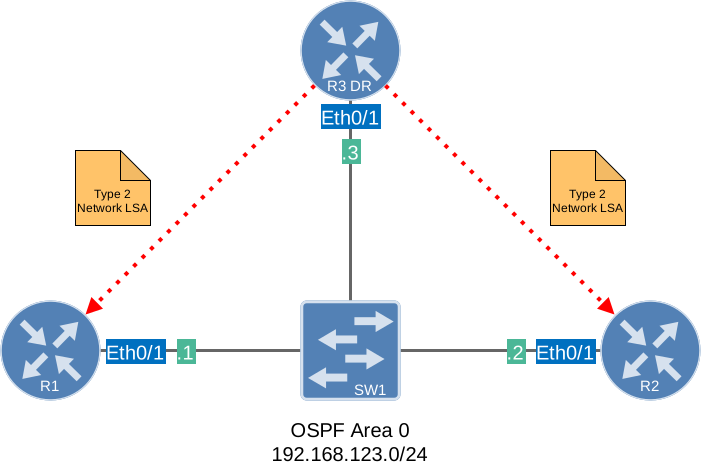
Three routers connected to a switch will do the job. R3 is the designated router (DR).
Configurations
Want to take a look for yourself? Here you will find the startup configuration of each device.
R1
hostname R1
!
ip cef
!
interface Ethernet0/1
 ip address 192.168.123.1 255.255.255.0
!
router ospf 1
 router-id 1.1.1.1
 network 192.168.123.0 0.0.0.255 area 0
!
end
R2
hostname R2
!
ip cef
!
interface Ethernet0/1
 ip address 192.168.123.2 255.255.255.0
!
router ospf 1
 router-id 2.2.2.2
 network 192.168.123.0 0.0.0.255 area 0
!
end
R3
hostname R3
!
ip cef
!
interface Ethernet0/1
 ip address 192.168.123.3 255.255.255.0
!
router ospf 1
 router-id 3.3.3.3
 network 192.168.123.0 0.0.0.255 area 0
!
end
All routers use this image:
Cisco IOS Software [Dublin], Linux Software (X86_64BI_LINUX-ADVENTERPRISEK9-M), Version 17.12.1, RELEASE SOFTWARE (fc5)
Topology: OSPF Three Routers Multi-Access
Verification
Let’s take a look at our routers.
Network Type
Before OSPF can elect a DR and BDR, the network type has to be broadcast or non-broadcast. Let’s make sure this is the case:
R1#show ip ospf interface Ethernet0/1 | include Network Type
Process ID 1, Router ID 1.1.1.1, Network Type BROADCAST, Cost: 10R2#show ip ospf interface Ethernet0/1 | include Network Type
Process ID 1, Router ID 2.2.2.2, Network Type BROADCAST, Cost: 10R3#show ip ospf interface Ethernet0/1 | include Network Type
Process ID 1, Router ID 3.3.3.3, Network Type BROADCAST, Cost: 10All three interfaces have the network type set to “BROADCAST” so that’s correct. OSPF will do a DR/BDR election.
DR and BDR Election
Let’s check who won the DR/BDR election:
R1#show ip ospf neighbor

Neighbor ID     Pri   State           Dead Time   Address         Interface
2.2.2.2           1   FULL/BDR        00:00:39    192.168.123.2   Ethernet0/1
3.3.3.3 1 FULL/DR 00:00:39 192.168.123.3 Ethernet0/1R2#show ip ospf neighbor
Neighbor ID Pri State Dead Time Address Interface
1.1.1.1 1 FULL/DROTHER 00:00:37 192.168.123.1 Ethernet0/1
3.3.3.3 1 FULL/DR 00:00:38 192.168.123.3 Ethernet0/1R3#show ip ospf neighbor
Neighbor ID Pri State Dead Time Address Interface
1.1.1.1 1 FULL/DROTHER 00:00:38 192.168.123.1 Ethernet0/1
2.2.2.2 1 FULL/BDR 00:00:39 192.168.123.2 Ethernet0/1Looking at the output above, we can see that R3 is the DR and R2 is the BDR.
R3, as the DR, will be responsible for originating LSA type 2 for this network segment.
LSDB
Let’s dive into the LSDB.
Designated Router (DR)
We’ll start with R3 because this is the DR. Here is the LSDB:
R3#show ip ospf database

            OSPF Router with ID (3.3.3.3) (Process ID 1)

		Router Link States (Area 0)

Link ID         ADV Router      Age         Seq#       Checksum Link count
1.1.1.1         1.1.1.1         422         0x80000009 0x00B596 1
2.2.2.2         2.2.2.2         410         0x80000008 0x0079CA 1
3.3.3.3         3.3.3.3         473         0x80000009 0x003901 1

		Net Link States (Area 0)

Link ID         ADV Router      Age         Seq#       Checksum
192.168.123.3   3.3.3.3         473         0x80000004 0x0046E0
The “Net Link States” part is what we need to look at. This is LSA type 2 and it tells us two things:
- Link ID: 192.168.123.3 is the IP address of the DR’s interface on this segment. It’s the IP address of R3 on the Ethernet0/1 interface.
- ADV Router: The router ID of the advertising router. This is R3.
Now, let’s look at this LSA in detail:
R3#show ip ospf database network self-originate

            OSPF Router with ID (3.3.3.3) (Process ID 1)

		Net Link States (Area 0)

  LS age: 477
  Options: (No TOS-capability, DC)
  LS Type: Network Links
  Link State ID: 192.168.123.3 (address of Designated Router)
  Advertising Router: 3.3.3.3
  LS Seq Number: 80000004
  Checksum: 0x46E0
  Length: 36
  Network Mask: /24
	Attached Router: 3.3.3.3
	Attached Router: 1.1.1.1
	Attached Router: 2.2.2.2
Let me break down the most important items here:
- LS Type: Network Links tells us this is LSA type 2.
- Link State ID: We saw this one in the overview. It’s the address of the DR.
- Advertising Router: We also saw this in the overview. The router ID of the DR.
- Network Mask: The prefix length of the network segment. We use 192.168.123.0/24 on this segment.
- Attached Router: These are the router IDs of the routers on this segment.
This information shows the purpose of LSA type 2. Its job is to list all routers on this multi-access network. On a multi-access network like Ethernet, instead of every router describing its relationship to every other router (which would create an n-squared problem), the DR generates a single Type 2 LSA that represents the entire segment and all routers attached to it. Every other router then simply points to the DR in its Type 1 LSA rather than to each individual neighbor.
Other Routers
Let’s check R1 and R2. They receive the exact same LSA type 2 that R3 originated: