

Lesson Contents
OSPFv2 LSA type 1 is one of the LSA types, also known as the router LSA and the link-state advertisement that every OSPF router originates for every area it participates in. This LSA describes the router itself and its directly connected links where OSPF is enabled, within that area. Routers flood the type 1 router LSA within the area. When all routers within an area have all LSAs, they can build the link state database (LSDB) and run the shortest path first (SPF) algorithm to calculate the shortest path for every router.
How do we identify a link?
- The IP prefix on an interface.
- The link type.
There are 4 different link types:
| Link Type | Description | Link ID |
| 1 | Point-to-point connection to another router | Neighbor router ID |
| 2 | Connection to transit network | IP address of DR |
| 3 | Connection to stub network | IP Network Address |
| 4 | Virtual Link | Neighbor router ID |
Here is a short explanation of each link type:
- Point-to-point (type 1): Used for serial point-to-point connections like PPP, HDLC, or Frame Relay point-to-point sub-interfaces.
- Transit network (type 2): A multi-access network (like Ethernet) where OSPF requires a DR/BDR election.
- Stub network (type 3): A network segment that is advertised in OSPF. This has nothing to do with stub areas.
- Virtual link (type 4): Used for OSPF virtual links.
The router LSA always stays within the area.
In this lesson, we’ll take a close look at the router LSA for the different link types. I’ll explain them, and I’ll show them on some actual routers.
Key Takeaways
- The OSPFv2 type 1 router LSA is originated by every OSPF router in each area to which it belongs and describes its directly connected links on which OSPF is enabled.
- Each router LSA is flooded only within its area and never crosses an Area Border Router (ABR).
- There are four possible link types inside a type 1 router LSA:
- Point-to-point (type 1): Describes a direct connection to another OSPF router.
- Transit network (type 2): Describes a connection to a multi-access network, such as Ethernet, where a DR/BDR election takes place.
- Stub network (type 3): Describes any connected subnet that is advertised into OSPF, including loopback interfaces and passive interfaces.
- Virtual link (type 4): Describes a logical point-to-point connection used to extend the backbone area across a transit area.
Prerequisites
To understand this lesson, you should have a basic understanding of OSPF fundamentals, such as:
- Areas
- LSDB
- SPF
- Designated Router (DR) / Backup Designated Router (BDR)
Configuration
Let’s go through all link types one by one and look at them on routers. I’ll use different topologies, but everything is tested with this image:
Cisco IOS Software [Dublin], Linux Software (X86_64BI_LINUX-ADVENTERPRISEK9-M), Version 17.12.1, RELEASE SOFTWARE (fc5).
Point-to-point connection to another router
Point-to-point is used for serial point-to-point connections, such as PPP, HDLC, and Frame Relay point-to-point subinterfaces. We also use it when you set the OSPF network type to point-to-point on Ethernet interfaces.
Topology
Let’s look at this in action. We need a point-to-point topology:
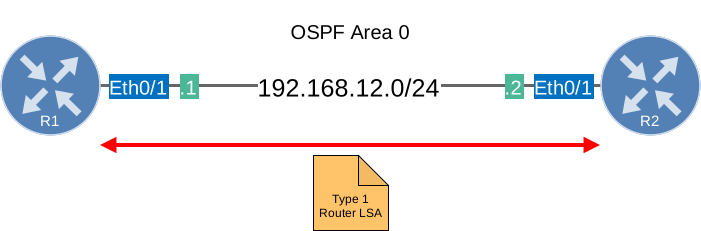
We only need two OSPF routers that are directly connected. To prevent the routers from doing a DR/BDR election, I changed the network type to point-to-point.
Configurations
Want to take a look for yourself? Here you will find the startup configuration of each device.
R1
hostname R1
!
ip cef
!
interface Loopback0
 ip address 1.1.1.1 255.255.255.255
!
interface Ethernet0/1
 ip address 192.168.12.1 255.255.255.0
 ip ospf network point-to-point
!
router ospf 1
 network 1.1.1.1 0.0.0.0 area 0
 network 192.168.12.0 0.0.0.255 area 0
!
end
R2
hostname R2
!
ip cef
!
interface Loopback0
 ip address 2.2.2.2 255.255.255.255
!
interface Ethernet0/1
 ip address 192.168.12.2 255.255.255.0
 ip ospf network point-to-point
!
router ospf 1
 network 2.2.2.2 0.0.0.0 area 0
 network 192.168.12.0 0.0.0.255 area 0
!
end
Let’s see what this looks like on a real router. If you want to see for yourself, here is the topology:
Verification
We’ll take a look at all type 1 LSAs that R1 generates:
R1#show ip ospf database router self-originate

            OSPF Router with ID (1.1.1.1) (Process ID 1)

                Router Link States (Area 0)

  LS age: 74
  Options: (No TOS-capability, DC)
  LS Type: Router Links
  Link State ID: 1.1.1.1
  Advertising Router: 1.1.1.1
  LS Seq Number: 80000006
  Checksum: 0x5DB2
  Length: 48
  Number of Links: 2

    Link connected to: another Router (point-to-point)
     (Link ID) Neighboring Router ID: 2.2.2.2
     (Link Data) Router Interface address: 192.168.12.1
      Number of MTID metrics: 0
       TOS 0 Metrics: 10

    Link connected to: a Stub Network
     (Link ID) Network/subnet number: 192.168.12.0
     (Link Data) Network Mask: 255.255.255.0
      Number of MTID metrics: 0
       TOS 0 Metrics: 10
There are two items here. We’ll focus on the first one. This router LSA has a link ID of “another Router (point-to-point)” and indicates that we are connected to neighbor 2.2.2.2 (R2) and can reach it using our IP address 192.168.12.1. This information is used to build the SPF topology. We’ll look at the “stub network” entry in another section because this is the one for link type 3.
Here’s what this LSA looks like in a packet capture. It’s a packet from R2 to R1:
Frame 18: Packet, 110 bytes on wire (880 bits), 110 bytes captured (880 bits) on interface eth1, id 0
Ethernet II, Src: aa:bb:cc:00:02:10 (aa:bb:cc:00:02:10), Dst: aa:bb:cc:00:01:10 (aa:bb:cc:00:01:10)
Internet Protocol Version 4, Src: 192.168.12.2, Dst: 192.168.12.1
Open Shortest Path First
    OSPF Header
    LS Update Packet
        Number of LSAs: 1
        LSA-type 1 (Router-LSA), len 48
            .000 0001 1110 0010 = LS Age (seconds): 482
            0... .... .... .... = Do Not Age Flag: 0
            Options: 0x22, (DC) Demand Circuits, (E) External Routing
            LS Type: Router-LSA (1)
            Link State ID: 2.2.2.2
            Advertising Router: 2.2.2.2
            Sequence Number: 0x80000006
            Checksum: 0xfc0e
            Length: 48
            Flags: 0x00
            Number of Links: 2
            Type: PTP      ID: 1.1.1.1         Data: 192.168.12.2    Metric: 10
            Type: Stub     ID: 192.168.12.0    Data: 255.255.255.0   Metric: 10
If you want to look for yourself:
Packet Capture: OSPF LSA Type 1 Point-to-Point
Connection to Transit Network
On a broadcast network, OSPF does not describe the segment as a collection of point-to-point links between every router. Instead, each router adds a link type 2 entry in its type 1 router LSA to describe its connection to the transit network. The designated router (DR) also creates a type 2 network LSA for that shared segment.
Topology
Let’s look at this in action. We need a topology where we require a DR/BDR election:

We have three routers on the same Ethernet segment:
- R1 with router ID 1.1.1.1
- R2 with router ID 2.2.2.2 (BDR)
- R3 with router ID 3.3.3.3 (DR)
All three routers are connected to subnet 192.168.123.0/24 and run OSPF process 1 in area 0.
Configurations
Want to take a look for yourself? Here you will find the startup configuration of each device.
R1
hostname R1
!
ip cef
!
interface Ethernet0/1
 ip address 192.168.123.1 255.255.255.0
!
router ospf 1
 router-id 1.1.1.1
 network 192.168.123.0 0.0.0.255 area 0
!
end
R2
hostname R2
!
ip cef
!
interface Ethernet0/1
 ip address 192.168.123.2 255.255.255.0
!
router ospf 1
 router-id 2.2.2.2
 network 192.168.123.0 0.0.0.255 area 0
!
end
R3
hostname R3
!
ip cef
!
interface Ethernet0/1
 ip address 192.168.123.3 255.255.255.0
!
router ospf 1
 router-id 3.3.3.3
 network 192.168.123.0 0.0.0.255 area 0
!
end
Here is the topology:
Verification
Let’s check the LSDB. We’ll first look at the type 1 router LSA on R1:
R1#show ip ospf database router self-originate

            OSPF Router with ID (1.1.1.1) (Process ID 1)

                Router Link States (Area 0)

  LS age: 336
  Options: (No TOS-capability, DC)
  LS Type: Router Links
  Link State ID: 1.1.1.1
  Advertising Router: 1.1.1.1
  LS Seq Number: 80000004
  Checksum: 0xBF91
  Length: 36
  Number of Links: 1

    Link connected to: a Transit Network
     (Link ID) Designated Router address: 192.168.123.3
     (Link Data) Router Interface address: 192.168.123.1
      Number of MTID metrics: 0
       TOS 0 Metrics: 10
This is link type 2 inside the router LSA. The link ID is the IP address of the designated router on the shared segment. In this example, R3 is the DR, so the link ID is 192.168.123.3. The link data is the local interface address of the router that generated the LSA. For R1, that’s 192.168.123.1.
R2 shows the same transit network, but with its own interface address:
R2#show ip ospf database router self-originate

            OSPF Router with ID (2.2.2.2) (Process ID 1)

                Router Link States (Area 0)

  LS age: 335
  Options: (No TOS-capability, DC)
  LS Type: Router Links
  Link State ID: 2.2.2.2
  Advertising Router: 2.2.2.2
  LS Seq Number: 80000005
  Checksum: 0x7FC7
  Length: 36
  Number of Links: 1

    Link connected to: a Transit Network
     (Link ID) Designated Router address: 192.168.123.3
     (Link Data) Router Interface address: 192.168.123.2
      Number of MTID metrics: 0
       TOS 0 Metrics: 10
The IP address of the DR remains the same (192.168.123.3), and only the link data IP address is different for each router.
Here is R3:
R3#show ip ospf database router self-originate

            OSPF Router with ID (3.3.3.3) (Process ID 1)

                Router Link States (Area 0)

  LS age: 335
  Options: (No TOS-capability, DC)
  LS Type: Router Links
  Link State ID: 3.3.3.3
  Advertising Router: 3.3.3.3
  LS Seq Number: 80000005
  Checksum: 0x41FC
  Length: 36
  Number of Links: 1

    Link connected to: a Transit Network
     (Link ID) Designated Router address: 192.168.123.3
     (Link Data) Router Interface address: 192.168.123.3
      Number of MTID metrics: 0
       TOS 0 Metrics: 10
Because R3 is the DR, both the designated router address and the local interface address are 192.168.123.3.
Packet Capture: OSPF LSA Type 1 Transit Network
Connection to a Stub Network
The name “stub” implies that this is an interface without any neighbors attached to it, but that’s not the case. A stub link in a type 1 LSA represents any network that is attached to the router and advertised in OSPF. This could be an Ethernet interface, a Loopback interface, or anything else. Each router describes its own networks directly in its type 1 router LSA using link type 3.
Topology
Let’s look at this in action. Here is the topology we’ll use:

We have two routers connected to each other but I added an additional loopback on R1 so we have an extra LSA entry to look at.
Configurations
Want to take a look for yourself? Here you will find the startup configuration of each device.
R1
hostname R1
!
ip cef
!
interface Loopback0
 ip address 1.1.1.1 255.255.255.255
!
interface Ethernet0/1
 ip address 192.168.12.1 255.255.255.0
 ip ospf network point-to-point
!
router ospf 1
 network 1.1.1.1 0.0.0.0 area 0
 network 192.168.12.0 0.0.0.255 area 0
!
end
R2
hostname R2
!
ip cef
!
interface Loopback0
 ip address 2.2.2.2 255.255.255.255
!
interface Ethernet0/1
 ip address 192.168.12.2 255.255.255.0
 ip ospf network point-to-point
!
router ospf 1
 network 2.2.2.2 0.0.0.0 area 0
 network 192.168.12.0 0.0.0.255 area 0
!
end
Here is the topology:
Verification
Let’s see what R1 advertises:
R1#show ip ospf database router self-originate

            OSPF Router with ID (1.1.1.1) (Process ID 1)

                Router Link States (Area 0)

  LS age: 763
  Options: (No TOS-capability, DC)
  LS Type: Router Links
  Link State ID: 1.1.1.1
  Advertising Router: 1.1.1.1
  LS Seq Number: 80000003
  Checksum: 0x738A
  Length: 60
  Number of Links: 3

    Link connected to: a Stub Network
     (Link ID) Network/subnet number: 1.1.1.1
     (Link Data) Network Mask: 255.255.255.255
      Number of MTID metrics: 0
       TOS 0 Metrics: 1

    Link connected to: another Router (point-to-point)
     (Link ID) Neighboring Router ID: 2.2.2.2
     (Link Data) Router Interface address: 192.168.12.1
      Number of MTID metrics: 0
       TOS 0 Metrics: 10

    Link connected to: a Stub Network
     (Link ID) Network/subnet number: 192.168.12.0
     (Link Data) Network Mask: 255.255.255.0
      Number of MTID metrics: 0
       TOS 0 Metrics: 10
We’ll focus on the two “stub network” entries. The first one is the loopback:
Link connected to: a Stub Network
 (Link ID) Network/subnet number: 1.1.1.1
 (Link Data) Network Mask: 255.255.255.255
  TOS 0 Metrics: 1
This describes R1’s loopback interface and shows the network address, subnet mask, and metric. R2 will use this entry to install 1.1.1.1/32 in its routing table.
The second stub network entry is the point-to-point link subnet itself:
Link connected to: a Stub Network
 (Link ID) Network/subnet number: 192.168.12.0
 (Link Data) Network Mask: 255.255.255.0
  TOS 0 Metrics: 10
Even though R1 and R2 are OSPF neighbors on this link, the subnet 192.168.12.0/24 is still described separately as a stub network entry. This is how OSPF ensures the subnet itself is reachable.
R2’s router LSA looks the same in structure, just with its own addresses:
R2#show ip ospf database router self-originate

            OSPF Router with ID (2.2.2.2) (Process ID 1)

                Router Link States (Area 0)

  LS age: 27
  Options: (No TOS-capability, DC)
  LS Type: Router Links
  Link State ID: 2.2.2.2
  Advertising Router: 2.2.2.2
  LS Seq Number: 80000004
  Checksum: 0x10C
  Length: 48
  Number of Links: 2

    Link connected to: another Router (point-to-point)
     (Link ID) Neighboring Router ID: 1.1.1.1
     (Link Data) Router Interface address: 192.168.12.2
      Number of MTID metrics: 0
       TOS 0 Metrics: 10

    Link connected to: a Stub Network
     (Link ID) Network/subnet number: 192.168.12.0
     (Link Data) Network Mask: 255.255.255.0
      Number of MTID metrics: 0
       TOS 0 Metrics: 10
R2 advertises the 192.168.12.0/24 subnet as a stub network entry as well.
Packet Capture: OSPF LSA Type 1 Stub Network
Connection to a Virtual Link
Each OSPF area has to be directly connected to the backbone area (0). When this is not the case, you can use a virtual link to logically extend the backbone. A virtual link creates a logical point-to-point adjacency across a transit area, and just like a real point-to-point link, it produces its own entry in the type 1 router LSA, but this time with link type 4.
Topology
Let’s look at this in action. We need a topology with a virtual link:
There’s a broken link that is supposed to show this figure “Ospf Type 1 Router Lsa Virtual Link Topology”. Can you please fix?
Hello Efrain
Thanks for letting us know, I will inform @ReneMolenaar to make the appropriate changes.
Laz
It has been fixed. Thanks!
For the virtual-links, you need to create a router id, otherwise you will get a packet mismatch error.
R1 Configuration
R2 Configuration
Thank you
Hello Kader
Thanks for the post! You’re correct that an OSPF virtual link is configured using the router ID of the remote ABR. However, explicitly configuring the router ID with the router-id command is not strictly required. Every OSPF router has a router ID. If one is not configured manually, IOS selects one automatically, normally from a loopback address or, if no loopback exists, from an active interface address.
The packet mismatch error that you are referring to, is it something like this?
... Continue reading in our forum