

How exactly does OSPF fill the LSDB? Let’s zoom in on the operation of how OSPF keeps its link-state database up-to-date:
Each LSA has an aging timer that carries the link-state age field. By default, each OSPF LSA is only valid for 30 minutes. If the LSA expires then the router that created the LSA will resend the LSA and increase the sequence number.
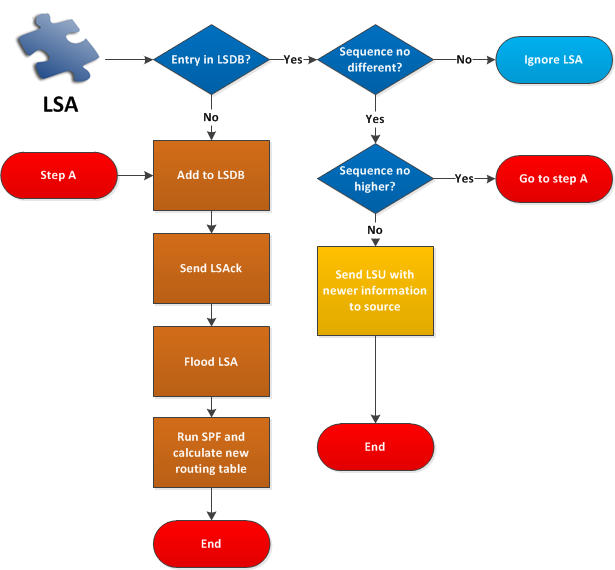
Let’s walk through this flowchart together. In this example, a new LSA is arriving at the router, and OSPF has to decide what to do with it:
- If the LSA isn’t already in the LSDB it will be added, and an LSAck (acknowledgment) will be sent to the OSPF neighbor. The LSA will be flooded to all other OSPF neighbors, and we have to run SPF to update our routing table.
- If the LSA is already in the LSDB and the sequence number is the same, then we will ignore the LSA.
- If the LSA is already in the LSDB and the sequence number is different, then we have to take action:
- If the sequence number is higher it means this information is newer and we have to add it to our LSDB.
- If the sequence number is lower it means our OSPF neighbor has an old LSA and we should help them. We will send a LSU (Link state update) including the newer LSA to our OSPF neighbor. The LSU is an envelope that can carry multiple LSAs in it.
It’s not just the sequence number that OSPF looks at to determine if an LSA is more recent. OSPF compares three fields, but it does not weigh them equally. It checks them in order and stops at the first one that differs:
- Sequence number: the LSA with the higher sequence number is more recent. The comparison stops here.
- Checksum: only if the sequence numbers are equal, the LSA with the higher (unsigned) checksum is considered more recent.
- LS Age: only if both the sequence number and checksum are equal:
- An LSA with an age of MaxAge (3600 seconds) is considered more recent than one that isn’t. This is how OSPF flushes an LSA from the topology.
- Otherwise, if the two ages differ by more than 15 minutes (MaxAgeDiff), the LSA with the smaller (younger) age is more recent.
- If none of the above apply, the two LSAs are considered identical (a duplicate), and OSPF treats them the same.
This answers a common question: “what if an LSA has a higher sequence number but the checksum and age are the same?” Because the sequence number is checked first, a higher sequence number alone makes the LSA more recent. The checksum and age are never even consulted. The checksum and age only act as tie-breakers when the field above them is equal. In practice you almost never see two LSAs with the same sequence number but different content, because any change to an LSA’s content causes the originating router to increment the sequence number (and the checksum changes along with it). We’ll see this for ourselves in a moment.
What do the sequence numbers look like for OSPF LSAs?
- There are 4 bytes or 32 bits.
- Begins with 0x80000001 and ends at 0x7FFFFFFF.
- Every 30 minutes, each LSA will age out and will be flooded:
- The sequence number will increment by one.
With 32 bits, we have a LOT of sequence numbers, and every 30 minutes, it will increase. If we reach the last sequence number 0x7FFFFFFF, it will wrap around and start again at 0x80000001. Every 30 minutes OSPF will flood an LSA to ensure the LSDB stays up to date, and when it does this, the sequence number will increase, and OSPF will reset the max-age when it receives a new LSA update.
You can view the OSPF link-state database on a Cisco router using the following command:
Router#show ip ospf database

            OSPF Router with ID (2.2.2.2) (Process ID 1)

		Router Link States (Area 0)

Link ID         ADV Router      Age         Seq#       Checksum Link count
1.1.1.1         1.1.1.1         109         0x80000002 0x004ED8 2
2.2.2.2         2.2.2.2         108         0x80000002 0x003EDB 2

		Net Link States (Area 0)

Link ID         ADV Router      Age         Seq#       Checksum
192.168.12.2    2.2.2.2         108         0x80000001 0x008F1F
Here is the output of the show ip ospf database command, which shows us the LSDB. What interesting things can we see here?
- Each OSPF router has interfaces in an area. For each interface, it will advertise a router LSA. The link ID is the OSPF router ID.
- The first router LSA entry you see is from an OSPF router with router ID 1.1.1.1, and you can see the age, sequence number, and checksum. You can see that the LSA has been updated two times since the sequence number is 0x80000002.
Configuration
The best way to understand the three fields above is to watch them change on a real router. Let’s use a simple topology with two routers, R1 (router ID 1.1.1.1) and R2 (router ID 2.2.2.2), connected on the 192.168.12.0/24 network in area 0.
The summary table is useful, but if you want to see the exact fields OSPF uses to compare LSAs, look at a single LSA in detail. Here is R1’s router LSA as seen on R2:
R2#show ip ospf database router 1.1.1.1

            OSPF Router with ID (2.2.2.2) (Process ID 1)

		Router Link States (Area 0)

  LS age: 9
  Options: (No TOS-capability, DC)
  LS Type: Router Links
  Link State ID: 1.1.1.1
  Advertising Router: 1.1.1.1
  LS Seq Number: 80000003
  Checksum: 0x4CD9
  Length: 48
  Number of Links: 2

    Link connected to: a Stub Network
     (Link ID) Network/subnet number: 1.1.1.1
     (Link Data) Network Mask: 255.255.255.255
      Number of MTID metrics: 0
       TOS 0 Metrics: 1

    Link connected to: a Transit Network
     (Link ID) Designated Router address: 192.168.12.2
     (Link Data) Router Interface address: 192.168.12.1
      Number of MTID metrics: 0
       TOS 0 Metrics: 1
There they are: LS age, LS Seq Number, and Checksum. The exact three fields OSPF uses to decide which LSA instance is more recent. Right now R1’s LSA has sequence number 0x80000003, checksum 0x4CD9, and describes 2 links.
Now let’s change something on R1 so it has to originate a new instance of its router LSA. We’ll add a second loopback interface and advertise it in OSPF:
R1(config)#interface Loopback1
R1(config-if)#ip address 11.11.11.11 255.255.255.255
R1(config-if)#router ospf 1
R1(config-router)#network 11.11.11.11 0.0.0.0 area 0
Let’s look at R1’s router LSA again:
May I modify the “Sequence no different” to “Is sequence different” ?
Again, may I modify the “Sequence no higher” to “Is sequence higher” ?
Dennis
Hi Dennis,
Sure, but which exact sentences do you mean?
Rene
Good tutorial, sir. Cleared my concept. All the best to u!.
Hi, Actually Link ID is not RID. It is a bug in Cisco IOS and Link ID actually shows the Link State ID which is dependent on the type of LSA. Like for example in your output the Network LSA shows Link ID as 192.168.12.2 which is the DR interface IP and the RID is 2.2.2.2
Hi Rizwan,
Thanks for sharing this!
Rene