

Lesson Contents
In previous lessons I explained how you can use PBR (Policy Based Routing) to overrule the routing table for certain types of traffic. I also explained in another lesson how IP SLA can be used to measure your network performance.
This lesson will combine those two topics, we’ll use PBR to overrule the routing table but only when our IP SLA operation is up and running. Let’s check out the configuration!
Configuration
Here’s the topology we will use:
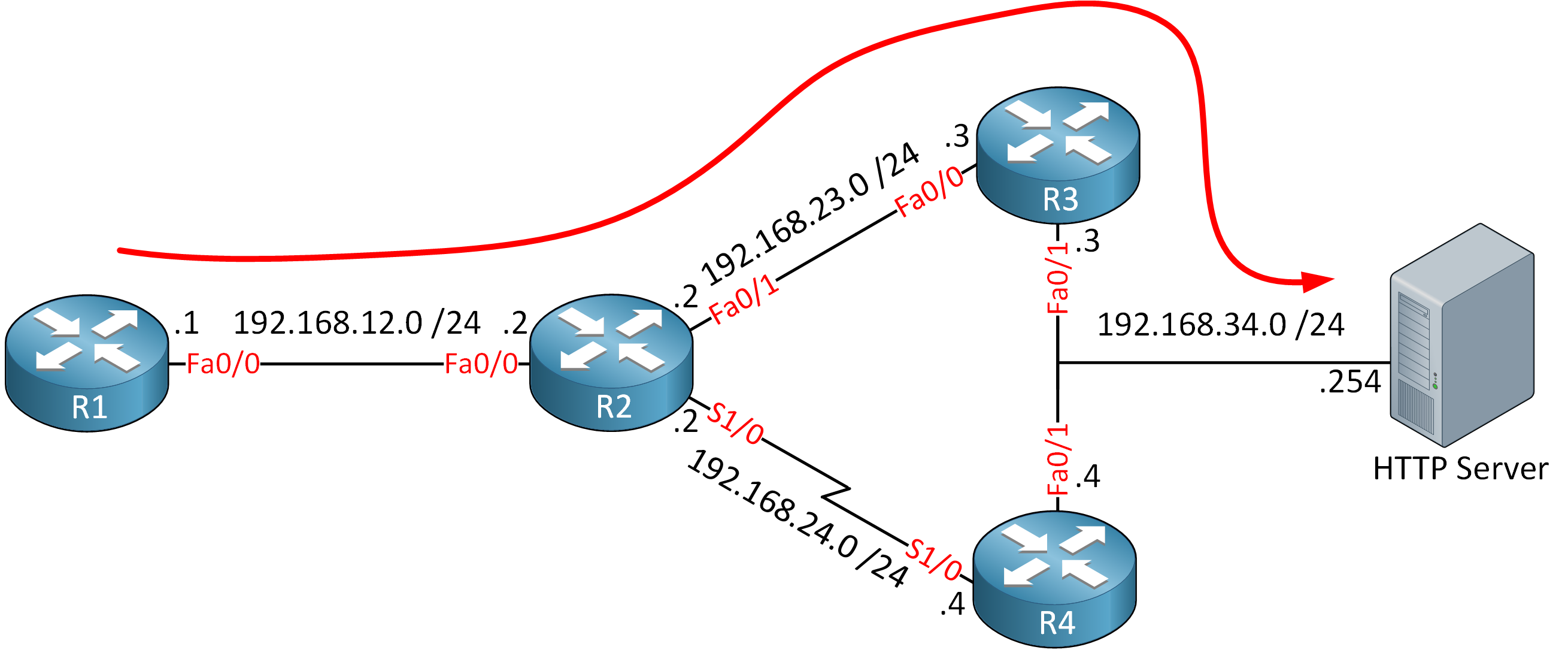
We have 4 routers and a webserver that we want to reach from R1. Because of the slow serial link between R2 and R4, all traffic is routed through R3:
R1#traceroute 192.168.34.254

Type escape sequence to abort.
Tracing the route to 192.168.34.254

  1 192.168.12.2 44 msec 44 msec 12 msec
  2 192.168.23.3 40 msec 44 msec 24 msec
  3 192.168.34.254 32 msec 60 msec 52 msec
For whatever reason we prefer to use R4 when we want to reach the webserver at 192.168.34.254. The serial link however isn’t very reliable so instead of simply using PBR to forward traffic to R4, we’ll combine it with IP SLA. On R2 we will ping the other side of the serial link (192.168.24.4) and when we get a reply, we’ll use R4 as the next hop to reach 192.168.34.254. Here’s how it’s done:
R2(config)#ip sla 1
R2(config-ip-sla)#icmp-echo 192.168.24.4
R2(config-ip-sla-echo)#frequency 10

R2(config)#ip sla schedule 1 start-time now life forever
First we configure IP SLA. I’ll use a simple ICMP echo and we will run this operation forever. We can’t “attach” IP SLA directly to the route-map that we will use for policy based routing so we’ll configure object tracking:
R2(config)#track 1 ip sla 1There we go, object number 1 is now connected to IP SLA operation 1. RTR (Response Time Reporter) is the old name for IP SLA. Let’s continue:
R2(config)#ip access-list extended HTTP_SERVER
R2(config-ext-nacl)#permit ip any host 192.168.34.254
The access-list above will be used in the route-map for PBR. It matches the IP address of the webserver. Now we can create the route-map:
thanks for this Rene, easy to understand! PBR with IP SLA is so useful.
Dear Rene,
This is not working for me, please help..
my debug ip policy output is as follows:
... Continue reading in our forumHmm the first few packets did get policy routed:
Did anything change in between those pings?
Nothing. Its not forwarding through serial port. Any hint. I’ll make the topology again in gns3 and check again to see whats happening.. thanks for the reply
Hi Rene,
As your diagram but i change from SERVER to Internet. Do i need default route or not ?
Best Regards,
CH