

Lesson Contents
EIGRP is an advanced distance vector routing protocol that has to establish a neighbor relationship before updates are sent. Because of this the first thing we’ll have to do is check if the neighbor adjacency is working properly. If this is the case we can continue by checking if networks are being advertised or not. In this lesson I’ll show you everything that can go wrong with EIGRP, how to fix it and in what order. Let’s get started with the neighbor adjacency!
There are a number of items that cause problems with EIGRP neighbor adjacencies:
- Uncommon subnet: EIGRP neighbors with IP addresses that are not in the same subnet.
- K value mismatch: By default bandwidth and delay are enabled for the metric calculation. We can enable load and reliability as well but we have to do it on all EIGRP routers.
- AS mismatch: The autonomous system number has to match on both EIGRP routers in order to form a neighbor adjacency.
- Layer 2 issues: EIGRP works on layer 3 of the OSI-model. If layer 1 and 2 are not working properly we’ll have issues with forming a neighbor adjacency.
- Access-list issues: It’s possible that someone created an access-list that filters out multicast traffic. EIGRP by default uses 224.0.0.10 to communicate with other EIGRP neighbors.
Let’s take a look at these different issues…
EIGRP Uncommon Subnet
The first EIGRP issue is easy to spot, I’ll use the following two routers for this:
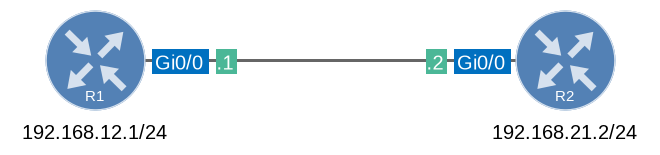
I’m using two routers running Cisco IOS 15.9(3)M9 (IOSv) for the examples in this lesson. Here’s the configuration of these two routers:
R1(config)#interface GigabitEthernet0/0
R1(config-if)#ip address 192.168.12.1 255.255.255.0
R1(config-if)#no shutdown
R1(config-if)#router eigrp 12
R1(config-router)#network 192.168.12.0R2(config)#interface GigabitEthernet0/0
R2(config-if)#ip address 192.168.21.2 255.255.255.0
R2(config-if)#no shutdown
R2(config-if)#router eigrp 12
R2(config-router)#network 192.168.21.0The uncommon subnet error is easy to spot. In the example above we have 2 routers and you can see I configured a different subnet on each interface.
After enabling EIGRP the following errors pop up:
R1#
%LINK-3-UPDOWN: Interface GigabitEthernet0/0, changed state to up
%LINEPROTO-5-UPDOWN: Line protocol on Interface GigabitEthernet0/0, changed state to up
%DUAL-6-NBRINFO: EIGRP-IPv4 12: Neighbor 192.168.21.2 (GigabitEthernet0/0) is blocked: not on common subnet (192.168.12.1/24)
%DUAL-6-NBRINFO: EIGRP-IPv4 12: Neighbor 192.168.21.2 (GigabitEthernet0/0) is blocked: not on common subnet (192.168.12.1/24)
R2#
%LINK-3-UPDOWN: Interface GigabitEthernet0/0, changed state to up
%LINEPROTO-5-UPDOWN: Line protocol on Interface GigabitEthernet0/0, changed state to up
%DUAL-6-NBRINFO: EIGRP-IPv4 12: Neighbor 192.168.12.1 (GigabitEthernet0/0) is blocked: not on common subnet (192.168.21.2/24)
%DUAL-6-NBRINFO: EIGRP-IPv4 12: Neighbor 192.168.12.1 (GigabitEthernet0/0) is blocked: not on common subnet (192.168.21.2/24)Both routers complain that they are not on the same subnet.
R2(config)#interface GigabitEthernet0/0
R2(config-if)#ip address 192.168.12.2 255.255.255.0
R2(config-if)#router eigrp 12
R2(config-router)#no network 192.168.21.0
R2(config-router)#network 192.168.12.0
I’ll change the IP address on R2 and make sure the correct network command is configured for EIGRP.
R1#
%DUAL-5-NBRCHANGE: EIGRP-IPv4 12: Neighbor 192.168.12.2 (GigabitEthernet0/0) is up: new adjacency
R2#
%DUAL-5-NBRCHANGE: EIGRP-IPv4 12: Neighbor 192.168.12.1 (GigabitEthernet0/0) is up: new adjacencyVoila! We now have an EIGRP neighbor adjacency.
R1#show ip eigrp neighbors
EIGRP-IPv4 Neighbors for AS(12)
H   Address                 Interface              Hold Uptime   SRTT   RTO  Q  Seq
                                                   (sec)         (ms)       Cnt Num
0 192.168.12.2 Gi0/0 13 00:00:22 4 100 0 2R2#show ip eigrp neighbors
EIGRP-IPv4 Neighbors for AS(12)
H Address Interface Hold Uptime SRTT RTO Q Seq
(sec) (ms) Cnt Num
0 192.168.12.1 Gi0/0 13 00:00:22 1363 5000 0 2We can verify this by using the show ip eigrp neighbors command.
Lesson learned: Make sure both routers are on the same subnet.
EIGRP K-Values Mismatch
Another common EIGRP issue is K-values mismatch. Take a look below:

This time the IP addresses are correct but we are using different K values on both sides. R1 has enabled K1, K2, K3 and K4, so it uses bandwidth, load and delay. K5 is still 0, which means reliability is not used. R2 is only using the ones for bandwidth and delay. Here’s what you will see on the console:
R1#
%DUAL-5-NBRCHANGE: EIGRP-IPv4 12: Neighbor 192.168.12.2 (GigabitEthernet0/0) is down: metric changed
%DUAL-5-NBRCHANGE: EIGRP-IPv4 12: Neighbor 192.168.12.2 (GigabitEthernet0/0) is down: K-value mismatch
%DUAL-5-NBRCHANGE: EIGRP-IPv4 12: Neighbor 192.168.12.2 (GigabitEthernet0/0) is down: K-value mismatch
R2#
%DUAL-5-NBRCHANGE: EIGRP-IPv4 12: Neighbor 192.168.12.1 (GigabitEthernet0/0) is down: Interface PEER-TERMINATION received
%DUAL-5-NBRCHANGE: EIGRP-IPv4 12: Neighbor 192.168.12.1 (GigabitEthernet0/0) is down: K-value mismatch
%DUAL-5-NBRCHANGE: EIGRP-IPv4 12: Neighbor 192.168.12.1 (GigabitEthernet0/0) is down: K-value mismatch
%DUAL-5-NBRCHANGE: EIGRP-IPv4 12: Neighbor 192.168.12.1 (GigabitEthernet0/0) is down: K-value mismatch
%DUAL-5-NBRCHANGE: EIGRP-IPv4 12: Neighbor 192.168.12.1 (GigabitEthernet0/0) is down: K-value mismatchThis error is easy to spot because your console will give you the “K-value mismatch” error on both routers. This is what the configuration of R1 looks like:
R1#show run | section eigrp
router eigrp 12
 metric weights 0 1 1 1 1 0
 network 192.168.12.0
We can verify our configuration by looking at both routers. You can see the K values were changed on R1. Let’s change R2 so that we use the same K values:
R2(config)#router eigrp 12
R2(config-router)#metric weights 0 1 1 1 1 0
This should help, this is what the console shows us:
R1#
%DUAL-5-NBRCHANGE: EIGRP-IPv4 12: Neighbor 192.168.12.2 (GigabitEthernet0/0) is up: new adjacency
R2#
%DUAL-5-NBRCHANGE: EIGRP-IPv4 12: Neighbor 192.168.12.1 (GigabitEthernet0/0) is up: new adjacencyAfter changing the K values we have an EIGRP neighbor adjacency. In case you missed the console messages you can also see it here:
R1#show ip eigrp neighbors
EIGRP-IPv4 Neighbors for AS(12)
H   Address                 Interface              Hold Uptime   SRTT   RTO  Q  Seq
                                                   (sec)         (ms)       Cnt Num
0 192.168.12.2 Gi0/0 12 00:00:22 9 150 0 8R2#show ip eigrp neighbors
EIGRP-IPv4 Neighbors for AS(12)
H Address Interface Hold Uptime SRTT RTO Q Seq
(sec) (ms) Cnt Num
0 192.168.12.1 Gi0/0 10 00:00:23 6 100 0 8Another problem solved! Lesson learned: Make sure the K-values are the same on all EIGRP routers within the same autonomous system.
EIGRP AS Number Mismatch
This is a typical Monday morning problem. EIGRP uses an AS number and it has to match on both EIGRP routers. Here’s the topology:
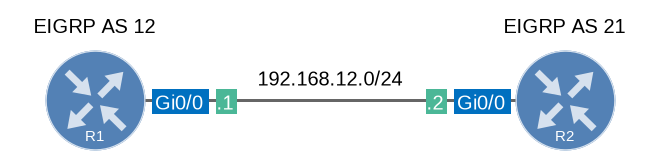
There’s a mismatch in the AS number. When we configure EIGRP we have to type in an AS number. Unlike OSPF (which uses a process ID) this number has to be the same on both routers. Let’s take a look:
R1#show ip eigrp neighbors
EIGRP-IPv4 Neighbors for AS(12)R2#show ip eigrp neighbors
EIGRP-IPv4 Neighbors for AS(21)Unlike the other EIGRP configuration mistakes this one doesn’t produce an error message. We can use show ip eigrp neighbors and see that there are no neighbors. Use your eagle eyes to spot for differences and you’ll quickly see that we are not using the same AS number. Here’s the configuration:
R1#show run | section eigrp
router eigrp 12
network 192.168.12.0R2#show run | section eigrp
router eigrp 21
network 192.168.12.0Let’s fix this, I’ll change the configuration of R2:
R2(config)#no router eigrp 21
R2(config)#router eigrp 12
R2(config-router)#network 192.168.12.0
After making the change, the neighbor adjacency will appear:
R1#
%DUAL-5-NBRCHANGE: EIGRP-IPv4 12: Neighbor 192.168.12.2 (GigabitEthernet0/0) is up: new adjacency
R2#
%DUAL-5-NBRCHANGE: EIGRP-IPv4 12: Neighbor 192.168.12.1 (GigabitEthernet0/0) is up: new adjacencyR1#show ip eigrp neighbors
EIGRP-IPv4 Neighbors for AS(12)
H Address Interface Hold Uptime SRTT RTO Q Seq
(sec) (ms) Cnt Num
0 192.168.12.2 Gi0/0 12 00:00:22 11 150 0 2R2#show ip eigrp neighbors
EIGRP-IPv4 Neighbors for AS(12)
H Address Interface Hold Uptime SRTT RTO Q Seq
(sec) (ms) Cnt Num
0 192.168.12.1 Gi0/0 11 00:00:22 6 100 0 10After changing the AS number life is good. Lesson learned: Make sure the AS number is the same if you want an EIGRP neighbor adjacency.
EIGRP Passive Interface
If you checked the AS number, K values, IP addresses and you still don’t have a working EIGRP neighbor adjacency then you should check if EIGRP is sending hello packets on the interface. Maybe it’s a passive interface. Here’s the topology:
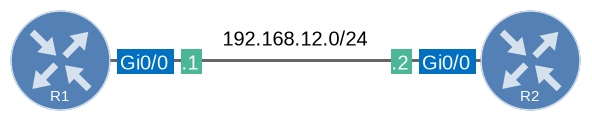
Once again two EIGRP routers and no neighbor adjacency. What is going on?
R1#show ip eigrp neighbors
EIGRP-IPv4 Neighbors for AS(12)R2#show ip eigrp neighbors
EIGRP-IPv4 Neighbors for AS(12)We see that there are no neighbors but the AS number matches. Let’s take a closer look:
R1#show ip protocols
*** IP Routing is NSF aware ***

[output omitted]

Routing Protocol is "eigrp 12"
  Outgoing update filter list for all interfaces is not set
  Incoming update filter list for all interfaces is not set
  Default networks flagged in outgoing updates
  Default networks accepted from incoming updates
  EIGRP-IPv4 Protocol for AS(12)
    Metric weight K1=1, K2=0, K3=1, K4=0, K5=0
    Soft SIA disabled
    NSF-aware route hold timer is 240
    Router-ID: 192.168.12.1
    Topology : 0 (base)
      Active Timer: 3 min
      Distance: internal 90 external 170
      Maximum path: 4
      Maximum hopcount 100
      Maximum metric variance 1

  Automatic Summarization: disabled
  Maximum path: 4
  Routing for Networks:
    192.168.12.0
  Routing Information Sources:
    Gateway         Distance      Last Update
Distance: internal 90 external 170R2#show ip protocols
*** IP Routing is NSF aware ***
[output omitted]
Routing Protocol is "eigrp 12"
Outgoing update filter list for all interfaces is not set
Incoming update filter list for all interfaces is not set
Default networks flagged in outgoing updates
Default networks accepted from incoming updates
EIGRP-IPv4 Protocol for AS(12)
Metric weight K1=1, K2=0, K3=1, K4=0, K5=0
Soft SIA disabled
NSF-aware route hold timer is 240
Router-ID: 192.168.12.2
Topology : 0 (base)
Active Timer: 3 min
Distance: internal 90 external 170
Maximum path: 4
Maximum hopcount 100
Maximum metric variance 1
Automatic Summarization: disabled
Maximum path: 4
Routing for Networks:
192.168.12.0
Passive Interface(s):
GigabitEthernet0/0
Routing Information Sources:
Gateway Distance Last Update
Distance: internal 90 external 170If you look at the output of show ip protocols you can see that the network has been advertised correctly. If you look closely on R2 you can see that we have a passive interface. Let’s get rid of it!
Hello Rene!
Hopé you are doing great!
Can you please Add Trouble Shooting Steps for EIGRP Neighbors Over DMVPN?
Thanks In Advance!
Miguel Jimenez.
Hi Miguel,
The “general” EIGRP troubleshooting lessons can also be applied to DMVPN, the only thing you need to keep in mind are the differences with the DMVPN phases.
Have you seen my EIGRP examples for the different phases?
https://networklessons.com/vpn...e-1-eigrp-routing
https://networklessons.com/vpn...e-2-eigrp-routing
https://networklessons.com/vpn...e-3-eigrp-routing
Here’s what you need to keep in mind:
When using phase 1, all traffic goes through the hub so the next hop address doesn't matter. Just make sure that the spoke routers have a
... Continue reading in our forumRene,
Am I correct in saying that you can use the neighbor command with sub-interfaces and have some of those sub-interfaces using the neighbor command with the others establishing a neighborship via normal means (i.e. dynamically discover neighbors)?
From an article I read from Kevin Wallace, (where three routers were connected via a switch and using physical interfaces), R1 and R2 initially established a dynamic neighborship, but then when R3 was introduced and a static neighbor was configured between R2 and R3, it broke the dynamic neighborship between R1 and R2.
Thanks in advance.
Hello Andy
Yes, it is possible to use the neighbor command with sub-interfaces. Each sub-interface is considered a separate entity when it comes to configuring EIGRP neighbors. Each sub-interface, just like the physical interfaces, can be configured to either automatically achieve neighbor relationship with an EIGRP neighbor, or achieve it manually via explicitly configuring the IP of the neighbor.
Now in the example that you state, the situation is different. Here you have three routers connected to the same subnet. When you configure a static neighbor
... Continue reading in our forumHello Liz Sir!
I have turned on , debug EIGRP packets on my router, but it doesn’t show me anything please see the attached although my second router which I named it R2, it has ping reply with R-1 but the debug command doesn’t show me anything!
Thanks in advance for the hep in this regard.
Regards.
https://cdn-forum.networklesso...e6b2e464326373ad1
Ajmal