

VLAN access lists (VACL) are very useful to filter traffic within the VLAN. Let me give you an example:
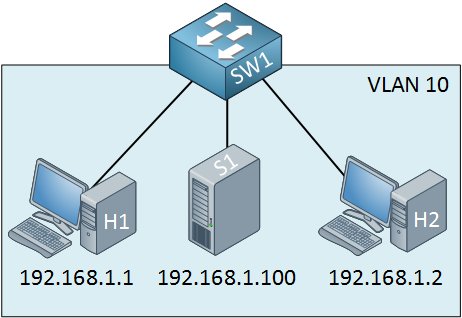
Let’s say I want to make sure that the two computers cannot communicate with the server. You could use port-security to filter MAC addresses, but this isn’t a very safe method.
I will show you how to configure a VACL so that the two computers won’t be able to reach the server. First, we have to create an access-list:
SW1(config)#access-list 100 permit ip any host 192.168.1.100The first step is to create an extended access-list. Traffic from any source to destination IP address 192.168.1.100 should match my access-list. This might look confusing to you because your gut will tell you to use “deny” in this statement…don’t do it, though, use the permit statement! Now we can create a VLAN access map:
SW1(config)#vlan access-map NOT-TO-SERVER 10
SW1(config-access-map)#match ip address 100
SW1(config-access-map)#action drop
SW1(config-access-map)#vlan access-map NOT-TO-SERVER 20
SW1(config-access-map)#action forward
My VLAN access map is called “NOT-TO-SERVER”. This is what it does:
• Sequence number 10 will look for traffic that matches access-list 100. All traffic that is permitted in access-list 100 will match here. The action is to drop this traffic.
• Sequence number 20 doesn’t have a match statement, so everything will match. The action is to forward traffic.
As a result, all traffic from any host to the destination IP address 192.168.1.100 will be dropped, and everything else will be forwarded. Let’s enable it:
SW1(config)#vlan filter NOT-TO-SERVER vlan-list 10The last step is to apply the VACL to the VLANs you want. I use mine for VLAN 10. Let’s see if this works or not. The hosts and the server in my lab are routers running Cisco IOS XE 17.12, and SW1 runs IOS XE 17.15 (IOL):
Hi, just getting ready for CCNP Switch .
I was wondering how do you edit / update VACLs ?
Do you need to use text editor like standard ?
Reload switch ?
Examples of changing requirements say add new server 192.168.1.101
Hi Geoff,
You can edit the access-list, no problem at all. I’m not 100% sure if it will be active right away or if you need to remove + add the VACL again before it is applied. If you want to know, I can try it and let you know the results.
Rene
Hi Rene,
I was trying to use the VACL with mac access-list to prevent traffic from Computer A to Computer B. Both computer are connected directly to the Swtich A as follow,
Switch A
Computer A Computer B
IP- 192.168.1.1 IP-192.168.1.2
MAC - 0023.2343.5678 MAC- 0023.2343.5679
Configuration on Switch A,
mac access-list extended test
permit any host 0023.2343.5679
vlan access-map test1 10
match mac address test
action drop
vlan access-map test1 20
action forward
vlan filter test1 vlan-list 1 (knowing all switch ports
... Continue reading in our forumwow, similar to route-map. awesome!
i have a question, on the 1st sentence you said that we can prevent both computers from communicating with server by using “port security”. could you elaborate on how port-security will filter the traffic of computers going to server?
@Ronie I just did some testing and I’m also seeing strange results when using a mac access-list to filter MAC addresses. I used two routers and one 3560 switch. When I apply the vlan filter, the routers are still able to ping each other until I clear their ARP tables. Once I do that, they are unable to reach each other anymore since some of the ARP packets get filtered.
I would expect all traffic that matches one of the MAC addresses to be filtered but for whatever reason, it’s acting weird.
... Continue reading in our forum@Frades you can use port security to set a limit to the number of MAC