

Lesson Contents
OSPF uses eleven different LSA types (Link State Advertisements) to build its LSDB (Link State Database) and share routing information between routers. Each LSA type has a specific purpose and flooding scope where it is flooded only within or between areas. In this lesson, we’ll look at the different LSA types, and I’ll show you how to identify them on Cisco IOS routers. We’ll focus on OSPFv2 because OSPFv3 uses a different set/format for LSAs.
LSA Types Overview
Let’s start with an overview of all LSA types:
| LSA Type | Name | Generated By | Flooding Scope |
| 1 | Router LSA | Every router | Within the area |
| 2 | Network LSA | DR | Within the area |
| 3 | Summary LSA | ABR | Into other areas |
| 4 | Summary ASBR LSA | ABR | Into other areas |
| 5 | External LSA | ASBR | Entire OSPF domain |
| 6 | Multicast LSA | N/A | N/A (not used) |
| 7 | NSSA External LSA | ASBR (in NSSA) | Within the NSSA only |
| 8 | External attribute LSA for BGP | N/A | N/A (not used) |
| 9 | Opaque LSA (link-local) | Router | Link-local scope |
| 10 | Opaque LSA (area-local) | Router | Within the area |
| 11 | Opaque LSA (AS-wide) | Router | Entire OSPF domain |
For many students, visualizing helps them understand and remember. I like to visualize OSPF LSAs as jigsaw puzzle pieces. One jigsaw means nothing, but all of them together give us the total picture…for OSPF, this is the LSDB.
LSA Type 1
Here’s the first LSA Type:
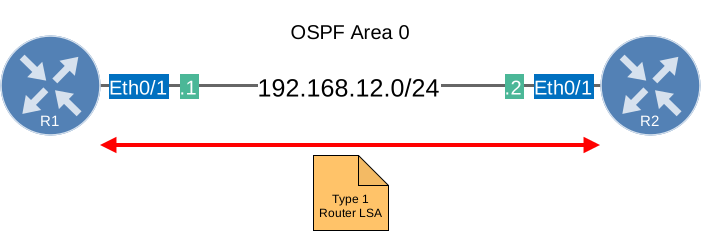
Each router within the area will flood a type 1 router LSA within the area. In this LSA, you will find a list of all the directly connected links of this router. How do we identify a link?
- The IP prefix on an interface.
- The link type. There are 4 different link types:
| Link Type | Description | Link ID |
| 1 | Point-to-point connection to another router. | Neighbor router ID |
| 2 | Connection to transit network. | IP address of DR |
| 3 | Connection to stub network. | IP Network |
| 4 | Virtual Link | Neighbor router ID |
Here is a short explanation of what each of these are:
- Point-to-point (type 1): Used for serial point-to-point connections like PPP, HDLC, or Frame Relay point-to-point sub-interfaces.
- Transit network (type 2): A multi-access network (like Ethernet) where there is more than one OSPF neighbor, requiring a DR/BDR election.
- Stub network (type 3): A network segment with only one OSPF router, such as a loopback interface or an Ethernet interface with no OSPF neighbors. This has nothing to do with stub areas.
- Virtual link (type 4): Used for OSPF virtual links.
The router LSA always stays within the area.
You can find a detailed walkthrough with all link types in the OSPFv2 LSA Type 1 (Router LSA) lesson.
LSA Type 2
The second LSA type (network LSA) is created for multi-access networks:
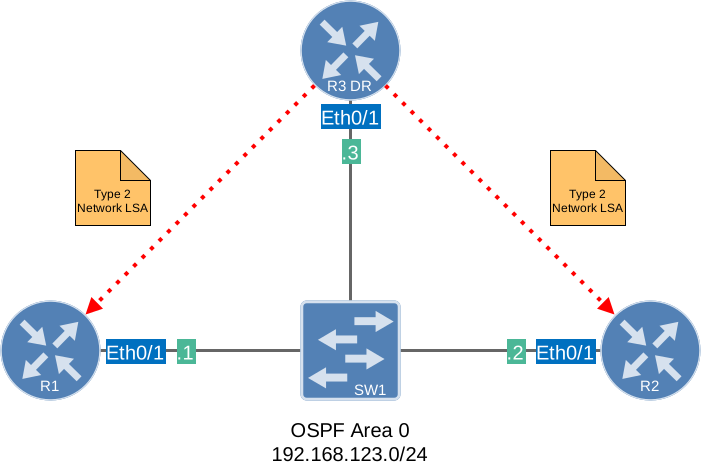
The network LSA, or type 2, is created for each multi-access network. Remember the OSPF network types? The broadcast and non-broadcast network types require a DR/BDR. If this is the case, you will see these network LSAs being generated by the DR. You won’t see them when you use a different network type such as point-point or point-to-multipoint (non-broadcast). In this LSA, we will find all the routers that are connected to the multi-access network, the DR, and, of course, the prefix and subnet mask.
For a detailed walkthrough, check the OSPFv2 LSA type 2 lesson.
LSA Type 3
Let’s look at the third LSA type:

Type 1 router LSAs always stay within the area. OSPF, however, works with multiple areas, and you probably want full connectivity within all of the areas. R1 is flooding a router LSA within the area, so R2 will store this in its LSDB. R3 and R4 also need to know about the networks in Area 2.
R2 is going to create a Type 3 summary LSA and flood it into area 0. This LSA will spread throughout the rest of our OSPF network. This way, all the routers in other areas will know about the prefixes from other areas.
The name “summary” LSA is very misleading. By default OSPF is not going to summarize anything for you. There is, however, a command that lets you summarize inter-area routes. Take a look at my OSPF summarization lesson if you are interested. If you are looking at the routing table of an OSPF router and see some O IA entries, you are looking at LSA type 3 summary LSAs. Those are your inter-area prefixes!
For a detailed overview, take a look at the LSA type 3 lesson.
LSA Type 4
Time for the fourth LSA type:

In this example, R1 redistributes information from the BGP router into OSPF. This makes R1 an ASBR (Autonomous System Border Router). R1 will flip a bit in the router LSA to identify itself as an ASBR. When R2, who is an ABR, receives this router LSA, it will create a type 4 summary ASBR LSA and flood it into area 0. This LSA will also be flooded in all other areas and is required so that all OSPF routers know where to find the ASBR.
LSA Type 5
What about LSA type 5? Let’s check it out:

Same topology, but I’ve added a prefix (5.5.5.0/24) on our RIP router. This prefix will be redistributed into OSPF. R1 (our ASBR) will take care of this and create a type 5 external LSA for this. Don’t forget we still need the type 4 summary ASBR LSA to locate R1. If you have ever tried redistribution with OSPF, you might have seen O E1 or O E2 entries. Those are the external prefixes and our type 5 LSAs. E2 is the default, which only uses the external cost set by the ASBR. The internal OSPF cost to reach the ASBR is not added. With the E1, we use the external cost plus the internal OSPF cost to reach the ASBR.
For a detailed explanation, check the LSA type 5 lesson.
LSA Type 6
What about OSPF LSA type 6? The most important thing to know about LSA Type 6 is that it is obsolete and never used in modern networking.
OSPF is designed to route unicast traffic, and in the past, developers created an extension to OSPF called Multicast OSPF (MOSPF), which is defined in RFC 1584.
The idea was to allow OSPF to handle multicast traffic, so that an OSPF router could tell other OSPF routers that it has receivers for a specific multicast group. When a host wanted to join a multicast group (usually communicating via IGMP), the local router would generate a type 6 LSA.
OSPF routers could then build a map of where the multicast receivers are located, run SPF to calculate a multicast distribution tree, and forward multicast traffic in the right direction.
The idea sounds nice, but it was never adopted. The main issue was that it doesn’t scale. Every router must maintain a state for each active multicast group. Also, whenever a new multicast source starts sending traffic, OSPF routers must run the SPF algorithm to calculate a new multicast tree. This increases your CPU load and memory usage.
In modern networks, we use Protocol Independent Multicast (PIM).
LSA Type 7
Let’s look at LSA type 7:

NSSA areas do not allow type 5 external LSAs. In my picture, R1 is still our ASBR, redistributing BGP information into OSPF.
Since type 5 is not allowed, we have to think of something else. That’s why we have a type 7 external LSA that carries the exact same information but is not blocked within the NSSA area. R2 (ABR) will translate this type 7 into a type 5 and flood it into the other areas. These have the same logic as the O E1 and O E2 routes:
- N1 translates to E1
- N2 translates to E2.
For a detailed explanation, see the LSA type 7 lesson.
LSA Type 8
Type 8 External Attribute LSA was designed to carry BGP attributes across OSPF domains. However, like Type 6, it is rarely implemented in practice and is not supported by most vendors, including Cisco. Modern networks use MP-BGP for carrying extended attributes instead.
Great job,your example are very smooth to learn .
very concise exlanation!
I have to tell you that I have seen different videos and took CCNP Training and never understood completely the Area Types but you explain it so easy that I understand now.
Thanks
In the above topology, when I redistribute connected on R2 and R3, R1 sees only one LSA type 4. It’s for R2 showing how to get to R3. Why don’t we also see an LSA type 4 for R2’s redistributed routes? Does a directly connected router not generate an LSA type 4 for its redistributed routes? Whew!
Hi,
In your explanation about LSA type 5, you wrote :
“Here you can see the type 5 external LSA in the LSDB. Keep in mind that router R2 and R3 both are in area 0.”
But, in the design, we can see that there are in area 1 ?
Regards.