

Lesson Contents
TCP (Transmission Control Protocol) is a connection oriented protocol which means that we keep track of how much data has been transmitted. The sender will transmit some data and the receiver has to acknowledge it. When we don’t receive the acknowledgment in time then the sender will re-transmit the data.
TCP uses “windowing” which means that a sender will send one or more data segments and the receiver will acknowledge one or all segments. When we start a TCP connection, the hosts will use a receive buffer where we temporarily store data before the application can process it.
When the receiver sends an acknowledgment, it will tell the sender how much data it can transmit before the receiver will send an acknowledgment. We call this the window size. Basically, the window size indicates the size of the receive buffer.
Besides the window size that the receiver advertises, the sender also keeps track of a congestion window. The sender never transmits more than the smallest of these two windows. Typically the TCP connection will start with a small congestion window and every time when there is a successful acknowledgement, the congestion window will increase. Here’s an example:
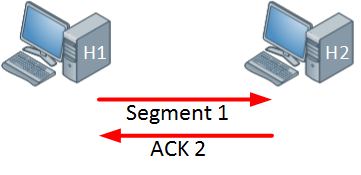
Above we have two hosts, the host on the left side will send one segment and the host on the right side will send an acknowledgment in return. Since the acknowledgement was successful, the window size will increase:
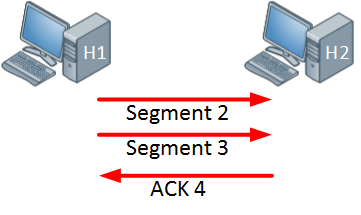
The host on the left side is now sending two segments and the host on the right side will return a single acknowledgment. Everything is working fine so the congestion window will increase even further:
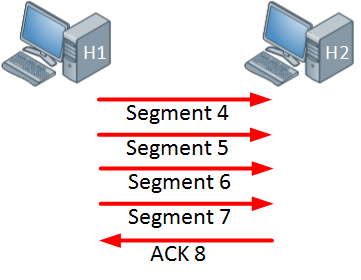
The host is now sending four segments and the host on the right side responds with a single acknowledgment.
In the example above the congestion window keeps increasing as long as the receiver sends acknowledgments for all our segments or when the window size hits a certain maximum limit. When the sender doesn’t receive an acknowledgment within a certain time period (called the retransmission timeout or RTO, which is calculated from the round-trip time) then the congestion window will be reduced.
When an interface has congestion then it’s possible that IP packets are dropped. To deal with this, TCP has a number of algorithms that deal with congestion control. One of them is called slow start.
With TCP slow start, the congestion window will initially grow exponentially (congestion window doubles) but when a packet is dropped and the retransmission timeout expires, the congestion window will be reduced to one segment. It will then grow exponentially again until the congestion window is half of what it was when the congestion occurred. At that moment, the congestion window will grow linearly instead of exponentially. (When the sender detects the drop sooner, through duplicate acknowledgments, fast recovery only halves the congestion window.)
When an interface gets congested, it’s possible that all your TCP connections will experience TCP slow start. Packets will be dropped and then all TCP connections will have a small window size. This is called TCP global synchronization. Here’s what it looks like:
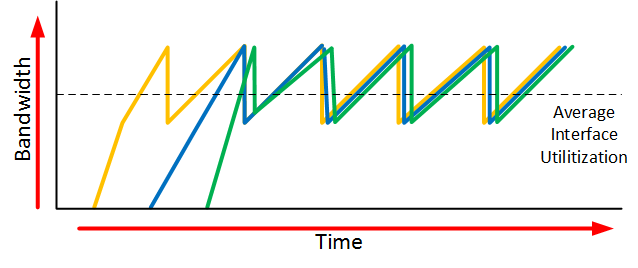
The orange, blue and green lines are three different TCP connections. These TCP connections start at different times and after awhile, the interface gets congested and packets of all TCP connections are dropped. What happens is that the congestion window of all these TCP connections will drop to one and once the interface congestion is gone, all their window sizes will increase again.
The interface then gets congested again, the window size drops back to one and the story repeats itself. The result of this is that we don’t use all the available bandwidth that our interface has to offer. If you look at the dashed line you can see that the average interface utilization isn’t very high.
To prevent global synchronization we can use RED (Random Early Detection). This is a feature that drops “random” packets from TCP flows based on the average number of packets in a queue. WRED (Weighted RED) also looks at the TOS (Type of Service) marking of the packets, so packets with a lower priority are dropped first. When packets are dropped before a queue is full, we can avoid the global synchronization.
The end result will look similar to this:
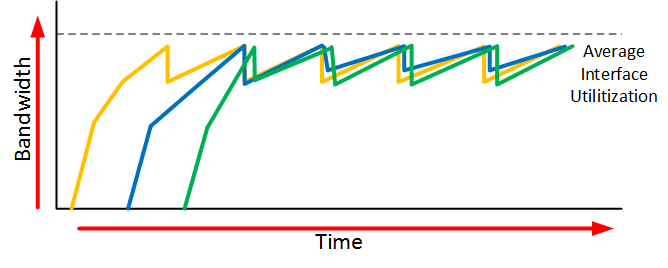
When we use RED, our average interface utilization will improve.
Now you have an idea what the TCP window size is about, let’s take a look at a real example of how the window size is used. We can use wireshark for this.
Wireshark Captures
To examine the TCP window size I will use two Linux hosts that are directly connected to each other. H1 (192.168.1.1) is the sender and H2 (192.168.1.2) is the receiver. I captured this between two Ubuntu 22.04 containers in containerlab (Linux kernel 6.8).

H1 sends 8 MB of data to an application on H2 over TCP port 5001. To get an interesting output, I turned H2 into a slow receiver:
- The link from H1 to H2 adds 10 ms of delay and is limited to 10 Mbps.
- The maximum receive buffer of H2 is 1 MB (
net.ipv4.tcp_rmem = 4096 131072 1048576) instead of the default 6 MB. - The application on H2 reads everything it receives for the first 3 seconds, then only about 100 KB per second for 2 seconds. After that, it stops reading for 4 seconds and then reads everything again.
I captured the traffic on H1. Here’s the largest window size that H2 advertised in every half second of the capture:
=====================================================================
| IO Statistics                                                     |
|                                                                   |
| Duration: 12.2 secs                                               |
| Interval:  0.5 secs                                               |
|                                                                   |
| Col  1: MAX(tcp.window_size)tcp.window_size && ip.src==192.168.1.2|
|-------------------------------------------------------------------|
|              |1       |                                           |
| Interval     |   MAX  |                                           |
|-----------------------|                                           |
|  0.0 <> 0.5  | 356032 |                                           |
|  0.5 <> 1.0  | 356032 |                                           |
|  1.0 <> 1.5  | 362656 |                                           |
|  1.5 <> 2.0  | 411136 |                                           |
|  2.0 <> 2.5  | 462688 |                                           |
|  2.5 <> 3.0  | 558528 |                                           |
|  3.0 <> 3.5  | 558528 |                                           |
|  3.5 <> 4.0  | 206336 |                                           |
|  4.0 <> 4.5  |  42624 |                                           |
|  4.5 <> 5.0  |  45344 |                                           |
|  5.0 <> 5.5  |      0 |                                           |
|  5.5 <> 6.0  |      0 |                                           |
|  6.0 <> 6.5  |      0 |                                           |
|  6.5 <> 7.0  |      0 |                                           |
|  7.0 <> 7.5  |      0 |                                           |
|  7.5 <> 8.0  |      0 |                                           |
|  8.0 <> 8.5  |      0 |                                           |
|  8.5 <> 9.0  |      0 |                                           |
|  9.0 <> 9.5  | 625248 |                                           |
|  9.5 <> 10.0 | 625248 |                                           |
| 10.0 <> 10.5 | 625248 |                                           |
| 10.5 <> 11.0 | 625248 |                                           |
| 11.0 <> 11.5 | 625248 |                                           |
| 11.5 <> 12.0 | 625248 |                                           |
| 12.0 <> 12.5 | 625248 |                                           |
=====================================================================
The window size grows from 65160 bytes in the SYN,ACK to 356032 bytes within half a second, and to 558528 bytes after 3 seconds. When the application on H2 slows down, the window size drops fast and at around 4.7 seconds, it totally collapses. The window size remains 0 until 9 seconds (tshark also shows 0 for the intervals where H2 sent nothing). Then the application reads again, the window size jumps to 625248 bytes, and the file transfer completes after about 12 seconds. Let’s take a closer look at this file transfer, which starts with the three way handshake:
1   0.000000  192.168.1.1 → 192.168.1.2  TCP 74 55346 → 5001 [SYN] Seq=0 Win=64240 Len=0 MSS=1460 SACK_PERM TSval=1492509859 TSecr=0 WS=128
2   0.000054  192.168.1.2 → 192.168.1.1  TCP 74 5001 → 55346 [SYN, ACK] Seq=0 Ack=1 Win=65160 Len=0 MSS=1460 SACK_PERM TSval=2925146130 TSecr=1492509859 WS=32
3   0.010129  192.168.1.1 → 192.168.1.2  TCP 66 55346 → 5001 [ACK] Seq=1 Ack=1 Win=64256 Len=0 TSval=1492509869 TSecr=2925146130
H1 uses 192.168.1.1 and H2 uses 192.168.1.2. Above you can see that in the SYN,ACK message, H2 wants to use a window size of 65160 with a window scaling factor of 32 (WS=32). The window size in a SYN or SYN,ACK is never scaled, so this is 65160 bytes. H1 advertises a window size of 64240 with a window scaling factor of 128 (WS=128), so later in the connection it can advertise window sizes up to 8388480 bytes (65535 * 128). This is irrelevant now since we are sending data to H2.
After about 3 seconds, the window size of H2 looks like this:
Frame 3839: Packet, 66 bytes on wire (528 bits), 66 bytes captured (528 bits)
Ethernet II, Src: aa:c1:ab:69:6c:76 (aa:c1:ab:69:6c:76), Dst: aa:c1:ab:50:e1:be (aa:c1:ab:50:e1:be)
Internet Protocol Version 4, Src: 192.168.1.2, Dst: 192.168.1.1
Transmission Control Protocol, Src Port: 5001, Dst Port: 55346, Seq: 1, Ack: 3504161, Len: 0
    Source Port: 5001
    Destination Port: 55346
    [Stream index: 0]
    [Stream Packet Number: 3839]
    [Conversation completeness: Incomplete, DATA (15)]
        ..0. .... = RST: Absent
        ...0 .... = FIN: Absent
        .... 1... = Data: Present
        .... .1.. = ACK: Present
        .... ..1. = SYN-ACK: Present
        .... ...1 = SYN: Present
        [Completeness Flags: ··DASS]
    [TCP Segment Len: 0]
    Sequence Number: 1    (relative sequence number)
    Sequence Number (raw): 3601011659
    [Next Sequence Number: 1    (relative sequence number)]
    Acknowledgment Number: 3504161    (relative ack number)
    Acknowledgment number (raw): 1844524031
    1000 .... = Header Length: 32 bytes (8)
    Flags: 0x010 (ACK)
        000. .... .... = Reserved: Not set
        ...0 .... .... = Accurate ECN: Not set
        .... 0... .... = Congestion Window Reduced: Not set
        .... .0.. .... = ECN-Echo: Not set
        .... ..0. .... = Urgent: Not set
        .... ...1 .... = Acknowledgment: Set
        .... .... 0... = Push: Not set
        .... .... .0.. = Reset: Not set
        .... .... ..0. = Syn: Not set
        .... .... ...0 = Fin: Not set
        [TCP Flags: ·······A····]
    Window: 17454
    [Calculated window size: 558528]
    [Window size scaling factor: 32]
    Checksum: 0x04d6 [unverified]
    [Checksum Status: Unverified]
    Urgent Pointer: 0
Above you can see that the window size has increased to 558528 (17454 * 32). Originally the window size is a 16 bit value so the largest window size would be 65535. Nowadays we use a scaling factor so that we can use larger window sizes.
At around the 3 second mark the window size decreased. The application on H2 reads slowly, so data piles up in its receive buffer and H2 advertises a smaller and smaller window size: 395584 bytes, then 206336 bytes, and at 3.8 seconds only 960 bytes. Here’s what happened a bit later:
4660   4.622529  192.168.1.2 → 192.168.1.1  TCP 66 [TCP Window Update] 5001 → 55346 [ACK] Seq=1 Ack=4578705 Win=45344 Len=0 TSval=2925150753 TSecr=1492514466
4661   4.635122  192.168.1.1 → 192.168.1.2  TCP 1514 55346 → 5001 [ACK] Seq=4578705 Ack=1 Win=64256 Len=1448 TSval=1492514492 TSecr=2925150753
4662   4.635126  192.168.1.1 → 192.168.1.2  TCP 1514 55346 → 5001 [PSH, ACK] Seq=4580153 Ack=1 Win=64256 Len=1448 TSval=1492514492 TSecr=2925150753
4663   4.637423  192.168.1.1 → 192.168.1.2  TCP 1514 55346 → 5001 [ACK] Seq=4581601 Ack=1 Win=64256 Len=1448 TSval=1492514492 TSecr=2925150753
4664   4.637429  192.168.1.1 → 192.168.1.2  TCP 1514 55346 → 5001 [PSH, ACK] Seq=4583049 Ack=1 Win=64256 Len=1448 TSval=1492514492 TSecr=2925150753
4665   4.639855  192.168.1.1 → 192.168.1.2  TCP 1514 55346 → 5001 [ACK] Seq=4584497 Ack=1 Win=64256 Len=1448 TSval=1492514492 TSecr=2925150753
4666   4.639862  192.168.1.1 → 192.168.1.2  TCP 1514 55346 → 5001 [PSH, ACK] Seq=4585945 Ack=1 Win=64256 Len=1448 TSval=1492514492 TSecr=2925150753
4667   4.642298  192.168.1.1 → 192.168.1.2  TCP 1514 55346 → 5001 [ACK] Seq=4587393 Ack=1 Win=64256 Len=1448 TSval=1492514492 TSecr=2925150753
4668   4.642304  192.168.1.1 → 192.168.1.2  TCP 1514 55346 → 5001 [PSH, ACK] Seq=4588841 Ack=1 Win=64256 Len=1448 TSval=1492514492 TSecr=2925150753
4669   4.644732  192.168.1.1 → 192.168.1.2  TCP 1514 55346 → 5001 [ACK] Seq=4590289 Ack=1 Win=64256 Len=1448 TSval=1492514492 TSecr=2925150753
4670   4.644739  192.168.1.1 → 192.168.1.2  TCP 1514 55346 → 5001 [PSH, ACK] Seq=4591737 Ack=1 Win=64256 Len=1448 TSval=1492514492 TSecr=2925150753
4671   4.647210  192.168.1.1 → 192.168.1.2  TCP 1514 55346 → 5001 [ACK] Seq=4593185 Ack=1 Win=64256 Len=1448 TSval=1492514492 TSecr=2925150753
4672   4.647213  192.168.1.1 → 192.168.1.2  TCP 1514 55346 → 5001 [PSH, ACK] Seq=4594633 Ack=1 Win=64256 Len=1448 TSval=1492514492 TSecr=2925150753
4673   4.649560  192.168.1.1 → 192.168.1.2  TCP 1514 55346 → 5001 [ACK] Seq=4596081 Ack=1 Win=64256 Len=1448 TSval=1492514492 TSecr=2925150753
4674   4.649566  192.168.1.1 → 192.168.1.2  TCP 1514 55346 → 5001 [PSH, ACK] Seq=4597529 Ack=1 Win=64256 Len=1448 TSval=1492514492 TSecr=2925150753
4675   4.652022  192.168.1.1 → 192.168.1.2  TCP 1514 55346 → 5001 [ACK] Seq=4598977 Ack=1 Win=64256 Len=1448 TSval=1492514492 TSecr=2925150753
4676   4.652026  192.168.1.1 → 192.168.1.2  TCP 1514 55346 → 5001 [PSH, ACK] Seq=4600425 Ack=1 Win=64256 Len=1448 TSval=1492514492 TSecr=2925150753
4677   4.654402  192.168.1.1 → 192.168.1.2  TCP 1514 55346 → 5001 [ACK] Seq=4601873 Ack=1 Win=64256 Len=1448 TSval=1492514492 TSecr=2925150753
4678   4.654407  192.168.1.1 → 192.168.1.2  TCP 1514 55346 → 5001 [PSH, ACK] Seq=4603321 Ack=1 Win=64256 Len=1448 TSval=1492514492 TSecr=2925150753
4679   4.656977  192.168.1.1 → 192.168.1.2  TCP 1514 55346 → 5001 [ACK] Seq=4604769 Ack=1 Win=64256 Len=1448 TSval=1492514492 TSecr=2925150753
4680   4.656983  192.168.1.1 → 192.168.1.2  TCP 1514 55346 → 5001 [PSH, ACK] Seq=4606217 Ack=1 Win=64256 Len=1448 TSval=1492514492 TSecr=2925150753
4681   4.659219  192.168.1.1 → 192.168.1.2  TCP 1514 55346 → 5001 [ACK] Seq=4607665 Ack=1 Win=64256 Len=1448 TSval=1492514492 TSecr=2925150753
4682   4.659223  192.168.1.1 → 192.168.1.2  TCP 1514 55346 → 5001 [PSH, ACK] Seq=4609113 Ack=1 Win=64256 Len=1448 TSval=1492514492 TSecr=2925150753
4683   4.661718  192.168.1.1 → 192.168.1.2  TCP 1514 55346 → 5001 [ACK] Seq=4610561 Ack=1 Win=64256 Len=1448 TSval=1492514492 TSecr=2925150753
4684   4.661722  192.168.1.1 → 192.168.1.2  TCP 1514 55346 → 5001 [PSH, ACK] Seq=4612009 Ack=1 Win=64256 Len=1448 TSval=1492514492 TSecr=2925150753
4685   4.662868  192.168.1.2 → 192.168.1.1  TCP 66 5001 → 55346 [ACK] Seq=1 Ack=4613457 Win=10592 Len=0 TSval=2925150793 TSecr=1492514492
4686   4.664169  192.168.1.1 → 192.168.1.2  TCP 1514 55346 → 5001 [ACK] Seq=4613457 Ack=1 Win=64256 Len=1448 TSval=1492514492 TSecr=2925150753
4687   4.664175  192.168.1.1 → 192.168.1.2  TCP 1514 55346 → 5001 [PSH, ACK] Seq=4614905 Ack=1 Win=64256 Len=1448 TSval=1492514492 TSecr=2925150753
4688   4.666509  192.168.1.1 → 192.168.1.2  TCP 1514 55346 → 5001 [ACK] Seq=4616353 Ack=1 Win=64256 Len=1448 TSval=1492514492 TSecr=2925150753
4689   4.666514  192.168.1.1 → 192.168.1.2  TCP 1514 55346 → 5001 [PSH, ACK] Seq=4617801 Ack=1 Win=64256 Len=1448 TSval=1492514492 TSecr=2925150753
4690   4.669001  192.168.1.1 → 192.168.1.2  TCP 1514 55346 → 5001 [ACK] Seq=4619249 Ack=1 Win=64256 Len=1448 TSval=1492514492 TSecr=2925150753
4691   4.669004  192.168.1.1 → 192.168.1.2  TCP 1514 55346 → 5001 [PSH, ACK] Seq=4620697 Ack=1 Win=64256 Len=1448 TSval=1492514492 TSecr=2925150753
4692   4.670556  192.168.1.1 → 192.168.1.2  TCP 1514 55346 → 5001 [ACK] Seq=4622145 Ack=1 Win=64256 Len=1448 TSval=1492514492 TSecr=2925150753
4693   4.670562  192.168.1.1 → 192.168.1.2  TCP 522 [TCP Window Full] 55346 → 5001 [PSH, ACK] Seq=4623593 Ack=1 Win=64256 Len=456 TSval=1492514492 TSecr=2925150753
4694   4.703105  192.168.1.2 → 192.168.1.1  TCP 66 [TCP ZeroWindow] 5001 → 55346 [ACK] Seq=1 Ack=4624049 Win=0 Len=0 TSval=2925150833 TSecr=1492514492
H2 seems to have trouble keeping up and its receive buffer is almost full. In frame 4660, it tells H1 to use a window size of 45344. H1 sends 31 segments with 1448 bytes and one segment of 456 bytes (45344 bytes in total). The last segment (frame 4693) shows us the “TCP Window Full” message. This is something that wireshark reports to us: H1 has completely filled the receive window of H2.
At around 4.7 seconds, the application on H2 stops reading and something bad happens. Take a look at the capture below:
4693   4.670562  192.168.1.1 → 192.168.1.2  TCP 522 [TCP Window Full] 55346 → 5001 [PSH, ACK] Seq=4623593 Ack=1 Win=64256 Len=456 TSval=1492514492 TSecr=2925150753
4694   4.703105  192.168.1.2 → 192.168.1.1  TCP 66 [TCP ZeroWindow] 5001 → 55346 [ACK] Seq=1 Ack=4624049 Win=0 Len=0 TSval=2925150833 TSecr=1492514492
4695   5.022400  192.168.1.1 → 192.168.1.2  TCP 66 [TCP Keep-Alive] 55346 → 5001 [ACK] Seq=4624048 Ack=1 Win=64256 Len=0 TSval=1492514882 TSecr=2925150833
4696   5.022430  192.168.1.2 → 192.168.1.1  TCP 66 [TCP ZeroWindow] 5001 → 55346 [ACK] Seq=1 Ack=4624049 Win=0 Len=0 TSval=2925151153 TSecr=1492514492
4697   5.678559  192.168.1.1 → 192.168.1.2  TCP 66 [TCP Keep-Alive] 55346 → 5001 [ACK] Seq=4624048 Ack=1 Win=64256 Len=0 TSval=1492515538 TSecr=2925151153
4698   5.678597  192.168.1.2 → 192.168.1.1  TCP 66 [TCP ZeroWindow] 5001 → 55346 [ACK] Seq=1 Ack=4624049 Win=0 Len=0 TSval=2925151809 TSecr=1492514492
4699   6.958401  192.168.1.1 → 192.168.1.2  TCP 66 [TCP Keep-Alive] 55346 → 5001 [ACK] Seq=4624048 Ack=1 Win=64256 Len=0 TSval=1492516818 TSecr=2925151809
4700   6.958442  192.168.1.2 → 192.168.1.1  TCP 66 [TCP ZeroWindow] 5001 → 55346 [ACK] Seq=1 Ack=4624049 Win=0 Len=0 TSval=2925153089 TSecr=1492514492
4701   9.037366  192.168.1.2 → 192.168.1.1  TCP 66 [TCP Window Update] 5001 → 55346 [ACK] Seq=1 Ack=4624049 Win=75648 Len=0 TSval=2925155168 TSecr=1492514492
Above you can see that H2 sends an ACK to H1 with a window size of 0 (frame 4694). This means that the window size will remain at 0 until H2 advertises a new window size. H2 is unable to receive any more data at this moment and the TCP transmission will be paused for a while until the receive buffer is processed. In the meantime, H1 sends zero window probes (frames 4695, 4697, and 4699), and the time between them doubles each time. H2 answers each probe with a window size of 0. Wireshark labels the probes “TCP Keep-Alive” because Linux sends them without data and with a sequence number that is one lower than expected.
Here’s the actual zero window packet:
Frame 4694: Packet, 66 bytes on wire (528 bits), 66 bytes captured (528 bits)
Ethernet II, Src: aa:c1:ab:69:6c:76 (aa:c1:ab:69:6c:76), Dst: aa:c1:ab:50:e1:be (aa:c1:ab:50:e1:be)
Internet Protocol Version 4, Src: 192.168.1.2, Dst: 192.168.1.1
Transmission Control Protocol, Src Port: 5001, Dst Port: 55346, Seq: 1, Ack: 4624049, Len: 0
    Source Port: 5001
    Destination Port: 55346
    [Stream index: 0]
    [Stream Packet Number: 4694]
    [Conversation completeness: Incomplete, DATA (15)]
        ..0. .... = RST: Absent
        ...0 .... = FIN: Absent
        .... 1... = Data: Present
        .... .1.. = ACK: Present
        .... ..1. = SYN-ACK: Present
        .... ...1 = SYN: Present
        [Completeness Flags: ··DASS]
    [TCP Segment Len: 0]
    Sequence Number: 1    (relative sequence number)
    Sequence Number (raw): 3601011659
    [Next Sequence Number: 1    (relative sequence number)]
    Acknowledgment Number: 4624049    (relative ack number)
    Acknowledgment number (raw): 1845643919
    1000 .... = Header Length: 32 bytes (8)
    Flags: 0x010 (ACK)
        000. .... .... = Reserved: Not set
        ...0 .... .... = Accurate ECN: Not set
        .... 0... .... = Congestion Window Reduced: Not set
        .... .0.. .... = ECN-Echo: Not set
        .... ..0. .... = Urgent: Not set
        .... ...1 .... = Acknowledgment: Set
        .... .... 0... = Push: Not set
        .... .... .0.. = Reset: Not set
        .... .... ..0. = Syn: Not set
        .... .... ...0 = Fin: Not set
        [TCP Flags: ·······A····]
    Window: 0
    [Calculated window size: 0]
    [Window size scaling factor: 32]
    Checksum: 0x242f [unverified]
    [Checksum Status: Unverified]
    Urgent Pointer: 0
Above you can see that the window size is now 0. Once the receive buffer has been processed, H2 will send an ACK with a new window size:
Bravo. Even with me level of experience you cleared up some concepts for me. I love this site! Thanks Rene
Thanks Michael!
Rene,
Thanks, that was nice to see this in detail like you showed.
Chris
Dear Rene,
Thanks, you explain every thing very nice. May I have capture file for this lesson.
Hmm I’m not sure if I still have it, I’ll take a look.