

Lesson Contents
Cisco IOS devices can be configured as DHCP servers and it’s also possible to configure a static binding for certain hosts. This might sound easy but there’s a catch to it…in this lesson, I’ll show you how to configure this for a Cisco router and two hosts. This is the topology I’ll be using:
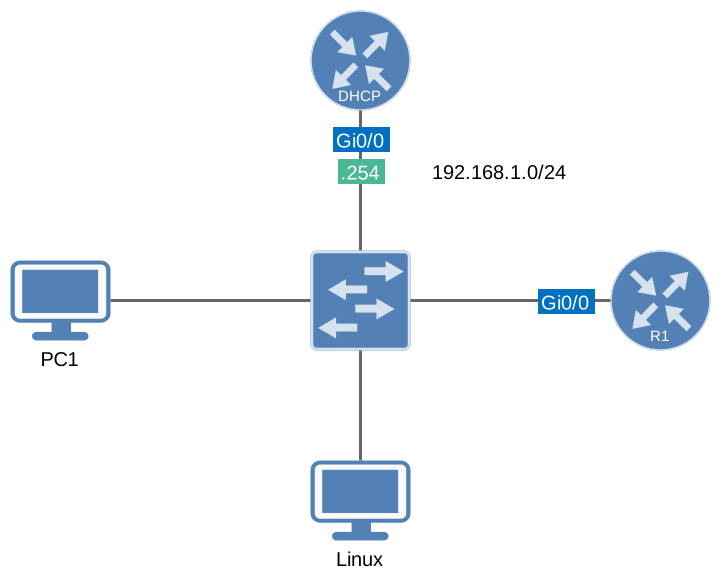
The router called “DHCP” will be the DHCP server, R1, and the two computers will be DHCP clients. The DHCP server and R1 are routers running Cisco IOS 15.9 (IOSv); PC1 and Linux are Alpine Linux hosts that use the BusyBox udhcpc DHCP client. Everything is connected to a switch and we’ll use the 192.168.1.0 /24 subnet. The idea is to create a DHCP pool and use static bindings for the two computers and R1:
- R1: 192.168.1.100
- PC1: 192.168.1.110
- Linux: 192.168.1.120
First, we will create a new DHCP pool for the 192.168.1.0 /24 subnet:
DHCP(config)#ip dhcp pool MYPOOL
DHCP(dhcp-config)#network 192.168.1.0 255.255.255.0
Whenever a DHCP client sends a DHCP discover it will send its client identifier or MAC address. We can see this if we enable a debug on the DHCP server:
DHCP#debug ip dhcp server packetCisco Router DHCP Client
Now we’ll configure R1 to request an IP address:
R1(config)#interface GigabitEthernet0/0
R1(config-if)#no shutdown
R1(config-if)#ip address dhcp
In a few seconds you will see the following message on the DHCP server:
DHCP#
DHCPD: client's VPN is .
DHCPD: No option 125
DHCPD: Option 125 not present in the msg.
DHCPD: DHCPDISCOVER received from client 0063.6973.636f.2d35.3235.342e.3030.3265.2e65.3066.382d.4769.302f.30 on interface GigabitEthernet0/0.
DHCPD: Option 125 not present in the msg.
DHCPD: Allocate an address without class information (192.168.1.0)
DHCPD: Saving workspace (ID=0xEF000003)
DHCPD: Reprocessing saved workspace (ID=0xEF000003)
DHCPD: Option 125 not present in the msg.
DHCPD: DHCPDISCOVER received from client 0063.6973.636f.2d35.3235.342e.3030.3265.2e65.3066.382d.4769.302f.30 on interface GigabitEthernet0/0.
DHCPD: Option 125 not present in the msg.
DHCPD: Sending DHCPOFFER to client 0063.6973.636f.2d35.3235.342e.3030.3265.2e65.3066.382d.4769.302f.30 (192.168.1.3).DHCPD: Setting only requested parameters

DHCPD: Option 125 not present in the msg.
DHCPD: no option 125
DHCPD: broadcasting BOOTREPLY to client 5254.002e.e0f8.
DHCPD: New packet workspace 0x1140BC60 (ID=0xC3000004)
DHCPD: client's VPN is .
DHCPD: No option 125
DHCPD: DHCPREQUEST received from client 0063.6973.636f.2d35.3235.342e.3030.3265.2e65.3066.382d.4769.302f.30.
DHCPD: Option 125 not present in the msg.
DHCPD: No default domain to append - abort update
DHCPD: Sending DHCPACK to client 0063.6973.636f.2d35.3235.342e.3030.3265.2e65.3066.382d.4769.302f.30 (192.168.1.3).DHCPD: Setting only requested parameters

DHCPD: Option 125 not present in the msg.
DHCPD: no option 125
DHCPD: broadcasting BOOTREPLY to client 5254.002e.e0f8.
R1 already has an address from MYPOOL. IOS refuses a client-identifier that already has a binding (“% A binding for this client already exists.”), so I’ll clear the binding first:
DHCP#clear ip dhcp binding *When a Cisco router sends a DHCP Discover, message, it will include a client identifier to identify the device uniquely. We can use this value to configure a static binding, here’s what it looks like:
DHCP(config)#ip dhcp pool R1-STATIC
DHCP(dhcp-config)#host 192.168.1.100 255.255.255.0
DHCP(dhcp-config)#client-identifier 0063.6973.636f.2d35.3235.342e.3030.3265.2e65.3066.382d.4769.302f.30
We create a new pool called “R1-STATIC” with the IP address we want to use for R1 and its client identifier. We’ll renew the IP address on R1 to see what happens:
R1#renew dhcp GigabitEthernet0/0Use the renew dhcp command or do a ‘shut’ and ‘no shut’ on the interface of R1 and you’ll see this on the DHCP server:
DHCP#
DHCPD: client's VPN is .
DHCPD: No option 125
DHCPD: DHCPREQUEST received from client 0063.6973.636f.2d35.3235.342e.3030.3265.2e65.3066.382d.4769.302f.30.
DHCPD: client is confused about its IP address (requested 192.168.1.3, assigned 192.168.1.100).
DHCPD: Option 125 not present in the msg.
DHCPD: Sending DHCPNAK to client 0063.6973.636f.2d35.3235.342e.3030.3265.2e65.3066.382d.4769.302f.30.
DHCPD: Option 125 not present in the msg.
DHCPD: no option 125
DHCPD: broadcasting BOOTREPLY to client 5254.002e.e0f8.
DHCPD: client's VPN is .
DHCPD: No option 125
DHCPD: Option 125 not present in the msg.
DHCPD: DHCPDISCOVER received from client 0063.6973.636f.2d35.3235.342e.3030.3265.2e65.3066.382d.4769.302f.30 on interface GigabitEthernet0/0.
DHCPD: Option 125 not present in the msg.
DHCPD: Sending DHCPOFFER to client 0063.6973.636f.2d35.3235.342e.3030.3265.2e65.3066.382d.4769.302f.30 (192.168.1.100).DHCPD: Setting only requested parameters

DHCPD: Option 125 not present in the msg.
DHCPD: no option 125
DHCPD: broadcasting BOOTREPLY to client 5254.002e.e0f8.
DHCPD: client's VPN is .
DHCPD: No option 125
DHCPD: DHCPREQUEST received from client 0063.6973.636f.2d35.3235.342e.3030.3265.2e65.3066.382d.4769.302f.30.
DHCPD: Option 125 not present in the msg.
DHCPD: No default domain to append - abort update
DHCPD: Sending DHCPACK to client 0063.6973.636f.2d35.3235.342e.3030.3265.2e65.3066.382d.4769.302f.30 (192.168.1.100).DHCPD: Setting only requested parameters

DHCPD: Option 125 not present in the msg.
DHCPD: no option 125
DHCPD: broadcasting BOOTREPLY to client 5254.002e.e0f8.
As you can see above the DHCP server uses the client identifier for the static binding and assigns IP address 192.168.1.100 to R1. If you don’t like these long numbers, you can also configure R1 to use the MAC address as the client identifier instead:
R1(config)#interface GigabitEthernet0/0
R1(config-if)#ip address dhcp client-id GigabitEthernet0/0
This tells the router to use the MAC address of its GigabitEthernet 0/0 interface as the client identifier. You’ll see this change on the DHCP server:
DHCP#
DHCPD: client's VPN is .
DHCPD: No option 125
DHCPD: DHCPRELEASE message received from client 0063.6973.636f.2d35.3235.342e.3030.3265.2e65.3066.382d.4769.302f.30 (192.168.1.100).
DHCPD: Finding a relay for client 0063.6973.636f.2d35.3235.342e.3030.3265.2e65.3066.382d.4769.302f.30 on interface GigabitEthernet0/0.
DHCPD: Option 125 not present in the msg.
DHCPD: client's VPN is .
DHCPD: No option 125
DHCPD: DHCPRELEASE message received from client 0063.6973.636f.2d35.3235.342e.3030.3265.2e65.3066.382d.4769.302f.30 (192.168.1.100).
DHCPD: Finding a relay for client 0063.6973.636f.2d35.3235.342e.3030.3265.2e65.3066.382d.4769.302f.30 on interface GigabitEthernet0/0.
DHCPD: Option 125 not present in the msg.
DHCPD: client's VPN is .
DHCPD: No option 125
DHCPD: Option 125 not present in the msg.
DHCPD: DHCPDISCOVER received from client 0152.5400.2ee0.f8 on interface GigabitEthernet0/0.
DHCPD: Option 125 not present in the msg.
DHCPD: Allocate an address without class information (192.168.1.0)
DHCPD: Saving workspace (ID=0xC3000004)
DHCPD: Reprocessing saved workspace (ID=0xC3000004)
DHCPD: Option 125 not present in the msg.
DHCPD: DHCPDISCOVER received from client 0152.5400.2ee0.f8 on interface GigabitEthernet0/0.
DHCPD: Option 125 not present in the msg.
DHCPD: Sending DHCPOFFER to client 0152.5400.2ee0.f8 (192.168.1.4).DHCPD: Setting only requested parameters

DHCPD: Option 125 not present in the msg.
DHCPD: no option 125
DHCPD: broadcasting BOOTREPLY to client 5254.002e.e0f8.
DHCPD: New packet workspace 0x11899D20 (ID=0x6F000005)
DHCPD: client's VPN is .
DHCPD: No option 125
DHCPD: DHCPREQUEST received from client 0152.5400.2ee0.f8.
DHCPD: Option 125 not present in the msg.
DHCPD: No default domain to append - abort update
DHCPD: Sending DHCPACK to client 0152.5400.2ee0.f8 (192.168.1.4).DHCPD: Setting only requested parameters

DHCPD: Option 125 not present in the msg.
DHCPD: no option 125
DHCPD: broadcasting BOOTREPLY to client 5254.002e.e0f8.
R1 has a dynamic binding again, so I’ll clear it first:
DHCP#clear ip dhcp binding 192.168.1.4Now we can change the binding on the DHCP server to match the MAC address:
DHCP(config)#ip dhcp pool R1-STATIC
DHCP(dhcp-config)#no client-identifier 0063.6973.636f.2d35.3235.342e.3030.3265.2e65.3066.382d.4769.302f.30
DHCP(dhcp-config)#client-identifier 0152.5400.2ee0.f8
Do another renew on R1:
R1#renew dhcp GigabitEthernet0/0And you’ll see that R1 gets its correct IP address from the DHCP server and is being identified with its MAC address:
DHCP#
DHCPD: client's VPN is .
DHCPD: No option 125
DHCPD: DHCPREQUEST received from client 0152.5400.2ee0.f8.
DHCPD: client is confused about its IP address (requested 192.168.1.4, assigned 192.168.1.100).
DHCPD: Option 125 not present in the msg.
DHCPD: Sending DHCPNAK to client 0152.5400.2ee0.f8.
DHCPD: Option 125 not present in the msg.
DHCPD: no option 125
DHCPD: broadcasting BOOTREPLY to client 5254.002e.e0f8.
DHCPD: client's VPN is .
DHCPD: No option 125
DHCPD: Option 125 not present in the msg.
DHCPD: DHCPDISCOVER received from client 0152.5400.2ee0.f8 on interface GigabitEthernet0/0.
DHCPD: Option 125 not present in the msg.
DHCPD: Sending DHCPOFFER to client 0152.5400.2ee0.f8 (192.168.1.100).DHCPD: Setting only requested parameters

DHCPD: Option 125 not present in the msg.
DHCPD: no option 125
DHCPD: broadcasting BOOTREPLY to client 5254.002e.e0f8.
DHCPD: client's VPN is .
DHCPD: No option 125
DHCPD: DHCPREQUEST received from client 0152.5400.2ee0.f8.
DHCPD: Option 125 not present in the msg.
DHCPD: No default domain to append - abort update
DHCPD: Sending DHCPACK to client 0152.5400.2ee0.f8 (192.168.1.100).DHCPD: Setting only requested parameters

DHCPD: Option 125 not present in the msg.
DHCPD: no option 125
DHCPD: broadcasting BOOTREPLY to client 5254.002e.e0f8.
So that’s how the Cisco router requests an IP address. Let’s look at PC1 now to see if there’s a difference.
PC1 DHCP Client
Windows uses its MAC address with a 01 prefix as the client identifier. I don’t have a Windows host in this lab, but the udhcpc client on PC1 does the same thing by default. Let’s request an IP address:
PC1:~$ sudo udhcpc -i eth0 -b
udhcpc: started, v1.37.0
udhcpc: broadcasting discover
udhcpc: broadcasting select for 192.168.1.7, server 192.168.1.254
udhcpc: lease of 192.168.1.7 obtained from 192.168.1.254, lease time 86400
This is what you’ll find on the DHCP server:
DHCP#
DHCPD: client's VPN is .
DHCPD: No option 125
DHCPD: Option 125 not present in the msg.
DHCPD: DHCPDISCOVER received from client 0152.5400.c58c.16 on interface GigabitEthernet0/0.
DHCPD: Option 125 not present in the msg.
DHCPD: Allocate an address without class information (192.168.1.0)
DHCPD: Saving workspace (ID=0xFE000007)
DHCPD: Reprocessing saved workspace (ID=0xFE000007)
DHCPD: Option 125 not present in the msg.
DHCPD: DHCPDISCOVER received from client 0152.5400.c58c.16 on interface GigabitEthernet0/0.
DHCPD: Option 125 not present in the msg.
DHCPD: Sending DHCPOFFER to client 0152.5400.c58c.16 (192.168.1.7).DHCPD: Setting only requested parameters

DHCPD: Option 125 not present in the msg.
DHCPD: no option 125
DHCPD: src nbma addr as zero
DHCPD: creating ARP entry (192.168.1.7, 5254.00c5.8c16, vrf default).
DHCPD: unicasting BOOTREPLY to client 5254.00c5.8c16 (192.168.1.7).
DHCPD: New packet workspace 0x1140BC60 (ID=0x15000008)
DHCPD: client's VPN is .
DHCPD: No option 125
DHCPD: DHCPREQUEST received from client 0152.5400.c58c.16.
DHCPD: Option 125 not present in the msg.
DHCPD: Can't find any hostname to update
DHCPD: Sending DHCPACK to client 0152.5400.c58c.16 (192.168.1.7).DHCPD: Setting only requested parameters

DHCPD: Option 125 not present in the msg.
DHCPD: no option 125
DHCPD: src nbma addr as zero
DHCPD: ARP entry exists (192.168.1.7, 5254.00c5.8c16).
DHCPD: unicasting BOOTREPLY to client 5254.00c5.8c16 (192.168.1.7).
PC1 uses its MAC address as the client identifier, with 01 (Ethernet) in front of it. We can verify this by looking at the MAC address of its interface:
PC1:~$ ip link show eth0
2: eth0: <BROADCAST,MULTICAST,UP,LOWER_UP> mtu 1500 qdisc pfifo_fast state UP qlen 1000
    link/ether 52:54:00:c5:8c:16 brd ff:ff:ff:ff:ff:ff
That’s easy enough. We’ll create another static binding on the DHCP server so that PC1 receives IP address 192.168.1.110. Just like with R1, I’ll clear the existing binding first:
DHCP#clear ip dhcp binding 192.168.1.7Now we can create the static binding:
DHCP(config)#ip dhcp pool PC1-STATIC
DHCP(dhcp-config)#host 192.168.1.110 255.255.255.0
DHCP(dhcp-config)#client-identifier 0152.5400.c58c.16
Let’s verify our work. The udhcpc client is still running in the background. Signal USR2 tells it to release its IP address, and USR1 tells it to request a new one:
PC1:~$ sudo killall -USR2 udhcpc
PC1:~$ sudo killall -USR1 udhcpc
This is what the debug on the DHCP server will tell us:
DHCP#
DHCPD: client's VPN is .
DHCPD: No option 125
DHCPD: DHCPRELEASE message received from client 0152.5400.c58c.16 (192.168.1.7).
DHCPD: Finding a relay for client 0152.5400.c58c.16 on interface GigabitEthernet0/0.
DHCPD: Option 125 not present in the msg.
DHCPD: client's VPN is .
DHCPD: No option 125
DHCPD: Option 125 not present in the msg.
DHCPD: DHCPDISCOVER received from client 0152.5400.c58c.16 on interface GigabitEthernet0/0.
DHCPD: Option 125 not present in the msg.
DHCPD: Sending DHCPOFFER to client 0152.5400.c58c.16 (192.168.1.110).DHCPD: Setting only requested parameters

DHCPD: Option 125 not present in the msg.
DHCPD: no option 125
DHCPD: src nbma addr as zero
DHCPD: creating ARP entry (192.168.1.110, 5254.00c5.8c16, vrf default).
DHCPD: unicasting BOOTREPLY to client 5254.00c5.8c16 (192.168.1.110).
DHCPD: client's VPN is .
DHCPD: No option 125
DHCPD: DHCPREQUEST received from client 0152.5400.c58c.16.
DHCPD: Option 125 not present in the msg.
DHCPD: Can't find any hostname to update
DHCPD: Sending DHCPACK to client 0152.5400.c58c.16 (192.168.1.110).DHCPD: Setting only requested parameters

DHCPD: Option 125 not present in the msg.
DHCPD: no option 125
DHCPD: src nbma addr as zero
DHCPD: ARP entry exists (192.168.1.110, 5254.00c5.8c16).
DHCPD: unicasting BOOTREPLY to client 5254.00c5.8c16 (192.168.1.110).
There you go, PC1 has received the correct IP address. Last but not least is our Linux host, which acts a little differently.
Linux DHCP Client
Not every DHCP client sends a client identifier. The ISC dhclient that older Ubuntu versions use doesn’t, for example. To show you what happens, I start udhcpc on this Linux host with the -C option, which tells it not to send a client identifier:
Linux:~$ sudo udhcpc -i eth0 -C -b
udhcpc: started, v1.37.0
udhcpc: broadcasting discover
udhcpc: broadcasting select for 192.168.1.8, server 192.168.1.254
udhcpc: lease of 192.168.1.8 obtained from 192.168.1.254, lease time 86400
The DHCP server shows this:
DHCP#
DHCPD: client's VPN is .
DHCPD: No option 125
DHCPD: Option 125 not present in the msg.
DHCPD: DHCPDISCOVER received from client 5254.007c.59d5 on interface GigabitEthernet0/0.
DHCPD: Option 125 not present in the msg.
DHCPD: Allocate an address without class information (192.168.1.0)
DHCPD: Saving workspace (ID=0x15000008)
DHCPD: Reprocessing saved workspace (ID=0x15000008)
DHCPD: Option 125 not present in the msg.
DHCPD: DHCPDISCOVER received from client 5254.007c.59d5 on interface GigabitEthernet0/0.
DHCPD: Option 125 not present in the msg.
DHCPD: Sending DHCPOFFER to client 5254.007c.59d5 (192.168.1.8).DHCPD: Setting only requested parameters

DHCPD: Option 125 not present in the msg.
DHCPD: no option 125
DHCPD: src nbma addr as zero
DHCPD: creating ARP entry (192.168.1.8, 5254.007c.59d5, vrf default).
DHCPD: unicasting BOOTREPLY to client 5254.007c.59d5 (192.168.1.8).
DHCPD: New packet workspace 0x11899D20 (ID=0xF9000009)
DHCPD: client's VPN is .
DHCPD: No option 125
DHCPD: DHCPREQUEST received from client 5254.007c.59d5.
DHCPD: Option 125 not present in the msg.
DHCPD: Can't find any hostname to update
DHCPD: Sending DHCPACK to client 5254.007c.59d5 (192.168.1.8).DHCPD: Setting only requested parameters

DHCPD: Option 125 not present in the msg.
DHCPD: no option 125
DHCPD: src nbma addr as zero
DHCPD: ARP entry exists (192.168.1.8, 5254.007c.59d5).
DHCPD: unicasting BOOTREPLY to client 5254.007c.59d5 (192.168.1.8).
We see the MAC address of the Linux server so we’ll create a static binding that matches this:
DHCP(config)#ip dhcp pool LINUX-STATIC
DHCP(dhcp-config)#host 192.168.1.120 255.255.255.0
DHCP(dhcp-config)#client-identifier 5254.007c.59d5
We’ll release the IP address on our Linux host:
Linux:~$ sudo killall -USR2 udhcpc
Linux:~$ sudo killall -USR1 udhcpc
Now take a good look at the debug:
DHCP#
DHCPD: client's VPN is .
DHCPD: No option 125
DHCPD: DHCPRELEASE message received from client 5254.007c.59d5 (192.168.1.8).
DHCPD: Option 125 not present in the msg.
DHCPD: removing ARP entry (192.168.1.8 vrf default).
DHCPD: client's VPN is .
DHCPD: No option 125
DHCPD: Option 125 not present in the msg.
DHCPD: DHCPDISCOVER received from client 5254.007c.59d5 on interface GigabitEthernet0/0.
DHCPD: Option 125 not present in the msg.
DHCPD: Saving workspace (ID=0xF9000009)
DHCPD: Reprocessing saved workspace (ID=0xF9000009)
DHCPD: Option 125 not present in the msg.
DHCPD: DHCPDISCOVER received from client 5254.007c.59d5 on interface GigabitEthernet0/0.
DHCPD: Option 125 not present in the msg.
DHCPD: Sending DHCPOFFER to client 5254.007c.59d5 (192.168.1.8).DHCPD: Setting only requested parameters

DHCPD: Option 125 not present in the msg.
DHCPD: no option 125
DHCPD: src nbma addr as zero
DHCPD: creating ARP entry (192.168.1.8, 5254.007c.59d5, vrf default).
DHCPD: unicasting BOOTREPLY to client 5254.007c.59d5 (192.168.1.8).
DHCPD: New packet workspace 0x1140BC60 (ID=0x4300000A)
DHCPD: client's VPN is .
DHCPD: No option 125
DHCPD: DHCPREQUEST received from client 5254.007c.59d5.
DHCPD: Option 125 not present in the msg.
DHCPD: Can't find any hostname to update
DHCPD: Sending DHCPACK to client 5254.007c.59d5 (192.168.1.8).DHCPD: Setting only requested parameters

DHCPD: Option 125 not present in the msg.
DHCPD: no option 125
DHCPD: src nbma addr as zero
DHCPD: ARP entry exists (192.168.1.8, 5254.007c.59d5).
DHCPD: unicasting BOOTREPLY to client 5254.007c.59d5 (192.168.1.8).
That’s not good, even though we configured the client identifier, it’s not working. Let’s double-check the MAC address:
Thanks for the info Rene
As always complete posts!
how to reserve a single ip for pc in router ? ?
That is exactly what this lesson is about…
Hi Rene
I have some challenges with CCNA R&S lab about DHCP/DHCP relay.The lab number is 10.1.3.3 assuming that you have access to the new CCNA R&S oficial course..
... Continue reading in our forumThe lab has two clients, two intermediary routers and another router connected to the intermediary routers via serials.
Intermediary router are R1 and R3, the central router is R2.
To R2 are connected via Ethernet GIgabit interfaces a DNS Seriver and the ISP
The lab tell me to do the R2 a dhcp server for the two PC’s connected to the intermediary routers R1 and R2 so they receive an IP..
The challen
Hi Catalin,
Your message wasn’t deleted but not approeved before, I do this manually because of spam. I think this example should help you:
https://networklessons.com/ip-services/cisco-ios-dhcp-relay-agent
If not, let me know.
Rene