

Lesson Contents
Hot Standby Router Protocol (HSRP) uses a state machine to figure out which router becomes active and forwards traffic for a virtual IP address. The other router(s) become standby routers in case the active one fails.
The state machine has six operational states, the events that trigger transitions between them, and the actions executed during each transition. In this lesson, we’ll take a detailed look at how the state machine works. We’ll also look at the election process in detail using show and debug commands, and packet captures. Let’s get started!
Key Takeaways
Here’s what you will learn in this lesson:
- HSRP state machine progresses through six distinct states:
- Initial
- Learn
- Listen
- Speak
- Standby
- Active
- State transitions are triggered by:
- Configuration events
- Timer expirations
- Received hello messages
- Interface state changes
- Each transition executes specific actions such as starting timers, learning parameters, or sending protocol messages.
- Three independent timers drive the state machine:
- Active timer monitors the active router.
- Standby timer monitors the standby router.
- Hello timer controls periodic keepalive message frequency.
- The router with the highest priority becomes the active router, and the other router becomes the standby.
Prerequisites
To follow this lesson, you need to understand the basics of HSRP.
HSRP States
Let’s start with the six possible operational states. Each state represents a specific role or phase for a router.
| State | Description |
|---|---|
| Initial State | The initial state is the starting point where HSRP is not yet running. A router enters this state when HSRP is first configured or when an interface comes up. While in this state, the router does not participate in any group elections. |
| Learn State | In the learn state, the router has not yet determined the virtual IP address and is waiting to receive information from the active router. The router remains in this state until it has seen a hello message from the active router. |
| Listen State | A router in the listen state already knows the virtual IP address but holds neither the active nor the standby role. It passively monitors hello messages from both the active and standby routers. Unlike routers in higher states, it does not send periodic hello messages of its own. |
| Speak State | The speak state is where the router becomes an active participant in the election process by sending periodic hello messages. It advertises itself as a candidate for either the active or standby role. A router must have a known virtual IP address before it can enter this state. |
| Standby State | A router in the standby state has been designated as the backup and continues to send periodic hello messages. Under normal conditions, only one router per group should have this role at any given time. The standby router continuously monitors the active router and is prepared to assume its role immediately upon detecting a failure. |
| Active State | The active state means the router is currently responsible for forwarding all packets sent to the group’s virtual MAC address. Under normal conditions, only one router per group should be in this state at a time. The active router sends periodic hello messages to announce its role and keep track of the standby router’s status. |
State Transition Events
State transitions are triggered by six categories of events. Each event type initiates a transition and some have corresponding actions.
Configuration Events
When HSRP is configured on an enabled interface, the router transitions out of the initial state and moves into either the learn or listen state, depending on whether the virtual IP address is already known. If HSRP is disabled or the interface is disabled, the router immediately returns to the initial state, regardless of its previous state.
Timer Expiry Events
When the active timer expires, it means that the active router has failed to send a hello message within the expected holdtime interval. This prompts other routers to begin an election.
When the standby timer expires, it means that the standby router has failed or has moved to a different state.
Routers in the speak, standby, or active states generate and send a new hello message on a regular interval.
Hello Message Reception Events
Received hello messages carry priority and role information that can trigger different state transitions.
For example, a router in the speak state that receives a hello from a higher-priority router will step back to the listen state, recognizing that a more preferred candidate exists. When a hello is received from the active router, the active timer is restarted if that router’s priority is higher than or equal to the receiving router’s own priority.
If the hello comes from an active router with a lower priority, the receiving router may take steps to assume the active role. On the standby side, receiving a hello from a higher-priority standby router starts the standby timer, while receiving one from a lower-priority standby router can prompt the receiving router to transition to the speak state and compete for the standby role.
Resign Message Reception
When a router in the standby state receives a resign message from the active router, it immediately transitions to assume the active role without waiting for the active timer to expire. This allows a fast handover when the active router voluntarily steps back, minimizing any disruption to traffic forwarding.
Coup Message Reception
When the active router receives a coup message from a higher-priority router, it steps down from the active role and transitions back to the speak state. A router only sends a coup message when it has a higher priority than the active router and preemption is enabled.
Interface State Changes
Changes to the state of tracked interfaces can also drive HSRP state transitions. If a tracked interface fails, the router’s effective priority may be reduced below that of another router in the group, causing it to lose eligibility for the active or standby role and triggering the appropriate state change.
Timer Mechanisms
The state machine has three independent timers that drive state transitions, detect failures, and control the frequency of periodic messages. These timers are the primary mechanism for detecting router failures and triggering failover.
| Timer | Description |
|---|---|
| Active Timer | Monitors the presence of the active router. It starts when a hello message is received from the active router and is set to the holdtime value. Its expiry indicates an active router failure and triggers a transition to the speak or standby state. |
| Standby Timer | Monitors the presence of the standby router. Started upon receiving a hello message from the standby router. Its expiry indicates a standby router failure or transition. |
| Hello Timer | The interval that defines how often we send a hello message. When it expires in the speak, standby, or active states, the router generates and sends a hello message. |
Transition Actions
State transitions execute specific actions. Here is an overview of all actions:
| Action | Description |
|---|---|
| Start Active Timer | When triggered by receiving a hello message from the active router, the active timer is set to the holdtime value found in that message. Otherwise, it is set to the router’s own current holdtime value. The timer is then started to monitor when the active router becomes unreachable. |
| Start Standby Timer | When triggered by receiving a hello message from the standby router, the standby timer is set to the holdtime value found in that message. Otherwise, it is set to the router’s own current holdtime value. The timer is then started to detect when the standby router goes offline. |
| Stop Active Timer | Stops the active timer, preventing it from expiring and triggering an unintended state change. This is done when transitioning out of states that monitor the active router. |
| Stop Standby Timer | Stops the standby timer to prevent a stale expiry from causing an unintended transition after the router has already moved to a new state. |
| Learn Parameters | Taken when an authenticated message is received from the active router. If the virtual IP address was not manually configured, it may be learned from the message. The router may also adopt the hello time and holdtime values advertised by the active router. |
| Send Hello Message | The router sends a hello message carrying its current state, hello time, and hold time. This is the primary keepalive mechanism, sent periodically by routers in the speak, standby, and active states. |
| Send Coup Message | Sent by a higher-priority router to inform the current active router that a more preferred candidate exists, initiating a graceful handover of the active role. |
| Send Resign Message | Sent when the active router voluntarily gives up its role, allowing the standby router to take over immediately rather than waiting for the active timer to expire. |
| Send Gratuitous ARP | The router broadcasts an ARP response advertising the group’s virtual IP address and its virtual MAC address. The virtual MAC is used as the source in both the link-layer header and inside the ARP payload, so that end hosts immediately update their ARP tables to point to the new active router. |
Priority-Based Election Logic
The election mechanism uses router priority as the primary criterion to figure out which router becomes active or standby. Priority provides a deterministic, configurable method for controlling role assignment.
| Concept | Description |
|---|---|
| Priority Comparison | The router with the highest configured priority wins the election for the active role, with the second-highest winning the standby role. Both HSRPv1 and HSRPv2 support priority values 0 to 255. The higher the numerical value, the more preferred the router. |
| IP Address Tiebreaker | When two or more routers share the same priority value, the highest IP address becomes the tie breaker. |
| Role Determination | The highest-priority router in the group becomes the active router, while the second-highest becomes the standby. Any remaining routers with lower priorities stay in either the listen or speak state, ready to participate if a higher-ranking router becomes unavailable. |
Preemption Mechanism
Preemption is an optional capability that allows a higher-priority router to proactively assume the active role from a lower-priority active router, rather than waiting for the lower-priority router to fail. Without preemption, once a router has assumed the active role, it will retain that role, even if another router has a higher priority.
When preemption is enabled, a higher-priority router can send a coup message and immediately take over the active role from the current active router. This is particularly useful when a primary router recovers from a failure and needs to reclaim its role.
With preemption disabled, a higher-priority router does not send a coup message. It stays in the standby (or listen) state, and the current active router remains in place until it either fails or voluntarily resigns.
For a router to send a coup message, it must have a higher priority than the current active router and preemption must be enabled. Preemption can also be triggered by interface tracking conditions, where a change in the state of a tracked interface causes a router’s effective priority to shift above or below that of the active router.
Configuration
Enough theory for now. Let’s look at those HSRP states in action. We’ll use this topology:
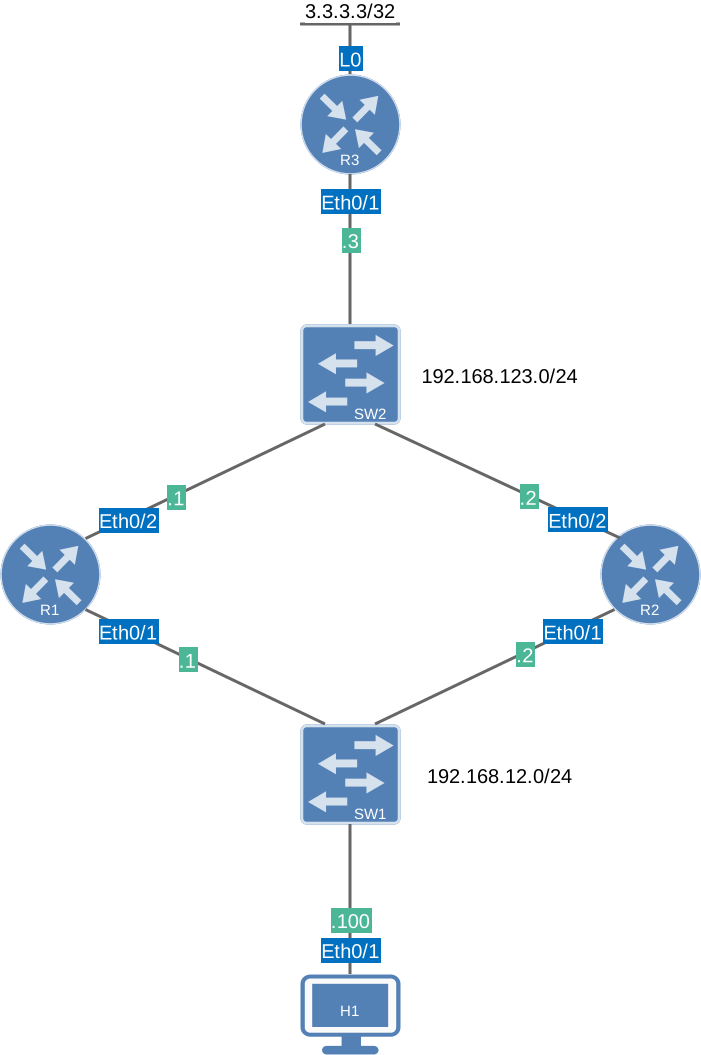
HSRP Basic Single Group topology
This is the same topology I used in the other HSRP examples, such as the basic configuration.
I’m using Cisco IOS Software [Dublin], Linux Software (X86_64BI_LINUX-ADVENTERPRISEK9-M), Version 17.12.1, RELEASE SOFTWARE (fc5) on all routers.
Configurations
Want to take a look for yourself? Here you will find the startup configuration of each device.
R1
hostname R1
!
ip cef
!
interface Ethernet0/1
 ip address 192.168.12.1 255.255.255.0
 standby 1 ip 192.168.12.254
 standby 1 priority 150
 standby 1 name HSRP_GATEWAY
!
interface Ethernet0/2
 ip address 192.168.123.1 255.255.255.0
!
router ospf 1
 router-id 1.1.1.1
 passive-interface Ethernet0/1
 network 192.168.12.0 0.0.0.255 area 0
 network 192.168.123.0 0.0.0.255 area 0
!
end
R2
hostname R2
!
ip cef
!
interface Ethernet0/1
 ip address 192.168.12.2 255.255.255.0
 standby 1 ip 192.168.12.254
 standby 1 name HSRP_GATEWAY
!
interface Ethernet0/2
 ip address 192.168.123.2 255.255.255.0
!
router ospf 1
 router-id 2.2.2.2
 passive-interface Ethernet0/1
 network 192.168.12.0 0.0.0.255 area 0
 network 192.168.123.0 0.0.0.255 area 0
!
end
R3
hostname R3
!
ip cef
!
interface Loopback0
 ip address 3.3.3.3 255.255.255.255
!
interface Ethernet0/1
 ip address 192.168.123.3 255.255.255.0
!
router ospf 1
 network 3.3.3.3 0.0.0.0 area 0
 network 192.168.123.0 0.0.0.255 area 0
!
end
H1
hostname H1
!
ip cef
!
interface Ethernet0/1
 ip address 192.168.12.100 255.255.255.0
!
ip route 0.0.0.0 0.0.0.0 192.168.12.254
!
end
Verification
Let’s use the debug standby command to watch the HSRP state machine in action. This command shows HSRP packet exchanges and state transitions in real time,
To capture every HSRP state from the beginning, we shut down the Ethernet0/1 interfaces on R1 and R2, enable debugging on both routers, and then bring both interfaces back up.
R1(config)#interface Ethernet0/1
R1(config-if)#shutdown

R2(config)#interface Ethernet0/1
R2(config-if)#shutdown
Enable the debug on both routers:
R1# debug standby
HSRP debugging is on

R2# debug standby
HSRP debugging is on
Then bring both interfaces back up:
R1(config)#interface Ethernet0/1
R1(config-if)#no shutdown

R2(config)#interface Ethernet0/1
R2(config-if)#no shutdown
R1
We’ll start with an overview, and then we’ll break it down. Here is the complete debug from R1:
R1#
12:20:44.188: HSRP: Et0/1 Interface UP
12:20:44.188: HSRP: Et0/1 Starting minimum intf delay (1 secs) - uptime 7694
12:20:45.200: HSRP: Et0/1 Intf min delay expired - uptime 7695
12:20:45.200: HSRP: Et0/1 Grp 1 Init: a/HSRP enabled
12:20:45.200: HSRP: Et0/1 Grp 1 Init -> Listen
12:20:55.342: HSRP: Et0/1 Grp 1 Listen: c/Active timer expired (unknown)
12:20:55.342: HSRP: Et0/1 Grp 1 Listen -> Speak
12:20:55.342: HSRP: Et0/1 Grp 1 Hello  out 192.168.12.1 Speak   pri 150 vIP 192.168.12.254
12:20:56.545: HSRP: Et0/1 Grp 1 Hello  in  192.168.12.2 Speak   pri 100 vIP 192.168.12.254
12:20:58.036: HSRP: Et0/1 Grp 1 Hello  out 192.168.12.1 Speak   pri 150 vIP 192.168.12.254
12:21:00.685: HSRP: Et0/1 Grp 1 Hello  out 192.168.12.1 Speak   pri 150 vIP 192.168.12.254
12:21:03.098: HSRP: Et0/1 Grp 1 Hello  out 192.168.12.1 Speak   pri 150 vIP 192.168.12.254
12:21:04.951: HSRP: Et0/1 Grp 1 Speak: d/Standby timer expired (unknown)
12:21:04.951: HSRP: Et0/1 Grp 1 Standby router is local
12:21:04.951: HSRP: Et0/1 Grp 1 Speak -> Standby
12:21:04.951: HSRP: Et0/1 Grp 1 Hello  out 192.168.12.1 Standby pri 150 vIP 192.168.12.254
12:21:07.217: HSRP: Et0/1 Grp 1 Standby: c/Active timer expired (unknown)
12:21:07.217: HSRP: Et0/1 Grp 1 Active router is local
12:21:07.217: HSRP: Et0/1 Grp 1 Standby router is unknown, was local
12:21:07.217: HSRP: Et0/1 Grp 1 Standby -> Active
12:21:07.217: %HSRP-5-STATECHANGE: Ethernet0/1 Grp 1 state Standby -> Active
12:21:07.217: HSRP: Et0/1 Grp 1 Hello  out 192.168.12.1 Active  pri 150 vIP 192.168.12.254
12:21:07.218: HSRP: Et0/1 Grp 1 Added 192.168.12.254 to ARP (0000.0c9f.f001)
12:21:07.218: HSRP: Et0/1 Grp 1 Activating MAC 0000.0c9f.f001
12:21:07.218: HSRP: Et0/1 Grp 1 Adding 0000.0c9f.f001 to MAC address filter
12:21:10.093: HSRP: Et0/1 Grp 1 Hello  out 192.168.12.1 Active  pri 150 vIP 192.168.12.254
12:21:12.727: HSRP: Et0/1 Grp 1 Hello  out 192.168.12.1 Active  pri 150 vIP 192.168.12.254
12:21:15.221: HSRP: Et0/1 Grp 1 Hello  out 192.168.12.1 Active  pri 150 vIP 192.168.12.254
12:21:16.735: HSRP: Et0/1 Grp 1 Hello  in  192.168.12.2 Speak   pri 100 vIP 192.168.12.254
12:21:18.017: HSRP: Et0/1 Grp 1 Hello  out 192.168.12.1 Active  pri 150 vIP 192.168.12.254
12:21:19.709: HSRP: Et0/1 Grp 1 Hello  in  192.168.12.2 Speak   pri 100 vIP 192.168.12.254
Above, you can see how R1 goes from the initial state to the active state.
R2
And here is R2:
R2#
12:20:44.153: HSRP: Et0/1 Interface UP
12:20:44.153: HSRP: Et0/1 Starting minimum intf delay (1 secs) - uptime 7694
12:20:45.154: HSRP: Et0/1 Intf min delay expired - uptime 7695
12:20:45.154: HSRP: Et0/1 Grp 1 Init: a/HSRP enabled
12:20:45.154: HSRP: Et0/1 Grp 1 Init -> Listen
12:20:55.343: HSRP: Et0/1 Grp 1 Hello  in  192.168.12.1 Speak   pri 150 vIP 192.168.12.254
12:20:56.544: HSRP: Et0/1 Grp 1 Listen: c/Active timer expired (unknown)
12:20:56.544: HSRP: Et0/1 Grp 1 Listen -> Speak
12:20:56.544: HSRP: Et0/1 Grp 1 Hello  out 192.168.12.2 Speak   pri 100 vIP 192.168.12.254
12:20:58.037: HSRP: Et0/1 Grp 1 Hello  in  192.168.12.1 Speak   pri 150 vIP 192.168.12.254
12:20:58.037: HSRP: Et0/1 Grp 1 Speak: f/Hello rcvd from higher pri Speak router (150/192.168.12.1)
12:20:58.037: HSRP: Et0/1 Grp 1 Speak -> Listen
12:21:00.686: HSRP: Et0/1 Grp 1 Hello  in  192.168.12.1 Speak   pri 150 vIP 192.168.12.254
12:21:03.098: HSRP: Et0/1 Grp 1 Hello  in  192.168.12.1 Speak   pri 150 vIP 192.168.12.254
12:21:04.951: HSRP: Et0/1 Grp 1 Hello  in  192.168.12.1 Standby pri 150 vIP 192.168.12.254
12:21:04.951: HSRP: Et0/1 Grp 1 Standby router is 192.168.12.1
12:21:07.218: HSRP: Et0/1 Grp 1 Hello  in  192.168.12.1 Active  pri 150 vIP 192.168.12.254
12:21:07.218: HSRP: Et0/1 Grp 1 Active router is 192.168.12.1
12:21:07.218: HSRP: Et0/1 Grp 1 Standby router is unknown, was 192.168.12.1
12:21:10.094: HSRP: Et0/1 Grp 1 Hello  in  192.168.12.1 Active  pri 150 vIP 192.168.12.254
12:21:12.727: HSRP: Et0/1 Grp 1 Hello  in  192.168.12.1 Active  pri 150 vIP 192.168.12.254
12:21:15.222: HSRP: Et0/1 Grp 1 Hello  in  192.168.12.1 Active  pri 150 vIP 192.168.12.254
12:21:16.735: HSRP: Et0/1 Grp 1 Listen: d/Standby timer expired (unknown)
12:21:16.735: HSRP: Et0/1 Grp 1 Listen -> Speak
12:21:16.735: HSRP: Et0/1 Grp 1 Hello  out 192.168.12.2 Speak   pri 100 vIP 192.168.12.254
12:21:18.018: HSRP: Et0/1 Grp 1 Hello  in  192.168.12.1 Active  pri 150 vIP 192.168.12.254
12:21:19.708: HSRP: Et0/1 Grp 1 Hello  out 192.168.12.2 Speak   pri 100 vIP 192.168.12.254
R2 becomes the standby router and sees R1 as active. Now let’s walk through what the debug output tells us, state by state.
Initial
The initial state is the very first state when HSRP starts on an interface. The router does nothing here. It is simply the entry point. What you see in the debug is the transition out of initial, triggered as soon as HSRP is enabled after the interface’s minimum delay expires.
On R1: