

In this lesson we’ll take a look at troubleshooting NTP (Network Time Protocol). NTP is an important protocol to use since it ensures our logging information has the correct time and date.
There are a couple of things that could go wrong with NTP:
- NTP traffic filtered: access-lists could block NTP traffic.
- NTP Authentication issues: NTP supports authentication, client and server need to use the same settings.
- Time offset too high: A large time offset between client/server does not stop NTP, the client steps its clock to the time of the server.
- Stratum level too high: The stratum level is between 1 (best) and 15 (worst). A stratum level of 16 is considered unusable.
- NTP server source filter: NTP servers can be configured to allow only clients from certain IP addresses.
We’ll take a look at these different issues. I will use the following two routers, both running Cisco IOS 15.9:
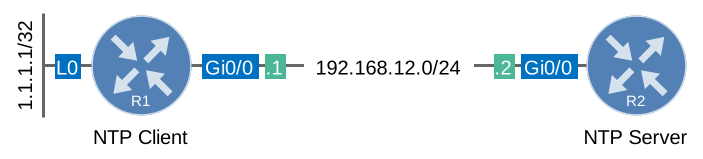
R1 will be our NTP client and R2 will be the NTP server. There are two useful commands that we should start with:
R1#show ntp status
Clock is unsynchronized, stratum 16, no reference clock
nominal freq is 1000.0003 Hz, actual freq is 1000.0003 Hz, precision is 2**16
ntp uptime is 5000 (1/100 of seconds), resolution is 1000
reference time is 00000000.00000000 (00:00:00.000 UTC Mon Jan 1 1900)
clock offset is 0.0000 msec, root delay is 0.00 msec
root dispersion is 0.75 msec, peer dispersion is 0.00 msec
loopfilter state is 'NSET' (Never set), drift is 0.000000000 s/s
system poll interval is 8, never updated.R1#show ntp associations
address ref clock st when poll reach delay offset disp
~192.168.12.2 .INIT. 16 - 64 0 0.000 0.000 15937.
* sys.peer, # selected, + candidate, - outlyer, x falseticker, ~ configuredThese tell us that R1 has 192.168.12.2 configured as the NTP server and it’s currently not synchronized. Let’s check if R1 is receiving NTP packets, we can use a debug for this:
R1#debug ntp packet
NTP packets debugging is on

NTP message sent to 192.168.12.2, from interface 'NULL' (0.0.0.0).
This debug tells us that R1 is sending NTP packets but we are not receiving anything from the NTP server. Make sure NTP traffic from the server is allowed to go through:
R1#show access-lists
Extended IP access list NO_TIME
    10 deny udp any any eq ntp (2 matches)
R1 uses UDP port 123 so make sure it’s not blocked, let’s get rid of this access-list:
R1(config)#interface GigabitEthernet0/0
R1(config-if)#no ip access-group NO_TIME in
After removing the access-list, NTP will be able to use the NTP packets from the server:
R1#
NTP message sent to 192.168.12.2, from interface 'GigabitEthernet0/0' (192.168.12.1).
NTP message received from 192.168.12.2 on interface 'GigabitEthernet0/0' (192.168.12.1).
This takes a while. R2 needs about 15 minutes after ntp master before it calls its clock synchronized, and R1 doesn’t accept its time until then. R1 then corrects its clock on the first NTP packet it accepts and measures its clock drift for another 15 minutes (loopfilter state FREQ). Here’s the end result:
R1#show ntp status
Clock is synchronized, stratum 2, reference is 192.168.12.2
nominal freq is 1000.0003 Hz, actual freq is 999.9985 Hz, precision is 2**16
ntp uptime is 195500 (1/100 of seconds), resolution is 1001
reference time is EE95E0B7.19375C87 (16:49:59.098 UTC Wed Nov 4 2026)
clock offset is 1.6877 msec, root delay is 2.45 msec
root dispersion is 4.20 msec, peer dispersion is 1.41 msec
loopfilter state is 'CTRL' (Normal Controlled Loop), drift is 0.000001747 s/s
system poll interval is 64, last update was 29 sec ago.
The clock is now synchronized. Another issue you can spot when debugging NTP is an authentication mismatch:
R1(config)#ntp server 192.168.12.2 key 1
R1(config)#ntp authentication-key 1 md5 MY_KEY
I’ll configure R1 to only accept NTP packets from the NTP server that are authenticated with a certain key. The NTP server however doesn’t use any form of authentication. We can find this error with the following debug:
R1#debug ntp core
NTP core messages debugging is on
It will tell us this:
R1#
NTP Core(INFO): 192.168.12.2 C01C 8C bad_auth no key
NTP Core(INFO): 192.168.12.2 C01C 8C bad_auth no key
Make sure your NTP authentication settings match on both sides. To make authentication work, you also need ntp trusted-key 1 on the client, and the same ntp authentication-key and ntp trusted-key 1 on the server. I also tried ntp authenticate, but on this IOS version it made no difference: R1 synchronized with and without it.
What if the time/date difference between the NTP server and NTP client is significant? Let’s try this by setting the clock of R1 to a date in the past:
R1#clock set 18:00:00 30 January 2015Right now the clocks look like this:
R1#show clock
.18:00:00.478 UTC Fri Jan 30 2015R2#show clock
07:53:00.477 UTC Thu Nov 5 2026R1 doesn’t refuse this big difference and it doesn’t adjust its clock slowly. As soon as it accepts an NTP packet from the server, it steps its clock:
R1#debug ntp adjust
NTP clock adjustments debugging is on
R1#
.Jan 30 18:00:00.000: %SYS-6-CLOCKUPDATE: System clock has been updated from 07:52:59 UTC Thu Nov 5 2026 to 18:00:00 UTC Fri Jan 30 2015, configured from console by console.
NTP: step(0x16206F3B.81C79D00): local_offset = 0x00000000.00000000, curtime = 0xD8764522.4CCCC326A minute later, the clock on the NTP client is correct:
R1#show clock
07:54:01.062 UTC Thu Nov 5 2026
A difference of almost 12 years is no problem on this IOS version, you don’t have to set the clock manually.
Another issue with NTP is that the stratum level is limited, we can use values between 1 (best) and 15 (worst). If the NTP server has a stratum level of 15 then the NTP client ends up at stratum 16, which is considered unsynchronized.
Let’s set the NTP server to stratum 15:
R2(config)#ntp master 15Checking the NTP associations on the client will reveal this:
Hi
Due to high root dispersion , NTP clock and local clock have a time difference . Please suggest how to troubleshoot root dispersion .
Hello Sumit
Root dispersion is a rough estimate of of how much the local time has drifted away from some reference time. This reference time is often referred to as the root source. Root dispersion occurs when there is some malfunction in the time source. A disruption in service or a bad network connection can cause a steady increase in root dispersion. For Cisco IOS devices, any root dispersion in excess of one second will cause an NTP association to fail.
Root dispersion is also included in NTP updates so that NTP clients receiving them can choose to
... Continue reading in our forumHi,
I’m a bit confused about some NTP issues on my GNS3 lab.
on R1 ( NTP MASTER ):
ntp authentication-key 1 md5 <xxxxx> 7
ntp authenticate
ntp trsusted-key 1
ntp master 1
on R2:
clock set 00:00:00 01 jun 1996
ntp server X.X.X.X
I’m expecting on R2 nothing happen but it syncronize the clock with the master…
I saw with “debug ntp packets” comand.
How can It be possible?
Thank you
Hello Giovanni
One of the most common misconceptions of NTP authentication is the direction of authentication. By configuring authentication on the NTP master, what you have done is to configure R1 to synchronize only to systems providing the authentication key 1 in their NTP packets. In other words, R1 will synchronize (as a client) to any NTP server that has the configured authentication key. This configuration does not affect R2 synchronizing with R1, but affects R1 synchronizing with some other source.
If you configure authentication on R2 and not on
... Continue reading in our forumHello Rene/Laz,
I have a question about NTP which i’ve not been able to find an answer to in the config guides.
Let’s say R1-R2 have formed an NTP association. R1 is then configured with ntp access-group serve-only 2 - see ACL details below. In this case the IP address of R2 does not match access-list 2 on R1. What is the expected behaviour of R2 in terms of its association?
When labbing this I was expecting that R2 would tear down the association, but R2 actually continues to maintain it. Is it the case that R2 would simply no longer receive any more
... Continue reading in our forum