

Lesson Contents
HSRP routers use two timers to control how quickly a standby router takes over when the active router becomes unreachable:
- Hello timer: how often the active router sends hello packets to announce it is still alive.
- Hold timer: how long a router waits without receiving a hello before it declares the active router dead and triggers a failover.
We can change these items to make the failover happen sooner or later. On Cisco IOS, the default hello timer is three seconds, and the hold time is ten seconds. When the active router fails, it takes ten seconds for the standby router to take over, which is a long time for latency-sensitive applications such as VoIP.
In this lesson, you will learn how HSRP hello and hold timers work, and how to configure and verify them.
Key Takeaways
Here’s what you will learn:
- HSRP uses two timers to detect active router failure:
- The hello timer (how often hellos are sent)
- The hold timer (how long to wait before declaring the active router dead and triggering failover).
- By default, Cisco IOS uses a 3-second hello timer and a 10-second hold timer, meaning failover takes up to 10 seconds.
- You can configure timers in:
- Seconds (minimum: 1s hello / 2s hold)
- Milliseconds (minimum: 15ms hello / 50ms hold)
- Cisco recommends a minimum of 250ms hello and 800ms hold when using millisecond timers. Aggressive timers increase CPU load and risk false failovers from minor hiccups.
- The hold time should always be at least 3x the hello time to avoid unnecessary failovers caused by temporary high CPU load or dropped hello packets.
- Both the active and standby routers should be configured with the same timer values. If they are different, the standby router adopts whatever the active router advertises in its hello packets.
- You can verify the active timer values with
show standby.
Prerequisites
To understand this lesson, you should be familiar with the basics of HSRP and its configuration.
Configuration
Let’s look at this in action. Here is the topology we’ll use:
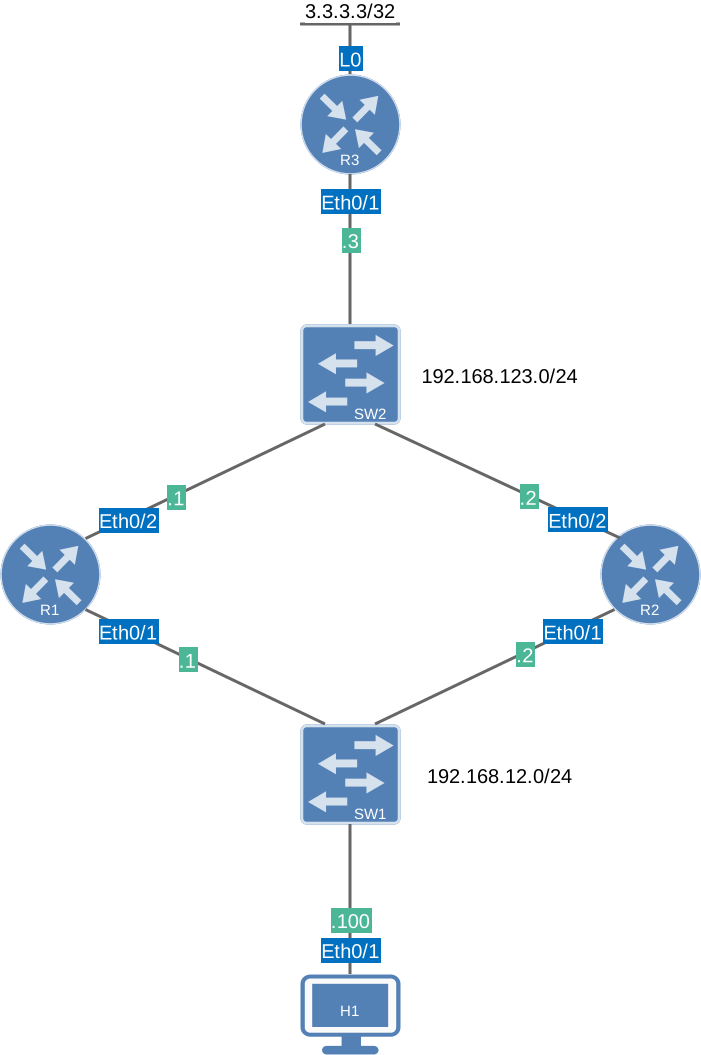
This is the same topology we used in the HSRP basic configuration lesson. HSRP is configured on R1 and R2. To test HSRP, we can send traffic from H1 to 3.3.3.3 behind R3.
I use Cisco IOS Software [Dublin], Linux Software (X86_64BI_LINUX-ADVENTERPRISEK9-M), Version 17.12.1, RELEASE SOFTWARE (fc5) on all routers.
Topology: HSRP Basic Single Group
Configurations
Want to take a look for yourself? Here you will find the startup configuration of each device.
R1
hostname R1
!
ip cef
!
interface Ethernet0/1
 ip address 192.168.12.1 255.255.255.0
 standby version 2
 standby 1 ip 192.168.12.254
 standby 1 priority 150
 standby 1 name HSRP_GATEWAY
!
interface Ethernet0/2
 ip address 192.168.123.1 255.255.255.0
!
router ospf 1
 router-id 1.1.1.1
 passive-interface Ethernet0/1
 network 192.168.12.0 0.0.0.255 area 0
 network 192.168.123.0 0.0.0.255 area 0
!
end
R2
hostname R2
!
ip cef
!
interface Ethernet0/1
 ip address 192.168.12.2 255.255.255.0
 standby version 2
 standby 1 ip 192.168.12.254
 standby 1 name HSRP_GATEWAY
!
interface Ethernet0/2
 ip address 192.168.123.2 255.255.255.0
!
router ospf 1
 router-id 2.2.2.2
 passive-interface Ethernet0/1
 network 192.168.12.0 0.0.0.255 area 0
 network 192.168.123.0 0.0.0.255 area 0
!
end
R3
hostname R3
!
ip cef
!
interface Loopback0
 ip address 3.3.3.3 255.255.255.255
!
interface Ethernet0/1
 ip address 192.168.123.3 255.255.255.0
!
router ospf 1
 network 3.3.3.3 0.0.0.0 area 0
 network 192.168.123.0 0.0.0.255 area 0
!
end
H1
hostname H1
!
ip cef
!
interface Ethernet0/1
 ip address 192.168.12.100 255.255.255.0
!
ip route 0.0.0.0 0.0.0.0 192.168.12.254
!
end
Configuration
Before we change anything, let’s confirm the default timer values. We can see them in the show standby output:
R1#show standby
Ethernet0/1 - Group 1 (version 2)
  State is Active
    2 state changes, last state change 00:02:21
  Virtual IP address is 192.168.12.254
  Active virtual MAC address is 0000.0c9f.f001 (MAC In Use)
    Local virtual MAC address is 0000.0c9f.f001 (v2 default)
  Hello time 3 sec, hold time 10 sec
    Next hello sent in 0.384 secs
  Preemption disabled
  Active router is local
  Standby router is 192.168.12.2, priority 100 (expires in 9.792 sec)
  Priority 150 (configured 150)
  Group name is "HSRP_GATEWAY" (cfgd)
FLAGS: 1/1R2#show standby
Ethernet0/1 - Group 1 (version 2)
State is Standby
1 state change, last state change 00:01:58
Virtual IP address is 192.168.12.254
Active virtual MAC address is 0000.0c9f.f001 (MAC Not In Use)
Local virtual MAC address is 0000.0c9f.f001 (v2 default)
Hello time 3 sec, hold time 10 sec
Next hello sent in 1.248 secs
Preemption disabled
Active router is 192.168.12.1, priority 150 (expires in 9.616 sec)
MAC address is aabb.cc00.0210
Standby router is local
Priority 100 (default 100)
Group name is "HSRP_GATEWAY" (cfgd)
FLAGS: 0/1The default HSRP timers are 3-second hello and 10-second hold. This means that if the active router stops sending hellos, the standby router will wait 10 seconds before taking over.
Let’s see if we can change it. Here are our options:
R1(config-if)#standby 1 timers ?
  <1-254>  Hello interval in seconds
  msec     Specify hello interval in milliseconds
When we select options, the lowest hello interval is one second. Here’s the lowest hold time in seconds:
R1(config-if)#standby 1 timers 1 ?
  <2-255>  Hold time in seconds
The lowest hold time is only two seconds. It’s possible to configure this, but it’s not a good idea. Hello packets are processed by the router (or multilayer switch) control plane, so when its CPU is busy, it is unlikely but still possible that it misses some hello packets. You don’t want it to fail over too quickly. It’s best to stick to the rule of thumb that the hold timer should be at least 3x the hello timer.
When we go for milliseconds, we can choose:
R1(config-if)#standby 1 timers msec ?
  <15-999>  Hello interval in milliseconds
The lowest you can go is 15 milliseconds:
R1(config-if)#standby 1 timers msec 15 msec ?
  <50-3000>  Hold time in milliseconds
If you would configure a hello timer of 15 milliseconds and a hold timer of 50 milliseconds, it would meet the “3x hello = hold time” rule, but it’s still not a good idea. Many Cisco documents recommend configuring a minimum hello interval of 250 milliseconds and a minimum hold time of 800 milliseconds. The reason is simple: With a 50-millisecond hello timer, you send 20 hello packets per second per HSRP group. That puts a burden on your CPU load, especially if you have many HSRP groups. With such aggressive timers, any minor hiccup can cause a failover.
If you want to go this route, don’t configure it this way; use BFD instead.
We’ll configure the timers to 5 seconds hello and 15 seconds hold on both routers:
R1(config)#interface Ethernet0/1
R1(config-if)#standby 1 timers 5 15R2(config)#interface Ethernet0/1
R2(config-if)#standby 1 timers 5 15Verification
Let’s verify the new timers with show standby: