

Lesson Contents
The User Datagram Protocol (UDP) header is an 8-byte structure at the beginning of every UDP datagram. It provides the minimum information needed to deliver data between applications while keeping overhead low.
Understanding the UDP header helps you troubleshoot connectivity issues, configure firewall rules, and diagnose application-layer problems. In this lesson, we’ll walk through each field in the UDP header, explain what each field is for, and show you an example of what an actual UDP packet looks like. For a broader introduction to transport layer protocols, see our Introduction to TCP and UDP lesson. If you are unsure how the different layers work together, it’s best to start with another look at the OSI model first. Let’s start with this picture:
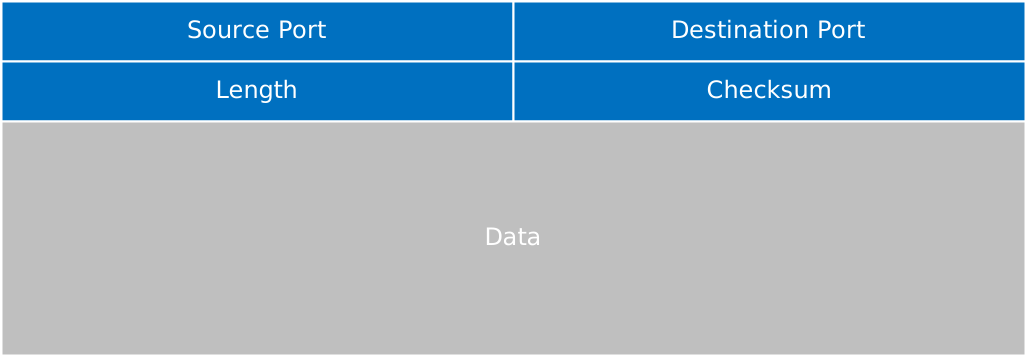
The image above contains all the fields you find in a UDP header. Unlike the IPv4 header, the UDP header has no options. It’s a fixed 8-byte structure. UDP is simple and suitable for applications that don’t need any of the reliability that TCP offers.
Header Fields
Let’s dive into each header field.
Source Port
This 16-bit field identifies the sending application’s port number. The source port allows the receiving system to know where to send replies. Port numbers range from 0 to 65535. The source port is optional. If the sender doesn’t expect a reply, this field can be set to 0.
Destination Port
This 16-bit field identifies the receiving application’s port number. This tells the operating system which application should receive the data. Common UDP services use well-known ports:
- DNS: 53
- DHCP Server: 67
- DHCP Client: 68
- TFTP: 69
- NTP: 123
- SNMP: 161
Length
This 16-bit field specifies the total length of the UDP datagram in bytes, including both the header and data. The minimum value is 8 bytes (header only, no data). The maximum theoretical value is 65535 bytes, but the actual maximum is constrained by the IP layer.
Since the IPv4 total length field is also 16 bits (65,535 bytes maximum) and must include the IP header (minimum 20 bytes), the practical maximum UDP datagram size is 65535 − 20 = 65515 bytes. Subtracting the 8-byte UDP header gives a maximum UDP payload of 65515 − 8 = 65507 bytes.
Practical Message Sizing
While the protocol allows large datagrams, you should keep UDP messages around 1400 to 1450 bytes in practice. Here’s why:
Most networks have a Maximum Transmission Unit (MTU) of 1500 bytes for Ethernet. When you account for the IP header (20 bytes) and UDP header (8 bytes), you have roughly 1472 bytes available for payload. Stay slightly below this threshold, around 1400-1450 bytes. This provides a safety margin for any additional headers (such as VPN encapsulation or IPv6 extension headers).
If your UDP datagram exceeds the path MTU, the IP layer fragments it into multiple packets. This creates problems:
- If any single fragment is lost, the entire datagram is lost since UDP has no retransmission mechanism.
- Fragmented packets require reassembly at the destination, adding processing overhead.
- Some firewalls and NAT devices drop fragmented UDP packets entirely.
Checksum
This 16-bit field provides error detection for the UDP header and data. Unlike the IPv4 header checksum, the UDP checksum covers the entire payload. The checksum is optional in IPv4 (set to 0 if unused), but mandatory in IPv6. If the checksum calculation results in all zeros (0x0000), it’s transmitted as all ones (0xFFFF) to indicate that the checksum is intentionally zero/unused. The checksum calculation includes a pseudo-header containing:
- Source IP address
- Destination IP address
- Protocol (17 for UDP)
- UDP length
This pseudo-header ensures the packet reached the correct destination IP address, not just the correct MAC address.
Wireshark Capture
Here’s what an actual UDP packet looks like:
Frame 1: Packet, 69 bytes on wire (552 bits), 69 bytes captured (552 bits) on interface \Device\NPF_{72B937F7-5110-4F8D-A05E-43BF5F540AF4}, id 0
Ethernet II, Src: Intel_22:1d:3e (e8:b1:fc:22:1d:3e), Dst: Synology_12:e0:fe (00:11:32:12:e0:fe)
Internet Protocol Version 4, Src: 10.82.100.134, Dst: 10.82.100.253
User Datagram Protocol, Src Port: 52117, Dst Port: 53
    Source Port: 52117
    Destination Port: 53
    Length: 35
    Checksum: 0x8803 [unverified]
    [Checksum Status: Unverified]
    [Stream index: 0]
    [Stream Packet Number: 1]
    [Timestamps]
    UDP payload (27 bytes)
Domain Name System (query)
Let me explain what we see above:
- Source Port: The temporary port (52117) chosen by the client application for this DNS query.
- Destination Port: Port 53 is the well-known port for DNS. This tells the receiving system to forward this data to the DNS server application.
- Length: The total size is 35 bytes. This is 8 bytes for the UDP header and 27 bytes of DNS query data.
- Checksum: A checksum value of 0x8803 that covers both the UDP header and DNS query payload. Unverified means that Wireshark did not verify the checksum.
Here’s another example showing a DHCP request:
Frame 1: Packet, 343 bytes on wire (2744 bits), 343 bytes captured (2744 bits) on interface tapd25ac376-4e, id 0
Ethernet II, Src: fa:16:3e:19:22:44 (fa:16:3e:19:22:44), Dst: Broadcast (ff:ff:ff:ff:ff:ff)
Internet Protocol Version 4, Src: 0.0.0.0, Dst: 255.255.255.255
User Datagram Protocol, Src Port: 68, Dst Port: 67
    Source Port: 68
    Destination Port: 67
    Length: 309
    Checksum: 0x504e [unverified]
    [Checksum Status: Unverified]
    [Stream index: 0]
    [Stream Packet Number: 1]
    [Timestamps]
    UDP payload (301 bytes)
Dynamic Host Configuration Protocol (Discover)
Let me explain what we see above:
- Source Port: The DHCP client port (68). Responses from the DHCP server will be sent to this port.
- Destination Port: The DHCP server port (67). This identifies that this packet should be processed by a DHCP server.
- Length: The total size is 309 bytes. 8 bytes for the UDP header plus 301 bytes of DHCP message data.
- Checksum: The error detection value (0x504e) for the entire DHCP discover message.
Additional Resources
RFCs
If you want to dive into specific items of UDP, take a look at these RFCs:
- RFC 768: This is the RFC that defines UDP and the header structure.
- RFC 8085: This RFC explains UDP usage guidelines and best practices.
- RFC 8200: The IPv6 specification, which explains that UDP checksums are mandatory in IPv6.
- RFC 6335: Internet Assigned Numbers Authority (IANA) Procedures for Port Number Management.
Packet Captures
Want to look at some more IP packets that use UDP?
These traceroute packets use UDP:
Packet Capture: Traceroute on Cisco
Packet Capture: Traceroute on Linux
Packet Capture: Traceroute on Windows
Here is a DNS lookup capture:
And an example for DHCP where a client receives an IP address from the DHCP server: