

Lesson Contents
Hot Standby Router Protocol (HSRP) for IPv6 is a Cisco proprietary First Hop Redundancy Protocol (FHRP) that lets two or more routers share a single virtual IP address, giving hosts a highly available default gateway. If the active router fails, the standby router takes over automatically. You don’t have to reconfigure the default gateway on your hosts.
HSRP for IPv6 is similar to IPv4, but you must use version 2. The mechanics are the same as with IPv4, but there are a few differences you should know about:
- HSRP for IPv6 uses a virtual link-local address (in the
FE80::/10range) derived from the HSRP virtual MAC address. This is the address hosts actually use as their default gateway. - You can also configure one or more virtual global unicast addresses for the group, which the active router will advertise.
- The virtual MAC address comes from the HSRP v2 IPv6 MAC pool:
0005.73a0.0001for group 1,0005.73a0.0002for group 2, and so on. - IPv6 unicast routing must be enabled globally before HSRP for IPv6 will work.
In this lesson, I’ll walk you through the configuration of HSRP for IPv6. We’ll look at the IPv6-specific parts and configure items like priority, preemption, and authentication, as we did in the HSRP for IPv4 lessons.
Key Takeaways
- HSRP version 2 is required for IPv6 support; version 1 works only with IPv4. Enable it on the interface with
standby version 2before configuring any HSRP IPv6 commands. - The
standby ipv6 autoconfigcommand auto-derives the virtual link-local address from the HSRP v2 IPv6 virtual MAC address (for group 1, that isFE80::5:73FF:FEA0:1), which is what hosts use as their default gateway. - Configure one or more global unicast virtual addresses with
standby 1 ipv6 <address>/<prefix-length>to allow reachability from outside the local segment and to support hosts preferring a global address as the gateway. - IPv6 unicast routing must be enabled globally on the router with
ipv6 unicast-routingbefore any HSRP for IPv6 configuration will function. - Set priority with
standby 1 priority <value>to determine the active router; the router with the highest priority (default 100) becomes active. Usestandby 1 preemptto allow a higher-priority router to reclaim the active role after recovering from a failure. - Configure identical MD5 authentication on all group members with
standby 1 authentication md5 key-string <password>to prevent unauthorized routers from joining the group or injecting spoofed HSRP messages. - Verify HSRP operation with
show standby, which displays the router’s role (active or standby), virtual addresses, priority, timers, authentication method, and preemption configuration. Useshow standby brieffor a compact summary across multiple groups. - Use
debug standby eventsto observe state transitions, hello packet exchanges, and failover events in real time when troubleshooting unexpected state changes or preemption failures.
Configuration
Here’s the topology we’ll use:
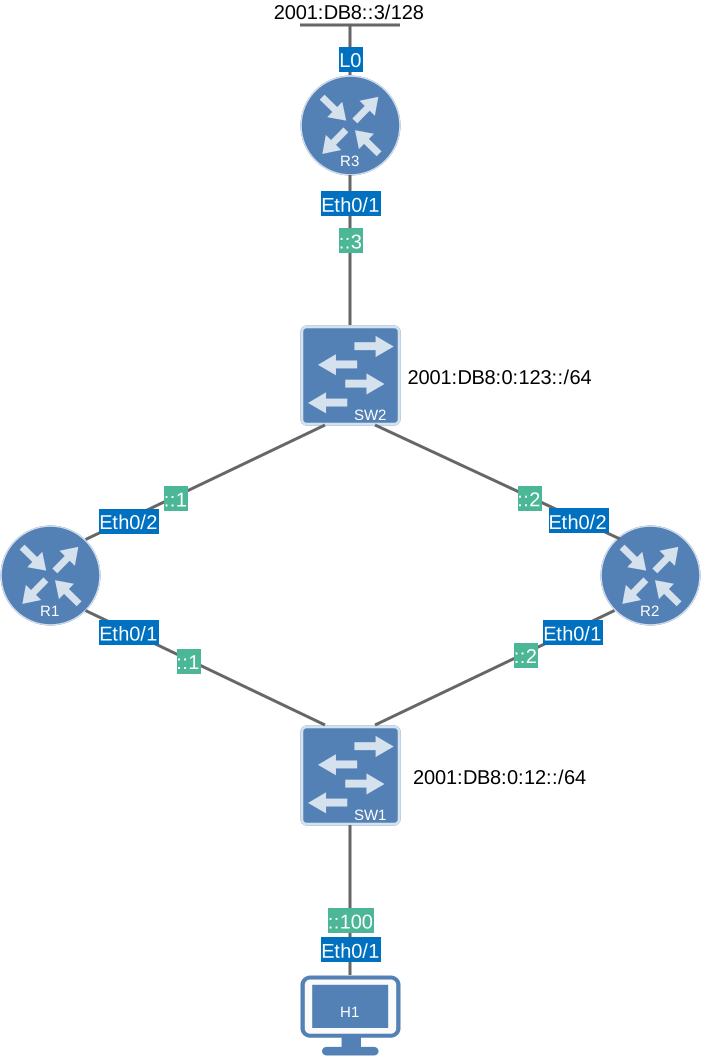
We’ll use the same topology as in the other HSRP lessons, but this time we’ll use IPv6 addresses. We’ll configure HSRP on the segment with R1, R2, and H1.
I use Cisco IOS Software [Dublin], Linux Software (X86_64BI_LINUX-ADVENTERPRISEK9-M), Version 17.12.1, RELEASE SOFTWARE (fc5) on all routers.
R1 and R2 will run HSRP. We’ll use H1 to see if we can reach the loopback interface on R3.
Configurations
Want to take a look for yourself? Here you will find the startup configuration of each device.
R1
hostname R1
!
ipv6 unicast-routing
ipv6 cef
!
interface Ethernet0/1
 no ip address
 ipv6 address 2001:DB8:0:12::1/64
!
interface Ethernet0/2
 ipv6 address 2001:DB8:0:123::1/64
!
ipv6 route ::/0 2001:DB8:0:123::3
!
end
R2
hostname R2
!
ipv6 unicast-routing
ipv6 cef
!
interface Ethernet0/1
 no ip address
 ipv6 address 2001:DB8:0:12::2/64
!
interface Ethernet0/2
 ipv6 address 2001:DB8:0:123::2/64
!
ipv6 route ::/0 2001:DB8:0:123::3
!
end
R3
hostname R3
!
ipv6 unicast-routing
ipv6 cef
!
interface Loopback0
 no ip address
 ipv6 address 2001:DB8::3/128
!
interface Ethernet0/1
 no ip address
 ipv6 address 2001:DB8:0:123::3/64
!
ipv6 route 2001:DB8:0:12::/64 2001:DB8:0:123::1
!
end
H1
hostname H1
!
ipv6 unicast-routing
ipv6 cef
!
interface Ethernet0/1
 no ip address
 ipv6 address 2001:DB8:0:12::100/64
!
ipv6 route ::/0 2001:DB8:0:12::FFFE
!
end
HSRP for IPv6 requires IPv6 unicast routing to be enabled globally. Without it, the router doesn’t process IPv6 routing at all, and the standby ipv6 command won’t work. I also added some static routes, so we have reachability between our routers. H1 is a router but used as a host to test if we can reach R3.
HSRP version 1 does not support IPv6. You must explicitly set version 2 on the interface before adding any IPv6 HSRP configuration. If you skip this step, the standby ipv6 command will be rejected.
R1(config-if)# standby version 2R2(config-if)# standby version 2Activate HSRP for IPv6 with a Virtual Link-Local Address
The standby 1 ipv6 autoconfig command does two things at once:
- It activates HSRP for IPv6 on this interface.
- Instructs the router to auto-generate the virtual link-local address from the HSRP virtual MAC address.
For group 1, the MAC address is 0005.73a0.0001, which produces the link-local address FE80::5:73FF:FEA0:1.
This link-local virtual address is what hosts should use as their IPv6 default gateway. Let’s enable it:
R1(config-if)# standby 1 ipv6 autoconfigR2(config-if)# standby 1 ipv6 autoconfigYou can also assign one or more global unicast virtual addresses to the HSRP group. This is useful when you need to reach the virtual gateway from outside the local segment, or when your hosts prefer a global address as their gateway. I’m using 2001:DB8:0:12::FFFE as the virtual gateway address for this subnet. Let’s add it:
R1(config-if)# standby 1 ipv6 2001:DB8:0:12::FFFE/64R2(config-if)# standby 1 ipv6 2001:DB8:0:12::FFFE/64Priority
By default, all routers in an HSRP group have a priority of 100. The router with the highest priority becomes the active router. To make R1 the preferred active router, I’ll set its priority to 120:
R1(config-if)# standby 1 priority 120R2 keeps the default of 100.
Preemption
Preemption lets a higher-priority router reclaim the active role after recovering from a failure. Without it, a router that comes back up stays in standby, even if it has a higher priority than the current active router.
On R1, preemption is configured with delays to prevent flapping. The delay minimum 30 means R1 waits 30 seconds before preempting. The reload 60 delay applies after a reboot to let routing protocols reconverge first. The sync 30 delay applies when IP routing is not enabled.
On R2, preemption is enabled with just a minimum delay, since it has a lower priority and is unlikely to need to reclaim the active role:
R1(config-if)# standby 1 preempt delay minimum 30 reload 60 sync 30R2(config-if)# standby 1 preempt delay minimum 30Timers
The standby 1 timers 3 10 command sets the hello interval to 3 seconds and the hold time to 10 seconds. These are the default values, but it’s a good habit to configure them explicitly so both routers stay in sync. The hello interval controls how often the active router sends hello packets. The hold time is how long a router waits without hearing a hello before declaring the active router dead.
R1(config-if)# standby 1 timers 3 10R2(config-if)# standby 1 timers 3 10MD5 Authentication
MD5 authentication prevents unauthorized routers from joining your HSRP group or injecting spoofed HSRP messages. It’s more secure than plain-text authentication because the password is never sent over the wire. Only a hash is exchanged.
Both routers must use the same key string. If the authentication doesn’t match, the routers won’t form an HSRP relationship. Let’s add it:
R1(config-if)# standby 1 authentication md5 key-string secretkeyR2(config-if)# standby 1 authentication md5 key-string secretkeyGroup Name
Giving the HSRP group a descriptive name makes it easier to identify in show output and in logs. This is especially useful when you have many HSRP groups across multiple VLANs. Let’s add a name:
R1(config-if)# standby 1 name VLAN100_HSRPR2(config-if)# standby 1 name VLAN100_HSRPThis completes our configuration.
Configurations
Want to take a look for yourself? Here you will find the final configuration of each device.
R1
hostname R1
!
ipv6 unicast-routing
ipv6 cef
!
interface Ethernet0/1
 no ip address
 standby 1 ipv6 autoconfig
 standby 1 ipv6 2001:DB8:0:12::FFFE/64
 standby 1 priority 120
 standby 1 preempt delay minimum 30 reload 60 sync 30
 standby 1 authentication md5 key-string secretkey
 standby 1 name VLAN100_HSRP
 ipv6 address 2001:DB8:0:12::1/64
!
interface Ethernet0/2
 ipv6 address 2001:DB8:0:123::1/64
!
ipv6 route ::/0 2001:DB8:0:123::3
!
end
R2
hostname R2
!
ipv6 unicast-routing
ipv6 cef
!
interface Ethernet0/1
 no ip address
 standby 1 ipv6 autoconfig
 standby 1 ipv6 2001:DB8:0:12::FFFE/64
 standby 1 preempt delay minimum 30
 standby 1 authentication md5 key-string secretkey
 standby 1 name VLAN100_HSRP
 ipv6 address 2001:DB8:0:12::2/64
!
interface Ethernet0/2
 ipv6 address 2001:DB8:0:123::2/64
!
ipv6 route ::/0 2001:DB8:0:123::3
!
end
R3
hostname R3
!
ipv6 unicast-routing
ipv6 cef
!
interface Loopback0
 no ip address
 ipv6 address 2001:DB8::3/128
!
interface Ethernet0/1
 no ip address
 ipv6 address 2001:DB8:0:123::3/64
!
ipv6 route 2001:DB8:0:12::/64 2001:DB8:0:123::1
!
end
H1
hostname H1
!
ipv6 unicast-routing
ipv6 cef
!
interface Ethernet0/1
 no ip address
 ipv6 address 2001:DB8:0:12::100/64
!
ipv6 route ::/0 2001:DB8:0:12::FFFE
!
end
Verification
Let’s verify our work.
show standby is the primary command for checking HSRP. It shows the current state of every HSRP group on every interface, including:
- Whether the router is active or standby
- What the virtual addresses are
- The priority
- Timer values
- Authentication method
- Preemption configuration
Let’s have a look. On R1, you can see it is the Active router with priority 120:
R1# show standby
Ethernet0/1 - Group 1 (version 2)
  State is Active
    2 state changes, last state change 00:15:06
  Link-Local Virtual IPv6 address is FE80::5:73FF:FEA0:1 (conf auto EUI64)
    Virtual IPv6 address 2001:DB8:0:12::FFFE/64
  Active virtual MAC address is 0005.73a0.0001 (MAC In Use)
    Local virtual MAC address is 0005.73a0.0001 (v2 IPv6 default)
  Hello time 3 sec, hold time 10 sec
    Next hello sent in 1.328 secs
  Authentication MD5, key-string
  Preemption enabled, delay min 30 secs, reload 60 secs, sync 30 secs
  Active router is local
  Standby router is FE80::A8BB:CCFF:FE00:310, priority 100 (expires in 11.456 sec)
  Priority 120 (configured 120)
  Group name is "VLAN100_HSRP" (cfgd)
  FLAGS: 1/1
Here’s what we see:
- The link-local virtual address
FE80::5:73FF:FEA0:1was auto-generated usingautoconfig. It is derived from the HSRP v2 IPv6 virtual MAC0005.73a0.0001. - The global virtual address
2001:DB8:0:12::FFFE/64is also present and active. Active router is localconfirms R1 is currently forwarding traffic.- R2 is identified as the standby router by its link-local address
FE80::A8BB:CCFF:FE00:310with priority 100. - The priority is 120, which is why R1 won the active election.
On R2, you can confirm it is in the Standby state:
R2# show standby
Ethernet0/1 - Group 1 (version 2)
  State is Standby
    1 state change, last state change 00:11:49
  Link-Local Virtual IPv6 address is FE80::5:73FF:FEA0:1 (conf auto EUI64)
    Virtual IPv6 address 2001:DB8:0:12::FFFE/64
  Active virtual MAC address is 0005.73a0.0001 (MAC Not In Use)
    Local virtual MAC address is 0005.73a0.0001 (v2 IPv6 default)
  Hello time 3 sec, hold time 10 sec
    Next hello sent in 2.528 secs
  Authentication MD5, key-string
  Preemption enabled, delay min 30 secs
  Active router is FE80::A8BB:CCFF:FE00:210, priority 120 (expires in 8.896 sec)
    MAC address is aabb.cc00.0210
  Standby router is local
  Priority 100 (default 100)
  Group name is "VLAN100_HSRP" (cfgd)
  FLAGS: 0/1
From R2’s perspective, Active router is FE80::A8BB:CCFF:FE00:210 which is R1’s real link-local address. R2 correctly identifies itself as the standby router. Notice MAC Not In Use. R2 knows the virtual MAC but isn’t currently using it to forward traffic. Priority 100 is the default since no explicit priority was configured on R2.
With show standby you can also check HSRP for a specific interface and group number. This is useful if you have many interfaces and groups. Here’s R1:
R1# show standby Ethernet0/1 1
Ethernet0/1 - Group 1 (version 2)
  State is Active
    2 state changes, last state change 00:11:42
  Link-Local Virtual IPv6 address is FE80::5:73FF:FEA0:1 (conf auto EUI64)
    Virtual IPv6 address 2001:DB8:0:12::FFFE/64
  Active virtual MAC address is 0005.73a0.0001 (MAC In Use)
    Local virtual MAC address is 0005.73a0.0001 (v2 IPv6 default)
  Hello time 3 sec, hold time 10 sec
    Next hello sent in 0.736 secs
  Authentication MD5, key-string
  Preemption enabled, delay min 30 secs, reload 60 secs, sync 30 secs
  Active router is local
  Standby router is FE80::A8BB:CCFF:FE00:310, priority 100 (expires in 8.896 sec)
  Priority 120 (configured 120)
  Group name is "VLAN100_HSRP" (cfgd)
  FLAGS: 1/1
If you want a quick overview, you can use thebrief option. This is useful when you have many HSRP groups across many interfaces and want a quick health check. Let’s have a look:
R1# show standby brief
                     P indicates configured to preempt.
                     |
Interface   Grp  Pri P State   Active          Standby         Virtual IP
Et0/1       1    120 P Active  local           FE80::A8BB:CCFF:FE00:310
                                                               FE80::5:73FF:FEA0:1
R2# show standby brief
P indicates configured to preempt.
|
Interface Grp Pri P State Active Standby Virtual IP
Et0/1 1 100 P Standby FE80::A8BB:CCFF:FE00:210
local FE80::5:73FF:FEA0:1The P flag in the priority column confirms preemption is enabled on both routers.
If you want to see the delay timers, use show standby delay. This command shows the preemption delay timers currently in effect for each HSRP-enabled interface. The values shown are in seconds:
R1# show standby delay Ethernet0/1
Interface          Minimum Reload
Ethernet0/1        1       5
The output shows the global defaults (1-second minimum and 5-second reload). These are the default values. The group-specific delays configured with standby 1 preempt delay minimum 30 reload 60 are stored per-group and are visible in show standby output.
If you want to see information related to neighbors, use show standby neighbors. This command lists the HSRP neighbors discovered on each interface along with which group roles each peer holds. Let’s have a look:
R1# show standby neighbors Ethernet0/1
HSRP neighbors on Ethernet0/1
  FE80::A8BB:CCFF:FE00:310
    No active groups
    Standby groups: 1
R1 has discovered one neighbor (R2) identified by its link-local address FE80::A8BB:CCFF:FE00:310. R2 is currently in the standby role for group 1. No active groups confirms R2 is not currently active for any group from R1’s perspective.
With the show standby redirect command you see the ICMP redirect settings for HSRP interfaces. When HSRP is active, ICMP redirects should be enabled so the active router can properly redirect hosts to the correct gateway. Here it is:
R1# show standby redirect
Interface    Redirects Unknown   Adv      Holddown
Et0/1        enabled   enabled   30       180

Active                Hits  Interface Group Virtual IP            Virtual MAC
local                 0     Et0/1     1     FE80::5:73FF:FEA0:1   0005.73a0.0001
Redirects are enabled on Ethernet0/1. The Adv (advertisement) timer is 30 seconds, and the Holddown is 180 seconds. These control how long redirect information is advertised and held after the active router changes. The bottom table confirms R1 is local-active for group 1 with its virtual link-local address and MAC address.
show standby also has an internal parameter. This command exposes HSRP’s internal state flags, process information, and the virtual IPv6 address hash table. It’s primarily a troubleshooting and platform-level diagnostic tool. Let me show it anyway:
R1# show standby internal
HSRP common process running
  MsgQ size 0, max 0
HSRP IPv4 process not running
HSRP IPv6 process running
HSRP Timer wheel running

Global           Confg: 0000
Et0/1 If hw      AmdP2 (64), Status 0x210040
Et0/1 If hw      Confg: 0000
Et0/1 If hw      Flags: 0000
Et0/1 If hw      Intf vectors: Lstn 55CA2B2D08C0, Add 55CA2B2D0950, Rem 55CA2B331CD0, Rst 55CA2B2D0CD0
Et0/1 If sw      ifnumber 3, idb 0x753556F11308
Et0/1 If sw      Confg: 0040, VERSION
Et0/1 If sw      Flags: 0000
Et0/1 Grp 1      Confg: 09B8, IPV6_ADDR, IPV6_AUTO, PRIORITY, PREEMPT, AUTH, NAME
Et0/1 Grp 1      Flags: 0000
Et0/1 Grp 1      Virtual MAC 0005.73a0.0001, type: v2 IPv6 default
Et0/1 Grp 1      Active MAC 0005.73a0.0001
Et0/1 Grp 1      Rsvd MAC 0005.73a0.0001, type: v2 IPv6 default
Et0/1 Grp 1      AddrF: 20 (pdb 0x75355D8C99E0)

HSRP virtual IPv6 Hash Table (global)
148 FE80::5:73FF:FEA0:1              Et0/1      Grp 1
245 2001:DB8:0:12::FFFE              Et0/1      Grp 1

HSRP MAC Address Table
1 Et0/1 0005.73a0.0001
    Et0/1 Grp 1
The HSRP IPv6 process running line confirms IPv6 HSRP is active (the IPv4 HSRP process isn’t running because we haven’t configured IPv4 HSRP). The configuration flags IPV6_ADDR, IPV6_AUTO, PRIORITY, PREEMPT, AUTH, NAME confirm all the features we configured are active on group 1. The HSRP virtual IPv6 Hash Table shows that both virtual addresses, the link-local and the global, are registered to interface Ethernet0/1, group 1.