

Lesson Contents
Hot Standby Router Protocol (HSRP) preemption allows a higher-priority router to take back the active role when it returns to the network. Without preemption, whichever router becomes active first stays active. Even if a higher-priority router comes back online later.
In this lesson, we demonstrate exactly that difference. First, we run through the scenario without preemption to see that a previously active router does not reclaim the active role after recovering. Then we enable preemption and run the same test to see that a previously active router automatically takes back the active role.
Key Takeaways
- Without preemption configured, a recovered router with a higher priority remains in Standby, allowing the previously elected lower-priority router to remain Active indefinitely.
- Preemption is enabled per group with the
standby preemptinterface command, and the P flag inshow standby briefconfirms it is active. - When an active router’s interface goes down, it sends a Resign message so the standby router can take over immediately instead of waiting for the hold timer to expire.
- With preemption enabled, a returning higher-priority router sends a Coup message straight from the Listen state to forcefully take back the Active role from a lower-priority router.
- A router receiving a Coup message from a higher-priority peer immediately steps down to Speak state, releasing the virtual IP and virtual MAC before settling into Standby.
- The
standby preempt delay minimumcommand adds a flat delay before preemption on every interface-up event, commonly used to let routing protocols like OSPF converge first and avoid traffic black holes. - The
standby preempt delay reloadcommand applies a delay only after a full device reload, since reload recovery takes longer than a simple interface flap. - The
standby preempt delay synccommand postpones preemption until registered IP redundancy clients, such as tracking objects, have synchronized their state.
Configuration
Let’s look at this in action. Here is the topology we’ll use:
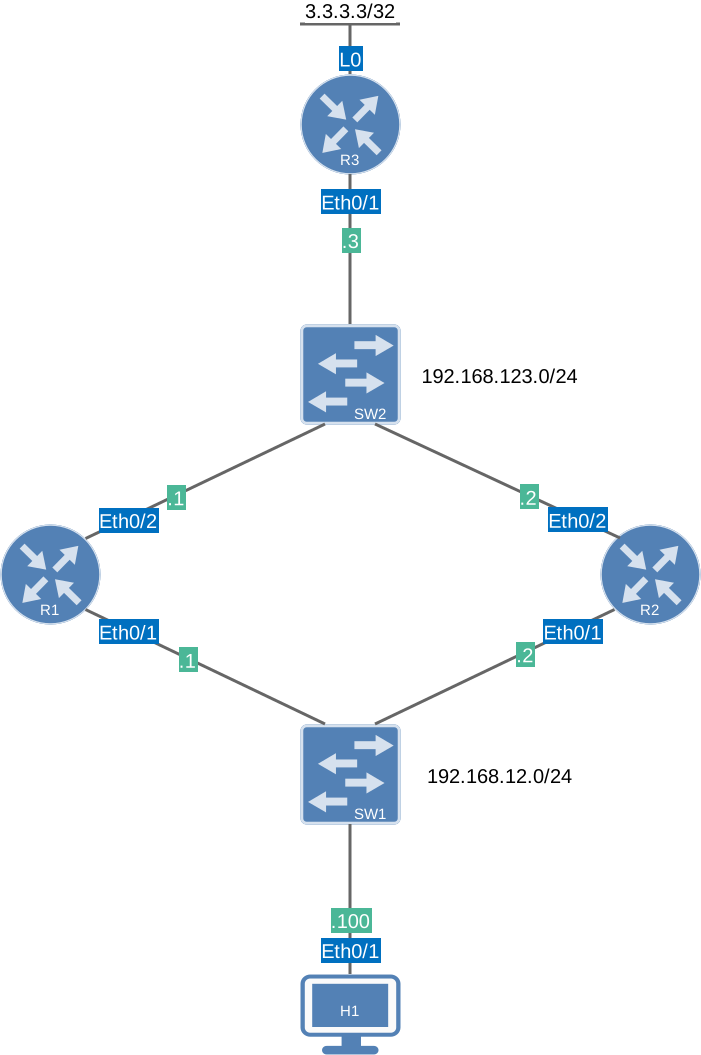
This is the same topology I use in the other HSRP lessons. To test HSRP preemption, you would only need two routers but with this topology, you can test it end-to-end if you want. You can send traffic from H1 to R3 and see how R1 or R2 forwards it. I use Cisco IOS Software [Dublin], Linux Software (X86_64BI_LINUX-ADVENTERPRISEK9-M), Version 17.12.1, RELEASE SOFTWARE (fc5) on all routers.
Configurations
Want to take a look for yourself? Here you will find the startup configuration of each device.
R1
hostname R1
!
ip cef
!
interface Ethernet0/1
 ip address 192.168.12.1 255.255.255.0
 standby 1 ip 192.168.12.254
 standby 1 priority 150
 standby 1 name HSRP_GATEWAY
!
interface Ethernet0/2
 ip address 192.168.123.1 255.255.255.0
!
router ospf 1
 router-id 1.1.1.1
 passive-interface Ethernet0/1
 network 192.168.12.0 0.0.0.255 area 0
 network 192.168.123.0 0.0.0.255 area 0
!
end
R2
hostname R2
!
ip cef
!
interface Ethernet0/1
 ip address 192.168.12.2 255.255.255.0
 standby 1 ip 192.168.12.254
 standby 1 name HSRP_GATEWAY
!
interface Ethernet0/2
 ip address 192.168.123.2 255.255.255.0
!
router ospf 1
 router-id 2.2.2.2
 passive-interface Ethernet0/1
 network 192.168.12.0 0.0.0.255 area 0
 network 192.168.123.0 0.0.0.255 area 0
!
end
R3
hostname R3
!
ip cef
!
interface Loopback0
 ip address 3.3.3.3 255.255.255.255
!
interface Ethernet0/1
 ip address 192.168.123.3 255.255.255.0
!
router ospf 1
 network 3.3.3.3 0.0.0.0 area 0
 network 192.168.123.0 0.0.0.255 area 0
!
end
H1
hostname H1
!
ip cef
!
interface Ethernet0/1
 ip address 192.168.12.100 255.255.255.0
!
ip route 0.0.0.0 0.0.0.0 192.168.12.254
!
end
Preemption Disabled
We start from the base HSRP configuration: R1 is the active router (priority 150), and R2 is the standby router (priority 100, the default). Preemption is disabled on both routers.
R1#show standby brief
                     P indicates configured to preempt.
                     |
Interface   Grp  Pri P State   Active          Standby         Virtual IP
Et0/1 1 150 Active local 192.168.12.2 192.168.12.254R2#show standby brief
P indicates configured to preempt.
|
Interface Grp Pri P State Active Standby Virtual IP
Et0/1 1 100 Standby 192.168.12.1 local 192.168.12.254R1 is active, and R2 is standby. The P column is empty on both routers, confirming preemption is not configured.
Now we enable debug standby on both routers so we can watch the state transitions in real time:
R1#debug standby
HSRP debugging is onR2#debug standby
HSRP debugging is onNow we shut down R1’s interface to simulate a failure:
R1(config)#interface Ethernet0/1
R1(config-if)#shutdown
Here’s what we see on R1:
R1#
HSRP: Et0/1 Interface going DOWN
HSRP: Et0/1 Sending resign messages for all the active groups
HSRP: Et0/1 Grp 1 Resign out 192.168.12.1 Active  pri 150 vIP 192.168.12.254
HSRP: Et0/1 Interface DOWN
HSRP: Et0/1 Grp 1 Active: b/HSRP disabled
HSRP: Et0/1 Grp 1 Active router is unknown, was local
HSRP: Et0/1 Grp 1 Active -> Init
%HSRP-5-STATECHANGE: Ethernet0/1 Grp 1 state Active -> Init
HSRP: Et0/1 Grp 1 Redundancy "HSRP_GATEWAY" state Active -> Init
HSRP: Et0/1 Grp 1 Removed 192.168.12.254 from ARP
HSRP: Et0/1 Grp 1 Deactivating MAC 0000.0c9f.f001
HSRP: Et0/1 Grp 1 Removing 0000.0c9f.f001 from MAC address filter
HSRP: Et0/1 Grp 1 Standby router is unknown, was 192.168.12.2
HSRP: Et0/1 Nbr 192.168.12.2 no longer standby for group 1 (Init)
HSRP: Et0/1 Nbr 192.168.12.2 Was active or standby - start passive holddown
HSRP: Et0/1 IP Redundancy "HSRP_GATEWAY" update, Active -> Init
HSRP: Et0/1 IP Redundancy "HSRP_GATEWAY" standby, 192.168.12.2 -> unknown
Let me explain what happens:
- The moment the interface goes down, R1 detects it with Interface going DOWN and immediately sends a Resign message out to the group before the interface fully drops. This tells R2 it can take over right away without waiting for the hold timer to expire.
- Once the interface is fully down, HSRP is disabled on R1 and the state transitions from Active to Init.
- R1 removes the virtual IP 192.168.12.254 from its ARP table and deactivates the virtual MAC address 0000.0c9f.f001, removing it from the MAC address filter. R1 is no longer responsible for forwarding traffic destined to the virtual IP.
- R1 clears its knowledge of the standby router (R2) and puts it in a passive holddown.
Here’s R2:
R2#
HSRP: Et0/1 Grp 1 Hello  out 192.168.12.2 Standby pri 100 vIP 192.168.12.254
HSRP: Et0/1 Grp 1 Resign in  192.168.12.1 Active  pri 150 vIP 192.168.12.254
HSRP: Et0/1 Grp 1 Standby: i/Resign rcvd (150/192.168.12.1)
HSRP: Et0/1 Grp 1 Active router is local, was 192.168.12.1
HSRP: Et0/1 Nbr 192.168.12.1 no longer active for group 1 (Standby)
HSRP: Et0/1 Nbr 192.168.12.1 Was active or standby - start passive holddown
HSRP: Et0/1 Grp 1 Standby router is unknown, was local
HSRP: Et0/1 Grp 1 Standby -> Active
HSRP2: Et0/1 Interface adv out, active 1 passive 0
%HSRP-5-STATECHANGE: Ethernet0/1 Grp 1 state Standby -> Active
HSRP: Et0/1 Grp 1 Redundancy "HSRP_GATEWAY" state Standby -> Active
HSRP: Et0/1 Grp 1 Hello  out 192.168.12.2 Active  pri 100 vIP 192.168.12.254
HSRP: Et0/1 Grp 1 Added 192.168.12.254 to ARP (0000.0c9f.f001)
HSRP: Et0/1 Grp 1 Activating MAC 0000.0c9f.f001
HSRP: Et0/1 Grp 1 Adding 0000.0c9f.f001 to MAC address filter
HSRP: Et0/1 IP Redundancy "HSRP_GATEWAY" standby, local -> unknown
HSRP: Et0/1 IP Redundancy "HSRP_GATEWAY" update, Standby -> Active
HSRP: Et0/1 IP Redundancy "HSRP_GATEWAY" update, Active -> Active
Here is what we see on R2:
- R2 receives the Resign message from R1 (192.168.12.1, priority 150) while still in the Standby state. It does not need to wait for the 10-second hold timer to expire.
- R2 immediately recognizes itself as the new active router: Active router is local, was 192.168.12.1.
- R2 transitions from Standby to Active and starts advertising itself as Active in its Hello messages.
- R2 adds the virtual IP 192.168.12.254 to its own ARP table and activates the virtual MAC address 0000.0c9f.f001. From this point on, R2 is forwarding traffic for the virtual IP.
- The standby role is now vacant (unknown) since no other router is in the group.
We now re-enable the interface on R1:
R1(config)#interface ethernet0/1
R1(config-if)#no shutdown
Let’s see what happens:
R1#
HSRP: Et0/1 Interface UP
HSRP: Et0/1 Starting minimum intf delay (1 secs) - uptime 3606
HSRP: Et0/1 ARP reload
HSRP: Et0/1 ARP reload
HSRP: Et0/1 Grp 1 Hello  in  192.168.12.2 Active  pri 100 vIP 192.168.12.254
HSRP: Et0/1 Grp 1 Active router is 192.168.12.2
HSRP: Et0/1 Nbr 192.168.12.2 is no longer passive
HSRP: Et0/1 Nbr 192.168.12.2 active for group 1
HSRP: Et0/1 Intf min delay expired - uptime 3607
HSRP: Et0/1 Grp 1 Init: a/HSRP enabled
HSRP: Et0/1 Grp 1 Init -> Listen
HSRP2: Et0/1 Interface adv out, active 0 passive 1
HSRP: Et0/1 Grp 1 Redundancy "HSRP_GATEWAY" state Init -> Backup
HSRP: Et0/1 IP Redundancy "HSRP_GATEWAY" update, Init -> Backup
HSRP: Et0/1 Grp 1 Hello  in  192.168.12.2 Active  pri 100 vIP 192.168.12.254
HSRP: Et0/1 ARP reload
HSRP: Et0/1 Grp 1 Hello  in  192.168.12.2 Active  pri 100 vIP 192.168.12.254
Here is what we see on R1:
- The interface comes back up, and HSRP starts a minimum interface delay of 1 second before participating in the election. This prevents the router from immediately jumping into the election before the interface is fully stable.
- Once the delay expires, R1 enables HSRP and starts in the Init state, then moves to Listen.
- R1 hears Hello messages from R2 advertising itself as Active with priority 100. R1 acknowledges R2 as the current active router.
- R1 moves to the Backup state (the internal name for Standby) and begins sending passive Hello messages. It does not attempt to reclaim the Active role even though it has a higher priority of 150, because preemption is disabled.
Let’s check R2:
R2#
HSRP: Et0/1 Grp 1 Hello  out 192.168.12.2 Active  pri 100 vIP 192.168.12.254
HSRP: Et0/1 Grp 1 Hello  out 192.168.12.2 Active  pri 100 vIP 192.168.12.254
HSRP: Et0/1 Grp 1 Hello  out 192.168.12.2 Active  pri 100 vIP 192.168.12.254
HSRP2: Et0/1 Interface adv in, active 0, passive 1, from 192.168.12.1
HSRP: Et0/1 Grp 1 Hello  out 192.168.12.2 Active  pri 100 vIP 192.168.12.254
HSRP: Et0/1 Grp 1 Hello  out 192.168.12.2 Active  pri 100 vIP 192.168.12.254
Here is what we see on R2:
- R2 continues to send Hello messages advertising itself as Active with priority 100 throughout the entire time R1 was absent.
- When R1 comes back, R2 receives an interface advertisement from R1 in passive mode. This tells R2 that R1 has rejoined the segment but is not challenging for the Active role.
- Because R1 does not send a higher-priority Hello that would trigger a preemption, R2 remains Active and keeps the virtual IP and virtual MAC.
Our routers now look like this:
R1#show standby
Ethernet0/1 - Group 1 (version 2)
  State is Standby
    14 state changes, last state change 00:00:17
  Virtual IP address is 192.168.12.254
  Active virtual MAC address is 0000.0c9f.f001 (MAC Not In Use)
    Local virtual MAC address is 0000.0c9f.f001 (v2 default)
  Hello time 3 sec, hold time 10 sec
    Next hello sent in 1.792 secs
  Preemption disabled
  Active router is 192.168.12.2, priority 100 (expires in 9.184 sec)
    MAC address is aabb.cc00.0310
  Standby router is local
  Priority 150 (configured 150)
  Group name is "HSRP_GATEWAY" (cfgd)
FLAGS: 0/1R2#show standby
Ethernet0/1 - Group 1 (version 2)
State is Active
19 state changes, last state change 00:00:53
Virtual IP address is 192.168.12.254
Active virtual MAC address is 0000.0c9f.f001 (MAC In Use)
Local virtual MAC address is 0000.0c9f.f001 (v2 default)
Hello time 3 sec, hold time 10 sec
Next hello sent in 0.864 secs
Preemption disabled
Active router is local
Standby router is 192.168.12.1, priority 150 (expires in 10.304 sec)
Priority 100 (default 100)
Group name is "HSRP_GATEWAY" (cfgd)
FLAGS: 1/1After R1 returns, the roles are now reversed from the initial state. R2 is Active (priority 100) and R1 is Standby (priority 150). Even though R1 has a higher priority, it cannot reclaim the Active role because standby 1 preempt is not configured. If preemption were enabled, R1 would have sent its Hello with priority 150 and immediately taken back the Active role from R2.
We disable the debug and reset the HSRP process to return to the starting state with R1 active:
R1#undebug all
All possible debugging has been turned offR2#undebug all
All possible debugging has been turned offPreemption Enabled
Now we enable preemption. We add standby 1 preempt to both routers. R1 already has its higher priority configured to 150. R2 gets preempted as well so it can also take over if R1 fails.
R1(config)#interface Ethernet0/1
R1(config-if)#standby 1 preemptR2(config)#interface Ethernet0/1
R2(config-if)#standby 1 preemptLet’s verify the starting state. Notice the P column is now populated on both routers:
R1#show standby brief
                     P indicates configured to preempt.
                     |
Interface   Grp  Pri P State   Active          Standby         Virtual IP
Et0/1 1 150 P Active local 192.168.12.2 192.168.12.254R2#show standby brief
P indicates configured to preempt.
|
Interface Grp Pri P State Active Standby Virtual IP
Et0/1 1 100 P Standby 192.168.12.1 local 192.168.12.254show standby confirms preemption is now enabled on both routers:
R1#show standby
Ethernet0/1 - Group 1 (version 2)
  State is Active
    2 state changes, last state change 00:02:07
  Virtual IP address is 192.168.12.254
  Active virtual MAC address is 0000.0c9f.f001 (MAC In Use)
    Local virtual MAC address is 0000.0c9f.f001 (v2 default)
  Hello time 3 sec, hold time 10 sec
    Next hello sent in 0.048 secs
  Preemption enabled
  Active router is local
  Standby router is 192.168.12.2, priority 100 (expires in 9.440 sec)
  Priority 150 (configured 150)
  Group name is "HSRP_GATEWAY" (cfgd)
FLAGS: 1/1R2#show standby
Ethernet0/1 - Group 1 (version 2)
State is Standby
1 state change, last state change 00:01:47
Virtual IP address is 192.168.12.254
Active virtual MAC address is 0000.0c9f.f001 (MAC Not In Use)
Local virtual MAC address is 0000.0c9f.f001 (v2 default)
Hello time 3 sec, hold time 10 sec
Next hello sent in 0.384 secs
Preemption enabled
Active router is 192.168.12.1, priority 150 (expires in 8.208 sec)
MAC address is aabb.cc00.0210
Standby router is local
Priority 100 (default 100)
Group name is "HSRP_GATEWAY" (cfgd)
FLAGS: 0/1Now we enable debug and repeat the test. Shut R1’s interface again:
R1#debug standby
HSRP debugging is onR2#debug standby
HSRP debugging is onR1(config)#interface Ethernet0/1
R1(config-if)#shutdownHere is the debug output of R1:
R1#
HSRP: Et0/1 Interface going DOWN
HSRP: Et0/1 Sending resign messages for all the active groups
HSRP: Et0/1 Grp 1 Resign out 192.168.12.1 Active  pri 150 vIP 192.168.12.254
HSRP: Et0/1 Interface DOWN
HSRP: Et0/1 Grp 1 Active: b/HSRP disabled
HSRP: Et0/1 Grp 1 Active router is unknown, was local
HSRP: Et0/1 Grp 1 Active -> Init
%HSRP-5-STATECHANGE: Ethernet0/1 Grp 1 state Active -> Init
HSRP: Et0/1 Grp 1 Redundancy "HSRP_GATEWAY" state Active -> Init
HSRP: Et0/1 Grp 1 Removed 192.168.12.254 from ARP
HSRP: Et0/1 Grp 1 Deactivating MAC 0000.0c9f.f001
HSRP: Et0/1 Grp 1 Removing 0000.0c9f.f001 from MAC address filter
HSRP: Et0/1 Grp 1 Standby router is unknown, was 192.168.12.2
HSRP: Et0/1 Nbr 192.168.12.2 no longer standby for group 1 (Init)
HSRP: Et0/1 Nbr 192.168.12.2 Was active or standby - start passive holddown
HSRP: Et0/1 IP Redundancy "HSRP_GATEWAY" update, Active -> Init
HSRP: Et0/1 IP Redundancy "HSRP_GATEWAY" standby, 192.168.12.2 -> unknown
The shutdown behavior on R1 is identical to the no-preempt scenario:
- When the interface goes down, an immediate Resign message is triggered, so R2 does not have to wait for the hold timer to expire.
- R1 transitions Active to Init, removes the virtual IP from ARP, and deactivates the virtual MAC address 0000.0c9f.f001.
Let’s check R2:
R2#
HSRP: Et0/1 Grp 1 Resign in  192.168.12.1 Active  pri 150 vIP 192.168.12.254
HSRP: Et0/1 Grp 1 Standby: i/Resign rcvd (150/192.168.12.1)
HSRP: Et0/1 Grp 1 Active router is local, was 192.168.12.1
HSRP: Et0/1 Nbr 192.168.12.1 no longer active for group 1 (Standby)
HSRP: Et0/1 Nbr 192.168.12.1 Was active or standby - start passive holddown
HSRP: Et0/1 Grp 1 Standby router is unknown, was local
HSRP: Et0/1 Grp 1 Standby -> Active
HSRP2: Et0/1 Interface adv out, active 1 passive 0
%HSRP-5-STATECHANGE: Ethernet0/1 Grp 1 state Standby -> Active
HSRP: Et0/1 Grp 1 Redundancy "HSRP_GATEWAY" state Standby -> Active
HSRP: Et0/1 Grp 1 Hello  out 192.168.12.2 Active  pri 100 vIP 192.168.12.254
HSRP: Et0/1 Grp 1 Added 192.168.12.254 to ARP (0000.0c9f.f001)
HSRP: Et0/1 Grp 1 Activating MAC 0000.0c9f.f001
HSRP: Et0/1 Grp 1 Adding 0000.0c9f.f001 to MAC address filter
HSRP: Et0/1 IP Redundancy "HSRP_GATEWAY" standby, local -> unknown
HSRP: Et0/1 IP Redundancy "HSRP_GATEWAY" update, Standby -> Active
HSRP: Et0/1 Grp 1 Hello  out 192.168.12.2 Active  pri 100 vIP 192.168.12.254
HSRP: Et0/1 IP Redundancy "HSRP_GATEWAY" update, Active -> Active
This is also identical to the no-preempt scenario:
- R2 receives the Resign, immediately knows it should take over, and transitions Standby to Active.
- R2 adds the virtual IP to its ARP table and activates the virtual MAC. R2 is now forwarding traffic.
The shutdown sequence is the same with preemption enabled. The real difference appears when R1 comes back up. Let’s check it.