

Lesson Contents
HSRP (Hot Standby Router Protocol) is a Cisco First Hop Redundancy Protocol (FHRP) that allows two or more routers to share a virtual IP and MAC address so hosts keep their gateway reachable even when a router fails. One router (or multilayer switch) is the active gateway, the other is the standby gateway. When the active gateway fails, the standby takes over.
Hot Standby Router Protocol (HSRP) is a Cisco proprietary First Hop Redundancy Protocol (FHRP). It allows two or more routers to share a virtual IP address and virtual MAC address, so that hosts on the LAN always have a reachable default gateway, even if a router fails.
In this lesson, I’ll explain how to configure and verify a basic HSRP version 2 setup. We’ll also take a look at some debugs so you can see it in action.
Key Takeaways
- Priority determines the active router. The router with the highest HSRP priority becomes active. The default priority is 100.
- HSRPv2 uses a virtual MAC address in the format
0000.0c9f.fXXX, where XXX is the HSRP group number in hexadecimal. - The
standby 1 ipcommand is the minimum required to create a working HSRP group. Version, priority, and group name are optional but recommended. - Preemption is disabled by default, meaning a router will not automatically reclaim the active role after recovering from a failure.
- The hello and hold timers default to 3 and 10 seconds, respectively. If the standby router does not hear from the active router within the hold time, it takes over.
- Traceroute reveals the real interface IP, not the virtual HSRP IP, because TTL-exceeded messages are sourced from the router’s physical interface.
- On failover, the new active router sends a Gratuitous ARP (GARP) to update ARP caches on hosts and MAC address tables on switches.
Prerequisites
Explain what knowledge is required to understand this topic, with links to other lessons.
- The basics of HSRP as explained in the HSRP explained lesson.
- Understand how a host device uses a default gateway.
Configuration
To configure HSRP, we have to:
- Change the HSRP version to version 2.
- Enable HSRP and set the virtual gateway IP address on the interface that faces the hosts.
- Set the HSRP priority to ensure that R1 is the active gateway.
Here is the topology we’ll use:
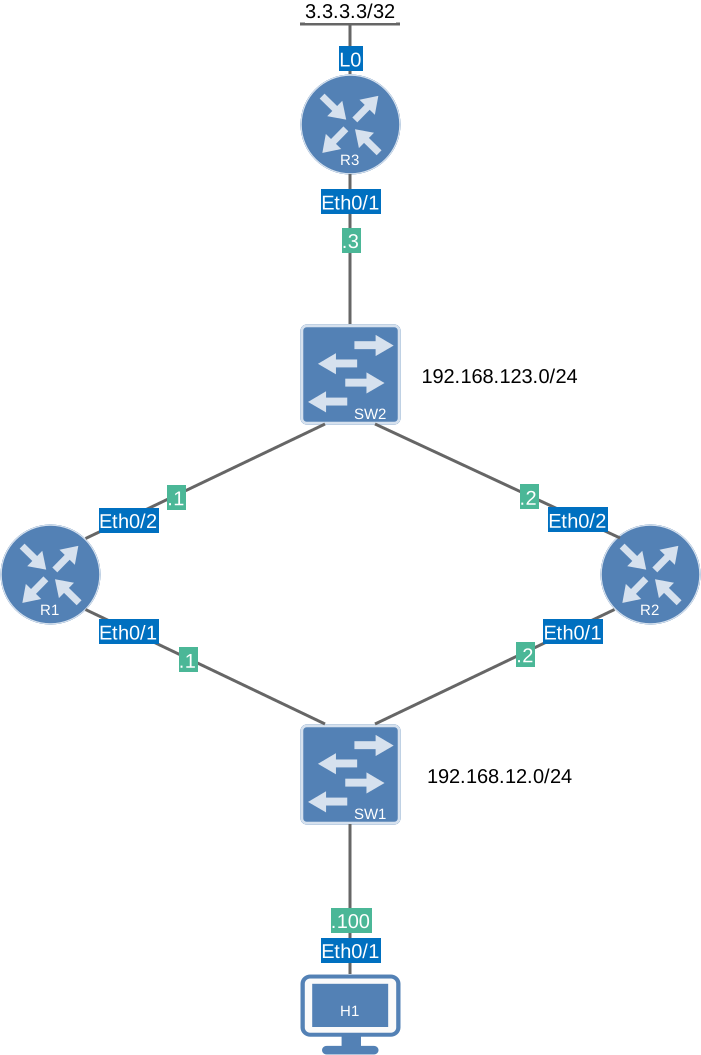
Here’s what we have:
- R1 and R2 are the HSRP routers, and we’ll configure a virtual gateway on the 192.168.12.0/24 subnet.
- H1 is a host device that we’ll use to test the virtual gateway.
- R3 has a loopback interface (3.3.3.3/32), which we’ll try to ping from H1.
- R1, R2, and R3 run OSPF to advertise all required networks, so we have full reachability.
I’m using Cisco IOS Software [Dublin], Linux Software (X86_64BI_LINUX-ADVENTERPRISEK9-M), Version 17.12.1, RELEASE SOFTWARE (fc5) on all routers.
Configurations
Want to take a look for yourself? Here you will find the startup configuration of each device.
R1
hostname R1
!
ip cef
!
interface Ethernet0/1
 ip address 192.168.12.1 255.255.255.0
!
interface Ethernet0/2
 ip address 192.168.123.1 255.255.255.0
!
router ospf 1
 router-id 1.1.1.1
 passive-interface Ethernet0/1
 network 192.168.12.0 0.0.0.255 area 0
 network 192.168.123.0 0.0.0.255 area 0
!
end
R2
hostname R2
!
ip cef
!
interface Ethernet0/1
 ip address 192.168.12.2 255.255.255.0
!
interface Ethernet0/2
 ip address 192.168.123.2 255.255.255.0
!
router ospf 1
 router-id 1.1.1.1
 passive-interface Ethernet0/1
 network 192.168.12.0 0.0.0.255 area 0
 network 192.168.123.0 0.0.0.255 area 0
!
end
R3
hostname R3
!
ip cef
!
interface Loopback0
 ip address 3.3.3.3 255.255.255.255
!
interface Ethernet0/1
 ip address 192.168.123.3 255.255.255.0
!
router ospf 1
 network 3.3.3.3 0.0.0.0 area 0
 network 192.168.123.0 0.0.0.255 area 0
!
end
H1
hostname H1
!
ip cef
!
interface Ethernet0/1
 ip address 192.168.12.100 255.255.255.0
!
ip route 0.0.0.0 0.0.0.0 192.168.12.254
!
end
Let’s get started.
We’ll start with R1, which will be the active router:
R1(config)# interface Ethernet0/1
R1(config-if)# standby version 2
R1(config-if)# standby 1 ip 192.168.12.254
R1(config-if)# standby 1 priority 150
R1(config-if)# standby 1 name HSRP_GATEWAY
The most important command is thestandby 1 ip command, which creates the 192.168.1.254 virtual gateway IP address for HSRP group 1. If you skipped all the other commands, you would have a working HSRP group, but it would be using version 1.
We’ll change it to version 2 and set the priority from the default (100) to 150 so R1 becomes the active router. The group name is optional, but it will show up in the output of show commands. In a lab like this, it doesn’t matter, but if you were to use HSRP on multilayer switches where you have an HSRP group for many VLANs, it can be helpful to quickly see what the HSRP group is for.
R2 will be the standby router. Let’s configure it:
R2(config)# interface Ethernet0/1
R2(config-if)# standby version 2
R2(config-if)# standby 1 ip 192.168.12.254
R2(config-if)# standby 1 name HSRP_GATEWAY
We set the same version and virtual IP, and assign the same group name. I don’t have to change the priority because the default (100) is fine. It’s lower than what we configured on R1.
That completes the configuration.
Verification
Let’s verify our work. We’ll start with show standby brief which gives a quick overview:
R1#show standby brief
                     P indicates configured to preempt.
                     |
Interface   Grp  Pri P State   Active          Standby         Virtual IP
Et0/1 1 150 Active local 192.168.12.2 192.168.12.254R2#show standby brief
P indicates configured to preempt.
|
Interface Grp Pri P State Active Standby Virtual IP
Et0/1 1 100 Standby 192.168.12.1 local 192.168.12.254This gives us a lot of information:
- HSRP is active on the Ethernet0/1 interfaces.
- The HSRP group ID.
- The priority of each router.
- Which router is active and which is on standby.
- The IP addresses on the Ethernet interfaces of the routers.
- The virtual IP address.
You can also use the show standby neighbors command, which lists the HSRP neighbors discovered on each interface:
R1# show standby neighbors
HSRP neighbors on Ethernet0/1
  192.168.12.2
    No active groups
    Standby groups: 1
R2# show standby neighbors
HSRP neighbors on Ethernet0/1
192.168.12.1
Active groups: 1
No standby groupsThis gives us a similar output. R1 sees R2 as the standby peer for group 1, and R2 sees R1 as the active peer for group 1.
The most useful command to verify HSRP is show standbywithout any parameters. Let’s start with R1:
R1# show standby
Ethernet0/1 - Group 1 (version 2)
  State is Active
    2 state changes, last state change 00:00:29
  Virtual IP address is 192.168.12.254
  Active virtual MAC address is 0000.0c9f.f001 (MAC In Use)
    Local virtual MAC address is 0000.0c9f.f001 (v2 default)
  Hello time 3 sec, hold time 10 sec
    Next hello sent in 0.592 secs
  Preemption disabled
  Active router is local
  Standby router is 192.168.12.2, priority 100 (expires in 10.848 sec)
  Priority 150 (configured 150)
  Group name is "HSRP_GATEWAY" (cfgd)
  FLAGS: 1/1
This gives us more detailed information. Let’s focus on what we have not seen before:
- We use HSRP version 2.
- The virtual MAC address (0000.0c9f.f001). HSRPv2 uses the format 0000.0c9f.fXXX, where XXX is the group number in hexadecimal.
- The hello timer (3 seconds) and hold timer (10 seconds). These are the default values.
- Preemption is disabled, so the router remains active even if you increase the priority of the standby router.
Let’s check R2 as well:
R2# show standby
Ethernet0/1 - Group 1 (version 2)
  State is Standby
    1 state change, last state change 00:00:06
  Virtual IP address is 192.168.12.254
  Active virtual MAC address is 0000.0c9f.f001 (MAC Not In Use)
    Local virtual MAC address is 0000.0c9f.f001 (v2 default)
  Hello time 3 sec, hold time 10 sec
    Next hello sent in 1.712 secs
  Preemption disabled
  Active router is 192.168.12.1, priority 150 (expires in 8.672 sec)
    MAC address is aabb.cc00.0210
  Standby router is local
  Priority 100 (default 100)
  Group name is "HSRP_GATEWAY" (cfgd)
  FLAGS: 0/1
We see a similar output, but now from R2’s perspective, which is in standby mode.
If you want to see HSRP in action, we can enable debugging. The debug standby command shows HSRP packet exchanges and state transitions in real time. It enables three sub-debugs simultaneously: errors, events, and packets. Let’s try it out:
R1# debug standby
HSRP debugging is on
Here’s how you can see which debugs are enabled:
R1# show debug
HSRP:
  HSRP Errors debugging is on
  HSRP Events debugging is on
  HSRP Packets debugging is on
Once enabled, the router logs every hello packet sent and received:
R1#
HSRP: Et0/1 Grp 1 Hello  in  192.168.12.2 Standby pri 100 vIP 192.168.12.254
HSRP: Et0/1 Grp 1 Hello  out 192.168.12.1 Active  pri 150 vIP 192.168.12.254
The debug output shows the inbound hello packets from R2 and the hello packets R1 sends to R2.
Packet Capture: HSRPv2 hello packets
debug standby terse command that suppresses hello packets. This is more useful for actual troubleshooting.Now let’s see if HSRP actually works. We’ll send some traffic from H1 to the loopback interface (3.3.3.3/32) on R3.
H1 has a default route pointing to the virtual gateway IP address:
H1#show ip route static

S*    0.0.0.0/0 [1/0] via 192.168.12.254
Let’s see if we can reach the loopback interface:
H1#ping 3.3.3.3
Type escape sequence to abort.
Sending 5, 100-byte ICMP Echos to 3.3.3.3, timeout is 2 seconds:
!!!!!
Success rate is 100 percent (5/5), round-trip min/avg/max = 1/1/1 ms
No problem, this works. When we look at the ARP table, we can see which MAC address it uses for 192.168.12.254:
H1#show arp 192.168.12.254
Protocol  Address          Age (min)  Hardware Addr   Type   Interface
Internet  192.168.12.254          2   0000.0c9f.f001  ARPA   Ethernet0/1
H1 has bound MAC address 0000.0c9f.f001 to 192.168.12.254. That’s the MAC address we saw in the output of the show standby command.
Trace shows physical IP address:
H1#traceroute 3.3.3.3 numeric probe 1
Type escape sequence to abort.
Tracing the route to 3.3.3.3
VRF info: (vrf in name/id, vrf out name/id)
  1 192.168.12.1 0 msec
  2 192.168.123.3 1 msec
This is by design. R1 IP. When a traceroute passes through an HSRP-enabled router, the router generates an ICMP TTL-exceeded message sourced from its real interface IP address (not the virtual HSRP IP).
Packet Capture: HSRPv2 Traceroute H1 to R3
Let’s look at ARP.
R1(config)#interface Ethernet0/1
R1(config-if)#shutdown
On R2, we’ll see:
R2#
%HSRP-5-STATECHANGE: Ethernet0/1 Grp 1 state Standby -> Active
R2 is now active:
R2#show standby
Ethernet0/1 - Group 1 (version 2)
  State is Active
    2 state changes, last state change 00:11:34
  Virtual IP address is 192.168.12.254
  Active virtual MAC address is 0000.0c9f.f001 (MAC In Use)
    Local virtual MAC address is 0000.0c9f.f001 (v2 default)
  Hello time 3 sec, hold time 10 sec
    Next hello sent in 0.256 secs
  Preemption disabled
  Active router is local
  Standby router is unknown
  Priority 150 (configured 150)
  Group name is "HSRP_GATEWAY" (cfgd)
  FLAGS: 1/1
We can also see it here:
R2#show standby brief
                     P indicates configured to preempt.
                     |
Interface   Grp  Pri P State   Active          Standby         Virtual IP
Et0/1       1    150   Active  local           unknown         192.168.12.254
That’s all there is to it.
Packet Captures
The show and debug commands tell us a lot, but behind the scenes, the routers exchange many HSRP packets that explain how it operates. Let’s take a look.
Election
When R1 and R2 are configured to use HSRP, they’ll elect which router becomes active and which becomes standby. Let’s check it out.
Both routers start by sending an Interface State TLV. This is a lightweight packet that doesn’t contain any HSRP group information yet. R1 and R2 both report 0 active groups and 1 passive group. This means they participate in HSRP, but no router is active yet:
Frame 12: Packet, 60 bytes on wire (480 bits), 60 bytes captured (480 bits) on interface eth1, id 0
Ethernet II, Src: aa:bb:cc:00:02:10 (aa:bb:cc:00:02:10), Dst: IPv4mcast_66 (01:00:5e:00:00:66)
Internet Protocol Version 4, Src: 192.168.12.1, Dst: 224.0.0.102
User Datagram Protocol, Src Port: 1985, Dst Port: 1985
Cisco Hot Standby Router Protocol
    Interface State TLV: Type=2 Len=4
        Active Groups: 0
        Passive Groups: 1
Frame 14: Packet, 60 bytes on wire (480 bits), 60 bytes captured (480 bits) on interface eth1, id 0
Ethernet II, Src: aa:bb:cc:00:03:10 (aa:bb:cc:00:03:10), Dst: IPv4mcast_66 (01:00:5e:00:00:66)
Internet Protocol Version 4, Src: 192.168.12.2, Dst: 224.0.0.102
User Datagram Protocol, Src Port: 1985, Dst Port: 1985
Cisco Hot Standby Router Protocol
Interface State TLV: Type=2 Len=4
Active Groups: 0
Passive Groups: 1After a short while, both routers enter the speak state and send full HSRP hello packets. Each router advertises its priority:
Frame 30: Packet, 94 bytes on wire (752 bits), 94 bytes captured (752 bits) on interface eth1, id 0
Ethernet II, Src: aa:bb:cc:00:02:10 (aa:bb:cc:00:02:10), Dst: IPv4mcast_66 (01:00:5e:00:00:66)
Internet Protocol Version 4, Src: 192.168.12.1, Dst: 224.0.0.102
User Datagram Protocol, Src Port: 1985, Dst Port: 1985
Cisco Hot Standby Router Protocol
    Group State TLV: Type=1 Len=40
        Version: 2
        Op Code: Hello (0)
        State: Speak (4)
        IP Ver.: IPv4 (4)
        Group: 1
        Identifier: aa:bb:cc:00:02:10 (aa:bb:cc:00:02:10)
        Priority: 150
        Hellotime: Default (3000)
        Holdtime: Default (10000)
        Virtual IP Address: 192.168.12.254
    Text Authentication TLV: Type=3 Len=8
Frame 32: Packet, 94 bytes on wire (752 bits), 94 bytes captured (752 bits) on interface eth1, id 0
Ethernet II, Src: aa:bb:cc:00:03:10 (aa:bb:cc:00:03:10), Dst: IPv4mcast_66 (01:00:5e:00:00:66)
Internet Protocol Version 4, Src: 192.168.12.2, Dst: 224.0.0.102
User Datagram Protocol, Src Port: 1985, Dst Port: 1985
Cisco Hot Standby Router Protocol
Group State TLV: Type=1 Len=40
Version: 2
Op Code: Hello (0)
State: Speak (4)
IP Ver.: IPv4 (4)
Group: 1
Identifier: aa:bb:cc:00:03:10 (aa:bb:cc:00:03:10)
Priority: 100
Hellotime: Default (3000)
Holdtime: Default (10000)
Virtual IP Address: 192.168.12.254
Text Authentication TLV: Type=3 Len=8Before R1 declares itself active, it sends one hello packet, which has the standby state:[teaser allow=”subscriber”]
Frame 46: Packet, 94 bytes on wire (752 bits), 94 bytes captured (752 bits) on interface eth1, id 0
Ethernet II, Src: aa:bb:cc:00:02:10 (aa:bb:cc:00:02:10), Dst: IPv4mcast_66 (01:00:5e:00:00:66)
Internet Protocol Version 4, Src: 192.168.12.1, Dst: 224.0.0.102
User Datagram Protocol, Src Port: 1985, Dst Port: 1985
Cisco Hot Standby Router Protocol
    Group State TLV: Type=1 Len=40
        Version: 2
        Op Code: Hello (0)
        State: Standby (5)
        IP Ver.: IPv4 (4)
        Group: 1
        Identifier: aa:bb:cc:00:02:10 (aa:bb:cc:00:02:10)
        Priority: 150
        Hellotime: Default (3000)
        Holdtime: Default (10000)
        Virtual IP Address: 192.168.12.254
    Text Authentication TLV: Type=3 Len=8
This is normal because HSRP has to go through the standby state before it can move to the active state. R1 immediately follows up with an updated Interface State TLV, which reports the active group:
Frame 47: Packet, 60 bytes on wire (480 bits), 60 bytes captured (480 bits) on interface eth1, id 0
Ethernet II, Src: aa:bb:cc:00:02:10 (aa:bb:cc:00:02:10), Dst: IPv4mcast_66 (01:00:5e:00:00:66)
Internet Protocol Version 4, Src: 192.168.12.1, Dst: 224.0.0.102
User Datagram Protocol, Src Port: 1985, Dst Port: 1985
Cisco Hot Standby Router Protocol
    Interface State TLV: Type=2 Len=4
        Active Groups: 1
        Passive Groups: 0
R2 updates its Interface State TLV in response and confirms it has no active groups:
Frame 51: Packet, 60 bytes on wire (480 bits), 60 bytes captured (480 bits) on interface eth1, id 0
Ethernet II, Src: aa:bb:cc:00:03:10 (aa:bb:cc:00:03:10), Dst: IPv4mcast_66 (01:00:5e:00:00:66)
Internet Protocol Version 4, Src: 192.168.12.2, Dst: 224.0.0.102
User Datagram Protocol, Src Port: 1985, Dst Port: 1985
Cisco Hot Standby Router Protocol
    Interface State TLV: Type=2 Len=4
        Active Groups: 0
        Passive Groups: 1
R1 now sends its hellos with the active state:
Frame 54: Packet, 94 bytes on wire (752 bits), 94 bytes captured (752 bits) on interface eth1, id 0
Ethernet II, Src: Cisco_9f:f0:01 (00:00:0c:9f:f0:01), Dst: IPv4mcast_66 (01:00:5e:00:00:66)
Internet Protocol Version 4, Src: 192.168.12.1, Dst: 224.0.0.102
User Datagram Protocol, Src Port: 1985, Dst Port: 1985
Cisco Hot Standby Router Protocol
    Group State TLV: Type=1 Len=40
        Version: 2
        Op Code: Hello (0)
        State: Active (6)
        IP Ver.: IPv4 (4)
        Group: 1
        Identifier: aa:bb:cc:00:02:10 (aa:bb:cc:00:02:10)
        Priority: 150
        Hellotime: Default (3000)
        Holdtime: Default (10000)
        Virtual IP Address: 192.168.12.254
    Text Authentication TLV: Type=3 Len=8
Notice the source MAC has changed to 00:00:0c:9f:f0:01. This is the HSRP virtual MAC address for group 1. R1 is now speaking as the virtual gateway instead of with its own MAC address.
While R1 is already active, R2 is still working through its own state machine. It continues sending speak hello packets because it hasn’t yet completed its transition to standby:
Frame 63: Packet, 94 bytes on wire (752 bits), 94 bytes captured (752 bits) on interface eth1, id 0
Ethernet II, Src: aa:bb:cc:00:03:10 (aa:bb:cc:00:03:10), Dst: IPv4mcast_66 (01:00:5e:00:00:66)
Internet Protocol Version 4, Src: 192.168.12.2, Dst: 224.0.0.102
User Datagram Protocol, Src Port: 1985, Dst Port: 1985
Cisco Hot Standby Router Protocol
    Group State TLV: Type=1 Len=40
        Version: 2
        Op Code: Hello (0)
        State: Speak (4)
        IP Ver.: IPv4 (4)
        Group: 1
        Identifier: aa:bb:cc:00:03:10 (aa:bb:cc:00:03:10)
        Priority: 100
        Hellotime: Default (3000)
        Holdtime: Default (10000)
        Virtual IP Address: 192.168.12.254
    Text Authentication TLV: Type=3 Len=8
Eventually, R2 figures out it is in the standby state:
Frame 79: Packet, 94 bytes on wire (752 bits), 94 bytes captured (752 bits) on interface eth1, id 0
Ethernet II, Src: aa:bb:cc:00:03:10 (aa:bb:cc:00:03:10), Dst: IPv4mcast_66 (01:00:5e:00:00:66)
Internet Protocol Version 4, Src: 192.168.12.2, Dst: 224.0.0.102
User Datagram Protocol, Src Port: 1985, Dst Port: 1985
Cisco Hot Standby Router Protocol
    Group State TLV: Type=1 Len=40
        Version: 2
        Op Code: Hello (0)
        State: Standby (5)
        IP Ver.: IPv4 (4)
        Group: 1
        Identifier: aa:bb:cc:00:03:10 (aa:bb:cc:00:03:10)
        Priority: 100
        Hellotime: Default (3000)
        Holdtime: Default (10000)
        Virtual IP Address: 192.168.12.254
    Text Authentication TLV: Type=3 Len=8
Packet Capture: HSRPv2 Election
Resign
When we did a shutdown of R1’s Ethernet0/1 interface so that R2 could take over, R1 announces that it gives up the active role:
Frame 1: Packet, 94 bytes on wire (752 bits), 94 bytes captured (752 bits) on interface eth1, id 0
Ethernet II, Src: Cisco_9f:f0:01 (00:00:0c:9f:f0:01), Dst: IPv4mcast_66 (01:00:5e:00:00:66)
Internet Protocol Version 4, Src: 192.168.12.1, Dst: 224.0.0.102
User Datagram Protocol, Src Port: 1985, Dst Port: 1985
Cisco Hot Standby Router Protocol
    Group State TLV: Type=1 Len=40
        Version: 2
        Op Code: Resign (2)
        State: Active (6)
        IP Ver.: IPv4 (4)
        Group: 1
        Identifier: aa:bb:cc:00:02:10 (aa:bb:cc:00:02:10)
        Priority: 150
        Hellotime: Default (3000)
        Holdtime: Default (10000)
        Virtual IP Address: 192.168.12.254
    Text Authentication TLV: Type=3 Len=8
The Op Code shows “Resign” and the current state is “Active”. The source MAC address is the HSRP virtual group address. R2 acknowledges this with the following message:
Frame 2: Packet, 60 bytes on wire (480 bits), 60 bytes captured (480 bits) on interface eth1, id 0
Ethernet II, Src: aa:bb:cc:00:03:10 (aa:bb:cc:00:03:10), Dst: IPv4mcast_66 (01:00:5e:00:00:66)
Internet Protocol Version 4, Src: 192.168.12.2, Dst: 224.0.0.102
User Datagram Protocol, Src Port: 1985, Dst Port: 1985
Cisco Hot Standby Router Protocol
    Interface State TLV: Type=2 Len=4
        Active Groups: 1
        Passive Groups: 0
R2 uses its own source MAC address and confirms it now has an active HSRP group.
Packet Capture: HSRPv2 Resign and Active
Gratuitous ARP (GARP)
When R2 took over, R2 also sends a gratuitous ARP (GARP), which sets the source MAC address to the HSRP virtual MAC address and broadcasts it:
Frame 213: Packet, 60 bytes on wire (480 bits), 60 bytes captured (480 bits) on interface eth1, id 0
Ethernet II, Src: Cisco_9f:f0:01 (00:00:0c:9f:f0:01), Dst: Broadcast (ff:ff:ff:ff:ff:ff)
Address Resolution Protocol (reply/gratuitous ARP)
    Hardware type: Ethernet (1)
    Protocol type: IPv4 (0x0800)
    Hardware size: 6
    Protocol size: 4
    Opcode: reply (2)
    [Is gratuitous: True]
    Sender MAC address: Cisco_9f:f0:01 (00:00:0c:9f:f0:01)
    Sender IP address: 192.168.12.254
    Target MAC address: Broadcast (ff:ff:ff:ff:ff:ff)
    Target IP address: 192.168.12.254
This GARP is specified in the HSRP RFC. This won’t impact the end hosts. They won’t have to change their ARP tables because nothing has changed. The GARP has two reasons, though:
- It refreshes state ARP entries on hosts.
- It updates the MAC address table on switches so they know the virtual MAC address is now reachable via another physical interface.
By sending it to the broadcast group (ff:ff:ff:ff:ff:ff), every device on the subnet will receive this GARP.
On Cisco devices, you’ll also see the same GARP, but sent to the STP UplinkFast destination group:
Frame 214: Packet, 60 bytes on wire (480 bits), 60 bytes captured (480 bits) on interface eth1, id 0
Ethernet II, Src: Cisco_9f:f0:01 (00:00:0c:9f:f0:01), Dst: STP-UplinkFast (01:00:0c:cd:cd:cd)
Address Resolution Protocol (reply/gratuitous ARP)
    Hardware type: Ethernet (1)
    Protocol type: IPv4 (0x0800)
    Hardware size: 6
    Protocol size: 4
    Opcode: reply (2)
    [Is gratuitous: True]
    Sender MAC address: Cisco_9f:f0:01 (00:00:0c:9f:f0:01)
    Sender IP address: 192.168.12.254
    Target MAC address: STP-UplinkFast (01:00:0c:cd:cd:cd)
    Target IP address: 192.168.12.254
The first frame that is sent to the broadcast group would trigger switches to update their MAC address tables. This second frame acts as a failsafe for certain scenarios:
- When UplinkFast causes a topology change, a blocking port transitions directly to forwarding without the STP listening and learning delay. It’s possible that switches still have stale entries in their MAC address table.
- When Storm Control is configured, it’s possible that certain broadcast frames are dropped.
By sending a frame to a specific destination (01:00:0c:cd:cd:cd) it forces every Cisco switch that receives this frame to update its MAC address table.
Packet Capture: HSRPv2 Gratuitous ARP (GARP)
Configurations
Want to take a look for yourself? Here you will find the final configuration of each device.
R1
hostname R1
!
ip cef
!
interface Ethernet0/1
 ip address 192.168.12.1 255.255.255.0
 standby version 2
 standby 1 ip 192.168.12.254
 standby 1 priority 150
 standby 1 name HSRP_GATEWAY
!
interface Ethernet0/2
 ip address 192.168.123.1 255.255.255.0
!
router ospf 1
 router-id 1.1.1.1
 passive-interface Ethernet0/1
 network 192.168.12.0 0.0.0.255 area 0
 network 192.168.123.0 0.0.0.255 area 0
!
end
R2
hostname R2
!
ip cef
!
interface Ethernet0/1
 ip address 192.168.12.2 255.255.255.0
 standby version 2
 standby 1 ip 192.168.12.254
 standby 1 name HSRP_GATEWAY
!
interface Ethernet0/2
 ip address 192.168.123.2 255.255.255.0
!
router ospf 1
 router-id 1.1.1.1
 passive-interface Ethernet0/1
 network 192.168.12.0 0.0.0.255 area 0
 network 192.168.123.0 0.0.0.255 area 0
!
end
R3
hostname R3
!
ip cef
!
interface Loopback0
 ip address 3.3.3.3 255.255.255.255
!
interface Ethernet0/1
 ip address 192.168.123.3 255.255.255.0
!
router ospf 1
 network 3.3.3.3 0.0.0.0 area 0
 network 192.168.123.0 0.0.0.255 area 0
!
end
H1
hostname H1
!
ip cef
!
interface Ethernet0/1
 ip address 192.168.12.100 255.255.255.0
!
ip route 0.0.0.0 0.0.0.0 192.168.12.254
!
end
Conclusion
You have now learned how to configure HSRP:
- Configured HSRPv2 on R1 and R2, assigning the virtual IP address 192.168.12.254 to HSRP group 1.
- Set R1’s HSRP priority to 150 (above the default of 100) to make it the active gateway, leaving R2 as the standby gateway.
- Verified the HSRP setup using these show commands:
show standby briefshow standby,show standby neighbors
- Enabled
debug standbyto observe live HSRP hello packet exchanges between R1 and R2. - Tested end-to-end connectivity by pinging R3’s loopback (
3.3.3.3) from H1 through the HSRP virtual gateway. - Simulated an active router failure by shutting down R1’s interface and confirmed that R2 took over as the active gateway.
- Captured and examined the gratuitous ARP (GARP) frames sent by R2 after the failover, including the broadcast and STP UplinkFast destination frames.