

Lesson Contents
When you copy a file to the running configuration on Cisco IOS, for example with copy startup-config running-config, the file is merged with the current configuration instead of replacing it. Commands from the file are added or overwrite existing ones, and everything else stays. To replace the running configuration completely, use configure replace.
In this lesson, we’ll take a closer look at the copy command when you use it to copy something to the running-configuration.
Key Takeaways
- Copying the running configuration to a destination, such as the startup configuration or a file on flash, always overwrites the destination.
- Copying something to the running configuration works like typing its commands in configuration mode: new commands are added, commands that allow only one value (such as an interface’s IP address) are overwritten, and commands that aren’t in the source stay.
- This works the same for any source, including the startup configuration in NVRAM and files on flash.
- You can start with a clean configuration by erasing the startup configuration and reloading the router, but that is slow.
configure replace <file>replaces the running configuration with the contents of a complete configuration file in a few seconds, without a reload.
Configuration
Here’s the current running configuration of a router. I’m using a router running Cisco IOS 15.9 (IOSv):
R1#show running-config
Building configuration...

Current configuration : 1185 bytes
!
! Last configuration change at 14:20:58 UTC Wed Nov 4 2026
!
version 15.9
service timestamps debug datetime msec
service timestamps log datetime msec
no service password-encryption
!
hostname R1
!
boot-start-marker
boot-end-marker
!
!
no logging console
!
no aaa new-model
!
!
!
mmi polling-interval 60
no mmi auto-configure
no mmi pvc
mmi snmp-timeout 180
!
!
!
!
!
!
!
!
!
!
!
no ip domain lookup
ip cef
no ipv6 cef
!
multilink bundle-name authenticated
!
!
!

!
!
redundancy
!
!
!
!
!
!
!
!
!
!
!
!
!
!
!
interface GigabitEthernet0/0
 ip address 192.168.1.1 255.255.255.0
 duplex auto
 speed auto
 media-type rj45
!
interface GigabitEthernet0/1
 ip address 192.168.2.1 255.255.255.0
 duplex auto
 speed auto
 media-type rj45
!
interface GigabitEthernet0/2
 no ip address
 shutdown
 duplex auto
 speed auto
 media-type rj45
!
interface GigabitEthernet0/3
 no ip address
 shutdown
 duplex auto
 speed auto
 media-type rj45
!
ip forward-protocol nd
!
!
no ip http server
no ip http secure-server
!
ipv6 ioam timestamp
!
!
!
control-plane
!
!
line con 0
 exec-timeout 0 0
line aux 0
line vty 0 4
 exec-timeout 0 0
 login
 length 0
 transport input none
!
no scheduler allocate
!
end
We have a hostname (R1) and two interfaces with an IP address. GigabitEthernet 0/2 and 0/3 are not in use.
Copy from running-config
If we want to save this running config, we can copy it to the startup configuration:
R1#copy running-config startup-config
Destination filename [startup-config]?
Building configuration...
[OK]
When we copy the running configuration to whatever destination, it will always overwrite the destination file. Let’s try that:
R1#copy running-config my-config.cfg
Destination filename [my-config.cfg]?
1185 bytes copied in 1.782 secs (665 bytes/sec)
The first time I save the running configuration as “my-config.cfg” the file does not exist. The second time I do this, it will overwrite the file:
R1#copy running-config my-config.cfg
Destination filename [my-config.cfg]?
%Warning:There is a file already existing with this name
Do you want to over write? [confirm]

1185 bytes copied in 0.993 secs (1193 bytes/sec)
Copy to running-config
Copying something to the running configuration works differently. Let’s say I have a file on my flash memory that I want to copy to the running configuration. Here’s the contents of the file:
R1#more flash:backup-config.cfg
!
hostname R1
!
interface Loopback0
 ip address 1.1.1.1 255.255.255.255
!
interface GigabitEthernet0/0
 ip address 172.16.1.1 255.255.255.0
!
end
So, what is the difference between this file and the running configuration?
- There is a new loopback interface with an IP address.
- GigabitEthernet 0/0 has a different IP address.
- There is nothing in it about GigabitEthernet 0/1.
Let’s see what happens when I copy this file to the running configuration:
R1#copy flash:backup-config.cfg running-config
Destination filename [running-config]?
146 bytes copied in 0.032 secs (4563 bytes/sec)
Here’s the end result:
R1#show running-config | section hostname|interface
hostname R1
interface Loopback0
 ip address 1.1.1.1 255.255.255.255
interface GigabitEthernet0/0
 ip address 172.16.1.1 255.255.255.0
 duplex auto
 speed auto
 media-type rj45
interface GigabitEthernet0/1
 ip address 192.168.2.1 255.255.255.0
 duplex auto
 speed auto
 media-type rj45
interface GigabitEthernet0/2
 no ip address
 shutdown
 duplex auto
 speed auto
 media-type rj45
interface GigabitEthernet0/3
 no ip address
 shutdown
 duplex auto
 speed auto
 media-type rj45
If you look at the output above, you can see the running configuration didn’t get replaced but got merged:
- The IP address on GigabitEthernet 0/0 was replaced with the IP address from my file.
- The loopback 0 interface was added.
- GigabitEthernet 0/1 remains untouched.
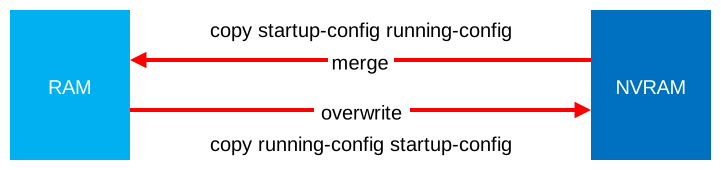
When you copy something to the running configuration, it’s similar to typing commands in configuration mode on the terminal. If it’s not in the running configuration, it will be added. A command that allows only one value, like an interface’s IP address, is overwritten. Commands that can exist multiple times, like static routes or access-list entries, are added next to the existing ones. A merge also doesn’t bring up a shut interface, because the source has no no shutdown line.
Here’s a picture to help you visualize this:
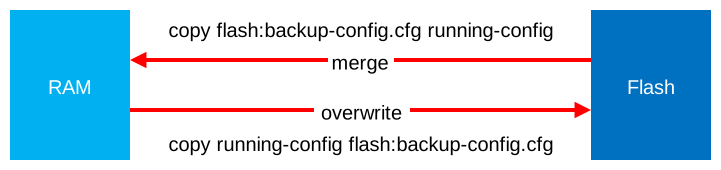
In my example, I copied something from the flash memory but it doesn’t matter what source you use. This also applies when you copy the startup-config from the NVRAM into the running configuration. For example, when you copy the startup configuration to the running configuration:
Erase startup config
So what methods do we have to replace the running configuration? One way is to remove the startup configuration and reload the router:
R1#erase startup-config
Set kernel IOMEM to 25 percent

Erasing the nvram filesystem will remove all configuration files! Continue? [confirm]
[OK]
Erase of nvram: complete
R1#reload

System configuration has been modified. Save? [yes/no]: no
Proceed with reload? [confirm]y
This works, but it’s slow. If you are doing labs then reloading the router over and over again becomes a chore.
Configure Replace
There is a faster method, the configure replace command allows us to replace the running configuration. It needs a complete configuration file, so I can’t use my backup-config.cfg file. Let’s see what happens when I try it anyway:
R1#configure replace flash:backup-config.cfg
This will apply all necessary additions and deletions
to replace the current running configuration with the
contents of the specified configuration file, which is
assumed to be a complete configuration, not a partial
configuration. Enter Y if you are sure you want to proceed. ? [no]: Y


%The input file is not a valid config file.
The router refuses this file because it is not a valid config file. Let’s use my-config.cfg instead. The router created this file itself when I saved the running configuration, so it is complete:
R1#configure replace flash:my-config.cfg
This will apply all necessary additions and deletions
to replace the current running configuration with the
contents of the specified configuration file, which is
assumed to be a complete configuration, not a partial
configuration. Enter Y if you are sure you want to proceed. ? [no]: Y

Total number of passes: 1
Rollback Done
The command above tells the router to replace the running configuration with the my-config.cfg file on my flash memory.
Here’s what the running configuration looks like now:
Hi Rene,
Thanks for the ticky article :slight_smile:
So , Copy from Running Config to any destination file , no issue because its overwrite/ replace with running config easily(write command also do the same things). but the issue on copy to running config , its will merge , right ? So if we want to overwrite the running config then the short way is “configure replace”. Please correct me if i am wrong :slight_smile: . Thanks
br//zaman
Hello Mohammad.
Yes, you’ve got it!
Laz