

Lesson Contents
DMVPN supports three different versions called “phases”. In my first DMVPN lesson I explained the basics and the DMVPN phase 2 configuration and DMVPN phase 1 configuration lessons explain how to configure the first two phases.
This time, I’ll show you how to configure DMVPN phase 3. We’ll use the following topology for this:
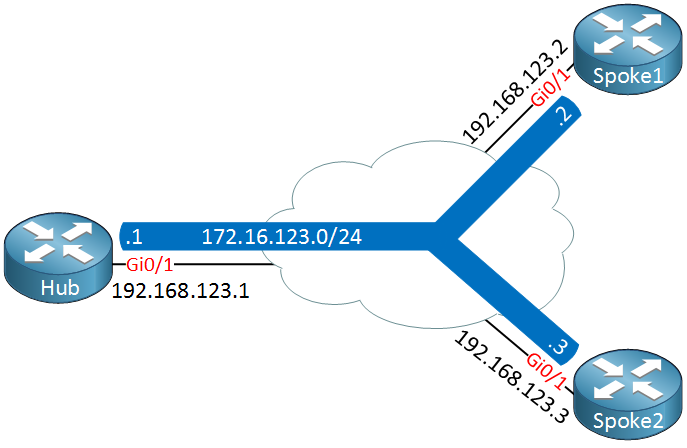
We have one hub router and two spoke routers.
Configuration
The configuration of DMVPN phase 3 and 2 is very similar. Let’s start with the following DMVPN phase 2 configuration on all routers:
Hub(config)#interface Tunnel0
Hub(config-if)#ip address 172.16.123.1 255.255.255.0
Hub(config-if)#ip nhrp authentication DMVPN
Hub(config-if)#ip nhrp map multicast dynamic
Hub(config-if)#ip nhrp network-id 1
Hub(config-if)#tunnel source GigabitEthernet0/1
Hub(config-if)#tunnel mode gre multipoint
Spoke1(config)#interface Tunnel0
Spoke1(config-if)#ip address 172.16.123.2 255.255.255.0
Spoke1(config-if)#ip nhrp authentication DMVPN
Spoke1(config-if)#ip nhrp map 172.16.123.1 192.168.123.1
Spoke1(config-if)#ip nhrp map multicast 192.168.123.1
Spoke1(config-if)#ip nhrp network-id 1
Spoke1(config-if)#ip nhrp nhs 172.16.123.1
Spoke1(config-if)#tunnel source GigabitEthernet0/1
Spoke1(config-if)#tunnel mode gre multipointSpoke2(config)#interface Tunnel0
Spoke2(config-if)#ip address 172.16.123.3 255.255.255.0
Spoke2(config-if)#ip nhrp authentication DMVPN
Spoke2(config-if)#ip nhrp map 172.16.123.1 192.168.123.1
Spoke2(config-if)#ip nhrp map multicast 192.168.123.1
Spoke2(config-if)#ip nhrp network-id 1
Spoke2(config-if)#ip nhrp nhs 172.16.123.1
Spoke2(config-if)#tunnel source GigabitEthernet0/1
Spoke2(config-if)#tunnel mode gre multipointTo migrate from DMVPN phase 2 to 3, we only need two commands…here’s the first command:
Hub(config)#interface tunnel 0
Hub(config-if)#ip nhrp redirect
The NHRP redirect command on the hub will inform spoke routers that they can reach another spoke router directly. The second command is needed on the spoke routers:
Hi !
I didnt have “ip nhrp redirect” in my IOS (C3745-ADVENTERPRISEK9_SNA-M) ??? that´s the only one i got..
/Oskar
Hi Oskar,
Check the Cisco Feature Navigator to find out which IOS versions support certain commands.
It seems the T11 release for the 3725 should support ip nhrp redirect:
c3725-adventerprisek9_sna-mz.124-6.T11.bin
http://tools.cisco.com/ITDIT/CFN/Dispatch?act=featdesc&task=display&featureId=5963
Rene
Hi Rene,
What is the advantages using the Phase 3 over Phase 2?
Try to minimize the routing entry in the spoke router?
Davis
Hi Davis,
The main advantage is that you have smaller routing tables. In phase 2, each spoke router requires specific entries for networks it wants to reach behind other spoke routers. With phase 3, a summary route is all you need.
Rene
Hi Rene,
ok. Thanks
Davis