

Lesson Contents
IPsec (Internet Protocol Security) is a framework that helps us to protect IP traffic on the network layer. Why? because the IP protocol itself doesn’t have any security features at all. IPsec can protect our traffic with the following features:
- Confidentiality: by encrypting our data, nobody except the sender and receiver will be able to read our data.
- Integrity: we want to make sure that nobody changes the data in our packets. By calculating a hash value, the sender and receiver will be able to check if changes have been made to the packet.
- Authentication: the sender and receiver will authenticate each other to make sure that we are really talking with the device we intend to.
- Anti-replay: even if a packet is encrypted and authenticated, an attacker could try to capture these packets and send them again. By using sequence numbers, the receiving IPsec peer will detect and drop any duplicate packets.
As a framework, IPsec uses a variety of protocols to implement the features I described above. Here’s an overview:
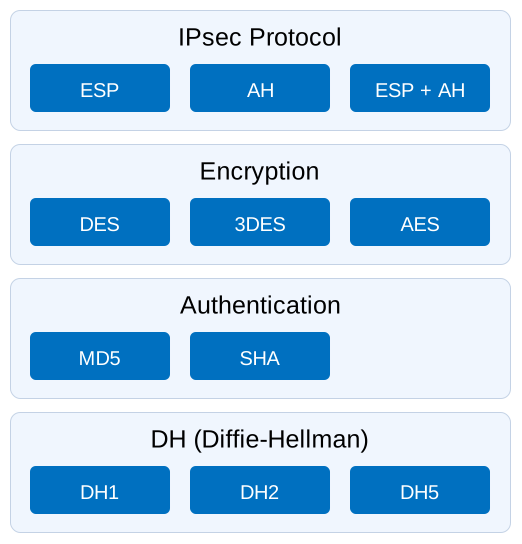
Don’t worry about all the boxes you see in the picture above, we will cover each of those. To give you an example, for encryption we can choose if we want to use DES, 3DES or AES. For authentication you can choose between MD5 or SHA. DES, 3DES and MD5 are outdated and shouldn’t be used anymore; nowadays, use AES and SHA-2 (for example, SHA-256).
IPsec can be used on many different devices, it’s used on routers, firewalls, hosts and servers. Here are some examples how you can use it:
- Between two routers to create a site-to-site VPN that “bridges” two LANs together.
- Between a firewall and windows host for remote access VPN.
- Between two linux servers to protect an insecure protocol like telnet.
IPsec is pretty complex and there are a lot of different ways to implement it. In this lesson I will start with an overview and then we will take a closer look at each of the components.
Before we can protect any IP packets, we need two IPsec peers that build the IPsec tunnel.
To establish an IPsec tunnel, we use a protocol called IKE (Internet Key Exchange).
There are two phases to build an IPsec tunnel:
- IKE phase 1
- IKE phase 2
In IKE phase 1, two peers will negotiate about the encryption, authentication, hashing and other protocols that they want to use and some other parameters that are required. In this phase, an ISAKMP (Internet Security Association and Key Management Protocol) session is established. This is also called the ISAKMP tunnel or IKE phase 1 tunnel.
The collection of parameters that the two devices will use is called a SA (Security Association). Here’s an example of two routers that have established the IKE phase 1 tunnel:
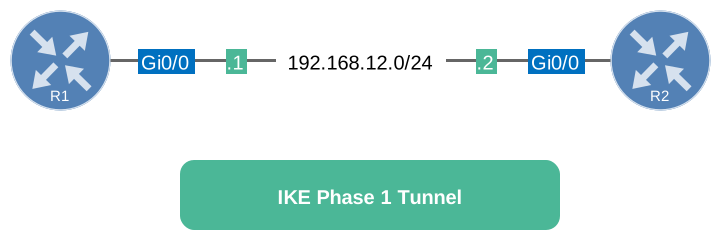
The IKE phase 1 tunnel is only used for management traffic. We use this tunnel as a secure method to establish the second tunnel called the IKE phase 2 tunnel or IPsec tunnel and for management traffic like keepalives.
Here’s a picture of our two routers that completed IKE phase 2:
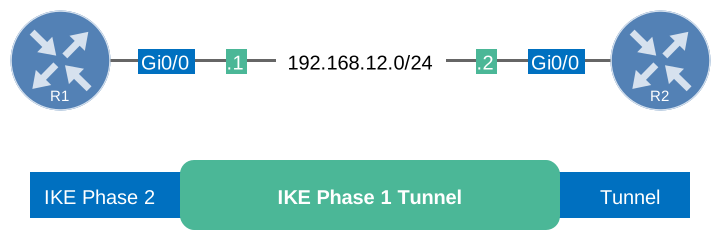
Once IKE phase 2 is completed, we have an IKE phase 2 tunnel (or IPsec tunnel) that we can use to protect our user data. This user data will be sent through the IKE phase 2 tunnel:
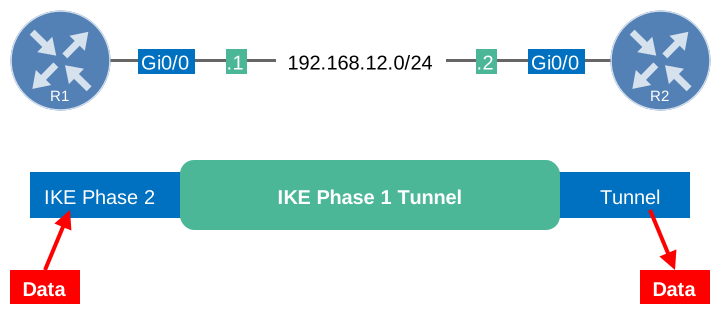
IKE builds the tunnels for us but it doesn’t authenticate or encrypt user data. We use two other protocols for this:
- AH (Authentication Header)
- ESP (Encapsulating Security Payload)
AH and ESP both offer authentication and integrity but only ESP supports encryption. Because of this, ESP is the most popular choice nowadays.
Both protocols support two different modes:
- Transport mode
- Tunnel mode
The main difference between the two is that with transport mode we will use the original IP header while in tunnel mode, we use a new IP header. Here’s an example to help you visualize this:
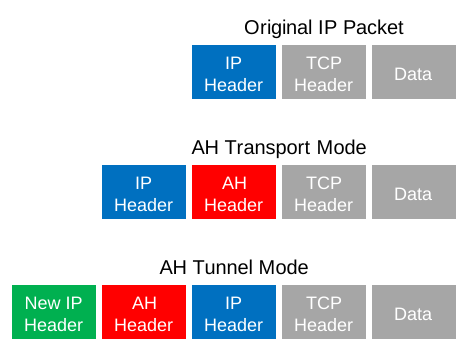
Transport mode is often between two devices that want to protect some insecure traffic (example: telnet traffic). Tunnel mode is typically used for site-to-site VPNs where we need to encapsulate the original IP packet since these are mostly private IP addresses and can’t be routed on the Internet. I will explain these two modes in detail later in this lesson.
The entire process of IPsec consists of five steps:
- Initiation: something has to trigger the creation of our tunnels. For example when you configure IPsec on a router, you use an access-list to tell the router what data to protect. When the router receives something that matches the access-list, it will start the IKE process. It’s also possible to manually initiate the tunnel.
- IKE phase 1: we negotiate a security association to build the IKE phase 1 tunnel (ISAKMP tunnel).
- IKE phase 2: within the IKE phase 1 tunnel, we build the IKE phase 2 tunnel (IPsec tunnel).
- Data transfer: we protect user data by sending it through the IKE phase 2 tunnel.
- Termination: when there is no user data to protect then the IPsec tunnel will be terminated after awhile.
Now you have an idea of the basics of IPsec, let’s take a closer look at each of the different components.
IKE (Internet Key Exchange)
IKE (Internet Key Exchange) is one of the primary protocols for IPsec since it establishes the security association between two peers. There are two versions of IKE:
- IKEv1
- IKEv2
IKEv1 was introduced around 1998 and superseded by IKEv2 in 2005. There are some differences between the two versions:
- IKEv2 requires less bandwidth than IKEv1.
- IKEv2 supports EAP authentication (next to pre-shared keys and digital certificates).
- IKEv2 has built-in support for NAT traversal (required when your IPsec peer is behind a NAT router).
- IKEv2 has a built-in keepalive mechanism for tunnels.
The list with advantages goes on but for now, let’s focus on understanding IKE. As explained before, IKE uses two phases:
- IKE Phase 1
- IKE Phase 2
Let’s discuss what happens at each phase. Everything I explain below applies to IKEv1.
IKE Phase 1
The main purpose of IKE phase 1 is to establish a secure tunnel that we can use for IKE phase 2.
We can break down phase 1 in three simple steps:
Step 1 : Negotiation
The peer that has traffic that should be protected will initiate the IKE phase 1 negotiation. The two peers will negotiate about the following items:
- Hashing: we use a hashing algorithm to verify the integrity, we use MD5 or SHA for this. MD5 is outdated, so use SHA-2 (for example, SHA-256).
- Authentication: each peer has to prove who he is. Two commonly used options are a pre-shared key or digital certificates.
- DH (Diffie Hellman) group: the DH group determines the strength of the key that is used in the key exchange process. Higher group numbers are typically more secure, but not always: group 22, for example, is weaker than group 14. A sensible choice nowadays is group 14 (2048-bit) or an elliptic curve group such as group 19.
- Lifetime: how long does the IKE phase 1 tunnel stand up? the shorter the lifetime, the more secure it is because rebuilding it means we will also use new keying material. Each vendor uses a different lifetime, a common default value is 86400 seconds (1 day).
- Encryption: what algorithm do we use for encryption? For example, DES, 3DES or AES. Only AES is a sensible choice nowadays.
Step 2: DH Key Exchange
Once the negotiation has succeeded, the two peers will know what policy to use. They will now use the DH group that they negotiated to exchange keying material. The end result will be that both peers will have a shared key.
Step 3: Authentication
The last step is that the two peers will authenticate each other using the authentication method that they agreed upon in the negotiation. When the authentication is successful, we have completed IKE phase 1. The end result is a IKE phase 1 tunnel (aka ISAKMP tunnel) which is bidirectional. This means that both peers can send and receive on this tunnel.
The three steps above can be completed using two different modes:
- Main mode
- Aggressive mode
Main mode uses six messages while aggressive mode only uses three messages. Main mode is considered more secure. Let’s take a closer look at both modes.
Main Mode
IKEv1 main mode uses 6 messages. I will show you these in Wireshark and I’ll explain the different fields. I’m using two routers running Cisco IOS 15.9 (IOSv).
Message 1
Frame 1: Packet, 210 bytes on wire (1680 bits), 210 bytes captured (1680 bits)
Ethernet II, Src: 52:54:00:c6:bb:16 (52:54:00:c6:bb:16), Dst: 52:54:00:0e:a1:ea (52:54:00:0e:a1:ea)
Internet Protocol Version 4, Src: 192.168.12.1, Dst: 192.168.12.2
User Datagram Protocol, Src Port: 500, Dst Port: 500
Internet Security Association and Key Management Protocol
    Initiator SPI: 43ad8273bc812690
    Responder SPI: 0000000000000000
    Next payload: Security Association (1)
    Version: 1.0
        0001 .... = MjVer: 0x1
        .... 0000 = MnVer: 0x0
    Exchange type: Identity Protection (Main Mode) (2)
    Flags: 0x00
        .... ...0 = Encryption: Not encrypted
        .... ..0. = Commit: No commit
        .... .0.. = Authentication: No authentication
    Message ID: 0x00000000
    Length: 168
    Payload: Security Association (1)
        Next payload: Vendor ID (13)
        Reserved: 00
        Payload length: 60
        Domain of interpretation: IPSEC (1)
        Situation: 00000001
            .... .... .... .... .... .... .... ...1 = Identity Only: True
            .... .... .... .... .... .... .... ..0. = Secrecy: False
            .... .... .... .... .... .... .... .0.. = Integrity: False
        Payload: Proposal (2) # 1
            Next payload: NONE / No Next Payload (0)
            Reserved: 00
            Payload length: 48
            Proposal number: 1
            Protocol ID: ISAKMP (1)
            SPI Size: 0
            Proposal transforms: 1
            Payload: Transform (3) # 1
                Next payload: NONE / No Next Payload (0)
                Reserved: 00
                Payload length: 40
                Transform number: 1
                Transform ID: KEY_IKE (1)
                Reserved: 0000
                IKE Attribute (t=1,l=2): Encryption-Algorithm: AES-CBC
                    1... .... .... .... = Format: Type/Value (TV)
                    Type: Encryption-Algorithm (1)
                    Value: 0007
                    Encryption Algorithm: AES-CBC (7)
                IKE Attribute (t=14,l=2): Key-Length: 128
                    1... .... .... .... = Format: Type/Value (TV)
                    Type: Key-Length (14)
                    Value: 0080
                    Key Length: 128
                IKE Attribute (t=2,l=2): Hash-Algorithm: SHA
                    1... .... .... .... = Format: Type/Value (TV)
                    Type: Hash-Algorithm (2)
                    Value: 0002
                    HASH Algorithm: SHA (2)
                IKE Attribute (t=4,l=2): Group-Description: Alternate 1024-bit MODP group
                    1... .... .... .... = Format: Type/Value (TV)
                    Type: Group-Description (4)
                    Value: 0002
                    Group Description: Alternate 1024-bit MODP group (2)
                IKE Attribute (t=3,l=2): Authentication-Method: Pre-shared key
                    1... .... .... .... = Format: Type/Value (TV)
                    Type: Authentication-Method (3)
                    Value: 0001
                    Authentication Method: Pre-shared key (1)
                IKE Attribute (t=11,l=2): Life-Type: Seconds
                    1... .... .... .... = Format: Type/Value (TV)
                    Type: Life-Type (11)
                    Value: 0001
                    Life Type: Seconds (1)
                IKE Attribute (t=12,l=4): Life-Duration: 86400
                    0... .... .... .... = Format: Type/Length/Value (TLV)
                    Type: Life-Duration (12)
                    Length: 4
                    Value: 00015180
                    Life Duration: 86400
    Payload: Vendor ID (13) : RFC 3947 Negotiation of NAT-Traversal in the IKE
        Next payload: Vendor ID (13)
        Reserved: 00
        Payload length: 20
        Vendor ID: 4a131c81070358455c5728f20e95452f
        Vendor ID: RFC 3947 Negotiation of NAT-Traversal in the IKE
    Payload: Vendor ID (13) : draft-ietf-ipsec-nat-t-ike-07
        Next payload: Vendor ID (13)
        Reserved: 00
        Payload length: 20
        Vendor ID: 439b59f8ba676c4c7737ae22eab8f582
        Vendor ID: draft-ietf-ipsec-nat-t-ike-07
    Payload: Vendor ID (13) : draft-ietf-ipsec-nat-t-ike-03
        Next payload: Vendor ID (13)
        Reserved: 00
        Payload length: 20
        Vendor ID: 7d9419a65310ca6f2c179d9215529d56
        Vendor ID: draft-ietf-ipsec-nat-t-ike-03
    Payload: Vendor ID (13) : draft-ietf-ipsec-nat-t-ike-02\n
        Next payload: NONE / No Next Payload (0)
        Reserved: 00
        Payload length: 20
        Vendor ID: 90cb80913ebb696e086381b5ec427b1f
        Vendor ID: draft-ietf-ipsec-nat-t-ike-02\n
The initiator (peer that wants to build the tunnel) will send the first message. This is a proposal for the security association. Above you can see that the initiator uses IP address 192.168.12.1 and is sending a proposal to responder (peer we want to connect to) 192.168.12.2. IKE uses UDP port 500 for this. In the output above you can see an initiator SPI (Security Parameter Index), this is a unique value that identifies this security association.
We can see the IKE version (1.0) and that we are using main mode. The domain of interpretation is IPsec and this is the first proposal. In the transform payload you can find the attributes that we want to use for this security association.
Message 2
Frame 2: Packet, 150 bytes on wire (1200 bits), 150 bytes captured (1200 bits)
Ethernet II, Src: 52:54:00:0e:a1:ea (52:54:00:0e:a1:ea), Dst: 52:54:00:c6:bb:16 (52:54:00:c6:bb:16)
Internet Protocol Version 4, Src: 192.168.12.2, Dst: 192.168.12.1
User Datagram Protocol, Src Port: 500, Dst Port: 500
Internet Security Association and Key Management Protocol
    Initiator SPI: 43ad8273bc812690
    Responder SPI: 5295c798228e3cec
    Next payload: Security Association (1)
    Version: 1.0
        0001 .... = MjVer: 0x1
        .... 0000 = MnVer: 0x0
    Exchange type: Identity Protection (Main Mode) (2)
    Flags: 0x00
        .... ...0 = Encryption: Not encrypted
        .... ..0. = Commit: No commit
        .... .0.. = Authentication: No authentication
    Message ID: 0x00000000
    Length: 108
    Payload: Security Association (1)
        Next payload: Vendor ID (13)
        Reserved: 00
        Payload length: 60
        Domain of interpretation: IPSEC (1)
        Situation: 00000001
            .... .... .... .... .... .... .... ...1 = Identity Only: True
            .... .... .... .... .... .... .... ..0. = Secrecy: False
            .... .... .... .... .... .... .... .0.. = Integrity: False
        Payload: Proposal (2) # 1
            Next payload: NONE / No Next Payload (0)
            Reserved: 00
            Payload length: 48
            Proposal number: 1
            Protocol ID: ISAKMP (1)
            SPI Size: 0
            Proposal transforms: 1
            Payload: Transform (3) # 1
                Next payload: NONE / No Next Payload (0)
                Reserved: 00
                Payload length: 40
                Transform number: 1
                Transform ID: KEY_IKE (1)
                Reserved: 0000
                IKE Attribute (t=1,l=2): Encryption-Algorithm: AES-CBC
                    1... .... .... .... = Format: Type/Value (TV)
                    Type: Encryption-Algorithm (1)
                    Value: 0007
                    Encryption Algorithm: AES-CBC (7)
                IKE Attribute (t=14,l=2): Key-Length: 128
                    1... .... .... .... = Format: Type/Value (TV)
                    Type: Key-Length (14)
                    Value: 0080
                    Key Length: 128
                IKE Attribute (t=2,l=2): Hash-Algorithm: SHA
                    1... .... .... .... = Format: Type/Value (TV)
                    Type: Hash-Algorithm (2)
                    Value: 0002
                    HASH Algorithm: SHA (2)
                IKE Attribute (t=4,l=2): Group-Description: Alternate 1024-bit MODP group
                    1... .... .... .... = Format: Type/Value (TV)
                    Type: Group-Description (4)
                    Value: 0002
                    Group Description: Alternate 1024-bit MODP group (2)
                IKE Attribute (t=3,l=2): Authentication-Method: Pre-shared key
                    1... .... .... .... = Format: Type/Value (TV)
                    Type: Authentication-Method (3)
                    Value: 0001
                    Authentication Method: Pre-shared key (1)
                IKE Attribute (t=11,l=2): Life-Type: Seconds
                    1... .... .... .... = Format: Type/Value (TV)
                    Type: Life-Type (11)
                    Value: 0001
                    Life Type: Seconds (1)
                IKE Attribute (t=12,l=4): Life-Duration: 86400
                    0... .... .... .... = Format: Type/Length/Value (TLV)
                    Type: Life-Duration (12)
                    Length: 4
                    Value: 00015180
                    Life Duration: 86400
    Payload: Vendor ID (13) : RFC 3947 Negotiation of NAT-Traversal in the IKE
        Next payload: NONE / No Next Payload (0)
        Reserved: 00
        Payload length: 20
        Vendor ID: 4a131c81070358455c5728f20e95452f
        Vendor ID: RFC 3947 Negotiation of NAT-Traversal in the IKE
When the responder receives the first message from the initiator, it will reply. This message is used to inform the initiator that we agree upon the attributes in the transform payload. You can also see that the responder has set its own SPI value.
Message 3
Frame 3: Packet, 326 bytes on wire (2608 bits), 326 bytes captured (2608 bits)
Ethernet II, Src: 52:54:00:c6:bb:16 (52:54:00:c6:bb:16), Dst: 52:54:00:0e:a1:ea (52:54:00:0e:a1:ea)
Internet Protocol Version 4, Src: 192.168.12.1, Dst: 192.168.12.2
User Datagram Protocol, Src Port: 500, Dst Port: 500
Internet Security Association and Key Management Protocol
    Initiator SPI: 43ad8273bc812690
    Responder SPI: 5295c798228e3cec
    Next payload: Key Exchange (4)
    Version: 1.0
        0001 .... = MjVer: 0x1
        .... 0000 = MnVer: 0x0
    Exchange type: Identity Protection (Main Mode) (2)
    Flags: 0x00
        .... ...0 = Encryption: Not encrypted
        .... ..0. = Commit: No commit
        .... .0.. = Authentication: No authentication
    Message ID: 0x00000000
    Length: 284
    Payload: Key Exchange (4)
        Next payload: Nonce (10)
        Reserved: 00
        Payload length: 132
        Key Exchange Data […]: b30cc4d1491a105cc19b5883918ae9d75c67a6a61a03314e9030a39670284958f3fe519189a3825b208d20da13ad062e41a14b4aea149b732cf19fa30c8b3fa7b75fbf461a182db1a0856c23c702742716ea1c623cd6ec7aab9b6f595fb5a6efa639b4f2435e2b249dc6ac
    Payload: Nonce (10)
        Next payload: Vendor ID (13)
        Reserved: 00
        Payload length: 24
        Nonce DATA: 8a1228e38fac6cedc030e508130ff48059944117
    Payload: Vendor ID (13) : RFC 3706 DPD (Dead Peer Detection)
        Next payload: Vendor ID (13)
        Reserved: 00
        Payload length: 20
        Vendor ID: afcad71368a1f1c96b8696fc77570100
        Vendor ID: RFC 3706 DPD (Dead Peer Detection)
    Payload: Vendor ID (13) : Unknown Vendor ID
        Next payload: Vendor ID (13)
        Reserved: 00
        Payload length: 20
        Vendor ID: b66a256ebc80269094167d8b98315e6f
        Vendor ID: Unknown Vendor ID
    Payload: Vendor ID (13) : XAUTH
        Next payload: NAT-D (RFC 3947) (20)
        Reserved: 00
        Payload length: 12
        Vendor ID: 09002689dfd6b712
        Vendor ID: XAUTH
    Payload: NAT-D (RFC 3947) (20)
        Next payload: NAT-D (RFC 3947) (20)
        Reserved: 00
        Payload length: 24
        HASH of the address and port: e90eedfae510870ab8f082b30a343b7d00209bbf
    Payload: NAT-D (RFC 3947) (20)
        Next payload: NONE / No Next Payload (0)
        Reserved: 00
        Payload length: 24
        HASH of the address and port: aa594b7b803d31f47d3cd47a5b28f64e8075a7a2
Since our peers agree on the security association to use, the initiator will start the Diffie Hellman key exchange. In the output above you can see the payload for the key exchange and the nonce.
Message 4
Frame 4: Packet, 346 bytes on wire (2768 bits), 346 bytes captured (2768 bits)
Ethernet II, Src: 52:54:00:0e:a1:ea (52:54:00:0e:a1:ea), Dst: 52:54:00:c6:bb:16 (52:54:00:c6:bb:16)
Internet Protocol Version 4, Src: 192.168.12.2, Dst: 192.168.12.1
User Datagram Protocol, Src Port: 500, Dst Port: 500
Internet Security Association and Key Management Protocol
    Initiator SPI: 43ad8273bc812690
    Responder SPI: 5295c798228e3cec
    Next payload: Key Exchange (4)
    Version: 1.0
        0001 .... = MjVer: 0x1
        .... 0000 = MnVer: 0x0
    Exchange type: Identity Protection (Main Mode) (2)
    Flags: 0x00
        .... ...0 = Encryption: Not encrypted
        .... ..0. = Commit: No commit
        .... .0.. = Authentication: No authentication
    Message ID: 0x00000000
    Length: 304
    Payload: Key Exchange (4)
        Next payload: Nonce (10)
        Reserved: 00
        Payload length: 132
        Key Exchange Data […]: 6dc1e4caf85a7e63e4bba213aefe4504bbfb1edec79772a580141309c005bf2b9ecf5995f702f7d2475534a5699e747b8385d0ba4fe554619bbb7c230ad98c26fe51fbc03ad1f5fa2fe6f305fce37ffaaa4f4cdd51f3f291b567558bd21c468cc76eb598103a6727144baa
    Payload: Nonce (10)
        Next payload: Vendor ID (13)
        Reserved: 00
        Payload length: 24
        Nonce DATA: 77de236b2d5beecfdf74370feead81dfb71ed801
    Payload: Vendor ID (13) : CISCO-UNITY 1.0
        Next payload: Vendor ID (13)
        Reserved: 00
        Payload length: 20
        Vendor ID: 12f5f28c457168a9702d9fe274cc0100
        Vendor ID: CISCO-UNITY
        CISCO-UNITY Major version: 1
        CISCO-UNITY Minor version: 0
    Payload: Vendor ID (13) : RFC 3706 DPD (Dead Peer Detection)
        Next payload: Vendor ID (13)
        Reserved: 00
        Payload length: 20
        Vendor ID: afcad71368a1f1c96b8696fc77570100
        Vendor ID: RFC 3706 DPD (Dead Peer Detection)
    Payload: Vendor ID (13) : Unknown Vendor ID
        Next payload: Vendor ID (13)
        Reserved: 00
        Payload length: 20
        Vendor ID: a7526085228f3cec842b6489f0012d80
        Vendor ID: Unknown Vendor ID
    Payload: Vendor ID (13) : XAUTH
        Next payload: NAT-D (RFC 3947) (20)
        Reserved: 00
        Payload length: 12
        Vendor ID: 09002689dfd6b712
        Vendor ID: XAUTH
    Payload: NAT-D (RFC 3947) (20)
        Next payload: NAT-D (RFC 3947) (20)
        Reserved: 00
        Payload length: 24
        HASH of the address and port: aa594b7b803d31f47d3cd47a5b28f64e8075a7a2
    Payload: NAT-D (RFC 3947) (20)
        Next payload: NONE / No Next Payload (0)
        Reserved: 00
        Payload length: 24
        HASH of the address and port: e90eedfae510870ab8f082b30a343b7d00209bbf
The responder will also send his/her Diffie Hellman nonces to the initiator, our two peers can now calculate the Diffie Hellman shared key.
Message 5
Frame 5: Packet, 150 bytes on wire (1200 bits), 150 bytes captured (1200 bits)
Ethernet II, Src: 52:54:00:c6:bb:16 (52:54:00:c6:bb:16), Dst: 52:54:00:0e:a1:ea (52:54:00:0e:a1:ea)
Internet Protocol Version 4, Src: 192.168.12.1, Dst: 192.168.12.2
User Datagram Protocol, Src Port: 500, Dst Port: 500
Internet Security Association and Key Management Protocol
    Initiator SPI: 43ad8273bc812690
    Responder SPI: 5295c798228e3cec
    Next payload: Identification (5)
    Version: 1.0
        0001 .... = MjVer: 0x1
        .... 0000 = MnVer: 0x0
    Exchange type: Identity Protection (Main Mode) (2)
    Flags: 0x01
        .... ...1 = Encryption: Encrypted
        .... ..0. = Commit: No commit
        .... .0.. = Authentication: No authentication
    Message ID: 0x00000000
    Length: 108
    Encrypted Data (80 bytes)
The last two messages are encrypted so we can’t see its contents anymore. These two are used for identification and authentication of each peer. The initiator starts.
Message 6
Frame 6: Packet, 118 bytes on wire (944 bits), 118 bytes captured (944 bits)
Ethernet II, Src: 52:54:00:0e:a1:ea (52:54:00:0e:a1:ea), Dst: 52:54:00:c6:bb:16 (52:54:00:c6:bb:16)
Internet Protocol Version 4, Src: 192.168.12.2, Dst: 192.168.12.1
User Datagram Protocol, Src Port: 500, Dst Port: 500
Internet Security Association and Key Management Protocol
    Initiator SPI: 43ad8273bc812690
    Responder SPI: 5295c798228e3cec
    Next payload: Identification (5)
    Version: 1.0
        0001 .... = MjVer: 0x1
        .... 0000 = MnVer: 0x0
    Exchange type: Identity Protection (Main Mode) (2)
    Flags: 0x01
        .... ...1 = Encryption: Encrypted
        .... ..0. = Commit: No commit
        .... .0.. = Authentication: No authentication
    Message ID: 0x00000000
    Length: 76
    Encrypted Data (48 bytes)
And above we have the 6th message from the responder with its identification and authentication information. IKEv1 main mode has now completed and we can continue with IKE phase 2.
Before we continue with phase 2, let me show you aggressive mode first.
Aggressive Mode
IKEv1 aggressive mode only requires three messages to establish the security association. It’s quicker than main mode since it adds all the information required for the DH exchange in the first two messages. Main mode is considered more secure since identification is encrypted, aggressive mode does this in clear-text.
Let’s take a look at the different messages.
Message 1
Frame 1: Packet, 430 bytes on wire (3440 bits), 430 bytes captured (3440 bits)
Ethernet II, Src: 52:54:00:c6:bb:16 (52:54:00:c6:bb:16), Dst: 52:54:00:0e:a1:ea (52:54:00:0e:a1:ea)
Internet Protocol Version 4, Src: 192.168.12.1, Dst: 192.168.12.2
User Datagram Protocol, Src Port: 500, Dst Port: 500
Internet Security Association and Key Management Protocol
    Initiator SPI: 43ad82730b78ffa5
    Responder SPI: 0000000000000000
    Next payload: Security Association (1)
    Version: 1.0
        0001 .... = MjVer: 0x1
        .... 0000 = MnVer: 0x0
    Exchange type: Aggressive (4)
    Flags: 0x00
        .... ...0 = Encryption: Not encrypted
        .... ..0. = Commit: No commit
        .... .0.. = Authentication: No authentication
    Message ID: 0x00000000
    Length: 388
    Payload: Security Association (1)
        Next payload: Vendor ID (13)
        Reserved: 00
        Payload length: 60
        Domain of interpretation: IPSEC (1)
        Situation: 00000001
            .... .... .... .... .... .... .... ...1 = Identity Only: True
            .... .... .... .... .... .... .... ..0. = Secrecy: False
            .... .... .... .... .... .... .... .0.. = Integrity: False
        Payload: Proposal (2) # 1
            Next payload: NONE / No Next Payload (0)
            Reserved: 00
            Payload length: 48
            Proposal number: 1
            Protocol ID: ISAKMP (1)
            SPI Size: 0
            Proposal transforms: 1
            Payload: Transform (3) # 1
                Next payload: NONE / No Next Payload (0)
                Reserved: 00
                Payload length: 40
                Transform number: 1
                Transform ID: KEY_IKE (1)
                Reserved: 0000
                IKE Attribute (t=1,l=2): Encryption-Algorithm: AES-CBC
                    1... .... .... .... = Format: Type/Value (TV)
                    Type: Encryption-Algorithm (1)
                    Value: 0007
                    Encryption Algorithm: AES-CBC (7)
                IKE Attribute (t=14,l=2): Key-Length: 128
                    1... .... .... .... = Format: Type/Value (TV)
                    Type: Key-Length (14)
                    Value: 0080
                    Key Length: 128
                IKE Attribute (t=2,l=2): Hash-Algorithm: SHA
                    1... .... .... .... = Format: Type/Value (TV)
                    Type: Hash-Algorithm (2)
                    Value: 0002
                    HASH Algorithm: SHA (2)
                IKE Attribute (t=4,l=2): Group-Description: Alternate 1024-bit MODP group
                    1... .... .... .... = Format: Type/Value (TV)
                    Type: Group-Description (4)
                    Value: 0002
                    Group Description: Alternate 1024-bit MODP group (2)
                IKE Attribute (t=3,l=2): Authentication-Method: Pre-shared key
                    1... .... .... .... = Format: Type/Value (TV)
                    Type: Authentication-Method (3)
                    Value: 0001
                    Authentication Method: Pre-shared key (1)
                IKE Attribute (t=11,l=2): Life-Type: Seconds
                    1... .... .... .... = Format: Type/Value (TV)
                    Type: Life-Type (11)
                    Value: 0001
                    Life Type: Seconds (1)
                IKE Attribute (t=12,l=4): Life-Duration: 86400
                    0... .... .... .... = Format: Type/Length/Value (TLV)
                    Type: Life-Duration (12)
                    Length: 4
                    Value: 00015180
                    Life Duration: 86400
    Payload: Vendor ID (13) : RFC 3947 Negotiation of NAT-Traversal in the IKE
        Next payload: Vendor ID (13)
        Reserved: 00
        Payload length: 20
        Vendor ID: 4a131c81070358455c5728f20e95452f
        Vendor ID: RFC 3947 Negotiation of NAT-Traversal in the IKE
    Payload: Vendor ID (13) : draft-ietf-ipsec-nat-t-ike-07
        Next payload: Vendor ID (13)
        Reserved: 00
        Payload length: 20
        Vendor ID: 439b59f8ba676c4c7737ae22eab8f582
        Vendor ID: draft-ietf-ipsec-nat-t-ike-07
    Payload: Vendor ID (13) : draft-ietf-ipsec-nat-t-ike-03
        Next payload: Vendor ID (13)
        Reserved: 00
        Payload length: 20
        Vendor ID: 7d9419a65310ca6f2c179d9215529d56
        Vendor ID: draft-ietf-ipsec-nat-t-ike-03
    Payload: Vendor ID (13) : draft-ietf-ipsec-nat-t-ike-02\n
        Next payload: Key Exchange (4)
        Reserved: 00
        Payload length: 20
        Vendor ID: 90cb80913ebb696e086381b5ec427b1f
        Vendor ID: draft-ietf-ipsec-nat-t-ike-02\n
    Payload: Key Exchange (4)
        Next payload: Nonce (10)
        Reserved: 00
        Payload length: 132
        Key Exchange Data […]: ccfab2aac995051f377685f8f5a2204acbba3218ec56b364546a4e1ef211ed909cf1d449161acf729c870d1b0a962fc805e2a58af6c2a7f2ef5ea9b903281227c8635602c594ec32bf6572c6ac9df6128c1b5ea079ec30bb86966d54260b3e761fa5c1e84212abd82457d1
    Payload: Nonce (10)
        Next payload: Identification (5)
        Reserved: 00
        Payload length: 24
        Nonce DATA: 32deb6f18c1c78148f19d858485ea571bf692793
    Payload: Identification (5)
        Next payload: Vendor ID (13)
        Reserved: 00
        Payload length: 12
        ID type: IPV4_ADDR (1)
        Protocol ID: UDP (17)
        Port: Unused
        Identification Data:192.168.12.1
            ID_IPV4_ADDR: 192.168.12.1
    Payload: Vendor ID (13) : RFC 3706 DPD (Dead Peer Detection)
        Next payload: Vendor ID (13)
        Reserved: 00
        Payload length: 20
        Vendor ID: afcad71368a1f1c96b8696fc77570100
        Vendor ID: RFC 3706 DPD (Dead Peer Detection)
    Payload: Vendor ID (13) : XAUTH
        Next payload: Vendor ID (13)
        Reserved: 00
        Payload length: 12
        Vendor ID: 09002689dfd6b712
        Vendor ID: XAUTH
    Payload: Vendor ID (13) : Unknown Vendor ID
        Next payload: NONE / No Next Payload (0)
        Reserved: 00
        Payload length: 20
        Vendor ID: b66a256e0b79ffa5bd621a97be21f774
        Vendor ID: Unknown Vendor ID
The first message is from the initiator (192.168.12.1) to the responder (192.168.12.2). You can see the transform payload with the security association attributes , DH nonces and the identification (in clear text) in this single message.
Message 2
Frame 2: Packet, 462 bytes on wire (3696 bits), 462 bytes captured (3696 bits)
Ethernet II, Src: 52:54:00:0e:a1:ea (52:54:00:0e:a1:ea), Dst: 52:54:00:c6:bb:16 (52:54:00:c6:bb:16)
Internet Protocol Version 4, Src: 192.168.12.2, Dst: 192.168.12.1
User Datagram Protocol, Src Port: 500, Dst Port: 500
Internet Security Association and Key Management Protocol
    Initiator SPI: 43ad82730b78ffa5
    Responder SPI: 5295c79807622783
    Next payload: Security Association (1)
    Version: 1.0
        0001 .... = MjVer: 0x1
        .... 0000 = MnVer: 0x0
    Exchange type: Aggressive (4)
    Flags: 0x00
        .... ...0 = Encryption: Not encrypted
        .... ..0. = Commit: No commit
        .... .0.. = Authentication: No authentication
    Message ID: 0x00000000
    Length: 420
    Payload: Security Association (1)
        Next payload: Vendor ID (13)
        Reserved: 00
        Payload length: 60
        Domain of interpretation: IPSEC (1)
        Situation: 00000001
            .... .... .... .... .... .... .... ...1 = Identity Only: True
            .... .... .... .... .... .... .... ..0. = Secrecy: False
            .... .... .... .... .... .... .... .0.. = Integrity: False
        Payload: Proposal (2) # 1
            Next payload: NONE / No Next Payload (0)
            Reserved: 00
            Payload length: 48
            Proposal number: 1
            Protocol ID: ISAKMP (1)
            SPI Size: 0
            Proposal transforms: 1
            Payload: Transform (3) # 1
                Next payload: NONE / No Next Payload (0)
                Reserved: 00
                Payload length: 40
                Transform number: 1
                Transform ID: KEY_IKE (1)
                Reserved: 0000
                IKE Attribute (t=1,l=2): Encryption-Algorithm: AES-CBC
                    1... .... .... .... = Format: Type/Value (TV)
                    Type: Encryption-Algorithm (1)
                    Value: 0007
                    Encryption Algorithm: AES-CBC (7)
                IKE Attribute (t=14,l=2): Key-Length: 128
                    1... .... .... .... = Format: Type/Value (TV)
                    Type: Key-Length (14)
                    Value: 0080
                    Key Length: 128
                IKE Attribute (t=2,l=2): Hash-Algorithm: SHA
                    1... .... .... .... = Format: Type/Value (TV)
                    Type: Hash-Algorithm (2)
                    Value: 0002
                    HASH Algorithm: SHA (2)
                IKE Attribute (t=4,l=2): Group-Description: Alternate 1024-bit MODP group
                    1... .... .... .... = Format: Type/Value (TV)
                    Type: Group-Description (4)
                    Value: 0002
                    Group Description: Alternate 1024-bit MODP group (2)
                IKE Attribute (t=3,l=2): Authentication-Method: Pre-shared key
                    1... .... .... .... = Format: Type/Value (TV)
                    Type: Authentication-Method (3)
                    Value: 0001
                    Authentication Method: Pre-shared key (1)
                IKE Attribute (t=11,l=2): Life-Type: Seconds
                    1... .... .... .... = Format: Type/Value (TV)
                    Type: Life-Type (11)
                    Value: 0001
                    Life Type: Seconds (1)
                IKE Attribute (t=12,l=4): Life-Duration: 86400
                    0... .... .... .... = Format: Type/Length/Value (TLV)
                    Type: Life-Duration (12)
                    Length: 4
                    Value: 00015180
                    Life Duration: 86400
    Payload: Vendor ID (13) : CISCO-UNITY 1.0
        Next payload: Vendor ID (13)
        Reserved: 00
        Payload length: 20
        Vendor ID: 12f5f28c457168a9702d9fe274cc0100
        Vendor ID: CISCO-UNITY
        CISCO-UNITY Major version: 1
        CISCO-UNITY Minor version: 0
    Payload: Vendor ID (13) : RFC 3706 DPD (Dead Peer Detection)
        Next payload: Vendor ID (13)
        Reserved: 00
        Payload length: 20
        Vendor ID: afcad71368a1f1c96b8696fc77570100
        Vendor ID: RFC 3706 DPD (Dead Peer Detection)
    Payload: Vendor ID (13) : Unknown Vendor ID
        Next payload: Vendor ID (13)
        Reserved: 00
        Payload length: 20
        Vendor ID: a75260850763278312b6457e30267d51
        Vendor ID: Unknown Vendor ID
    Payload: Vendor ID (13) : XAUTH
        Next payload: Vendor ID (13)
        Reserved: 00
        Payload length: 12
        Vendor ID: 09002689dfd6b712
        Vendor ID: XAUTH
    Payload: Vendor ID (13) : RFC 3947 Negotiation of NAT-Traversal in the IKE
        Next payload: Key Exchange (4)
        Reserved: 00
        Payload length: 20
        Vendor ID: 4a131c81070358455c5728f20e95452f
        Vendor ID: RFC 3947 Negotiation of NAT-Traversal in the IKE
    Payload: Key Exchange (4)
        Next payload: Identification (5)
        Reserved: 00
        Payload length: 132
        Key Exchange Data […]: 91233f4e0a5998acda57a88ef2a7b71ee55ac0d3e60abd854151ac8b19a58c72656d7c99ab8daa3552896f52c18518cdae2725a85677d685b93085d40ecf25e1799cb59e4c5f49bf6b119d677310a44e143c540ffd85892e4d1455c8cf936f9e5d1761635ea91669eeecc2
    Payload: Identification (5)
        Next payload: Nonce (10)
        Reserved: 00
        Payload length: 12
        ID type: IPV4_ADDR (1)
        Protocol ID: Unused
        Port: Unused
        Identification Data:192.168.12.2
            ID_IPV4_ADDR: 192.168.12.2
    Payload: Nonce (10)
        Next payload: Hash (8)
        Reserved: 00
        Payload length: 24
        Nonce DATA: 54d832b87bb593f82ad40241e8ca4a5d64a9a9d2
    Payload: Hash (8)
        Next payload: NAT-D (RFC 3947) (20)
        Reserved: 00
        Payload length: 24
        Hash DATA: 8137e46901430c29f17b91bc577434b8f78fa7ec
    Payload: NAT-D (RFC 3947) (20)
        Next payload: NAT-D (RFC 3947) (20)
        Reserved: 00
        Payload length: 24
        HASH of the address and port: bb22431c4c1101071869f18ceca582dcdb930d5c
    Payload: NAT-D (RFC 3947) (20)
        Next payload: NONE / No Next Payload (0)
        Reserved: 00
        Payload length: 24
        HASH of the address and port: ab16621765ea0fc95530e23e6f38d75ae714e760
The responder now has everything it needs to generate the DH shared key and sends some nonces to the initiator so that it can also calculate the DH shared key. It also calculates a hash that is used for authentication.
Message 3
Frame 3: Packet, 182 bytes on wire (1456 bits), 182 bytes captured (1456 bits)
Ethernet II, Src: 52:54:00:c6:bb:16 (52:54:00:c6:bb:16), Dst: 52:54:00:0e:a1:ea (52:54:00:0e:a1:ea)
Internet Protocol Version 4, Src: 192.168.12.1, Dst: 192.168.12.2
User Datagram Protocol, Src Port: 500, Dst Port: 500
Internet Security Association and Key Management Protocol
    Initiator SPI: 43ad82730b78ffa5
    Responder SPI: 5295c79807622783
    Next payload: Hash (8)
    Version: 1.0
        0001 .... = MjVer: 0x1
        .... 0000 = MnVer: 0x0
    Exchange type: Aggressive (4)
    Flags: 0x01
        .... ...1 = Encryption: Encrypted
        .... ..0. = Commit: No commit
        .... .0.. = Authentication: No authentication
    Message ID: 0x00000000
    Length: 140
    Encrypted Data (112 bytes)
Both peers have everything they need, the last message from the initiator is a hash that is used for authentication.
Our IKE phase 1 tunnel is now up and running and we are ready to continue with IKE phase 2.
IKE Phase 2
The IKE phase 2 tunnel (IPsec tunnel) will be actually used to protect user data. There is only one mode to build the IKE phase 2 tunnel which is called quick mode.
Just like in IKE phase 1, our peers will negotiate about a number of items:
- IPsec Protocol: do we use AH or ESP?
- Encapsulation Mode: transport or tunnel mode?
- Encryption: what encryption algorithm do we use? DES, 3DES or AES?
- Authentication: what authentication algorithm do we use? MD5 or SHA?
- Lifetime: how long is the IKE phase 2 tunnel valid? When the tunnel is about to expire, we will refresh the keying material.
- (Optional) DH exchange: used for PFS (Perfect Forward Secrecy).
This negotiation happens within the protection of our IKE phase 1 tunnel so we can’t see anything. Just for the sake of completeness, here’s what it looks like in wireshark:
Message 1
Frame 4: Packet, 214 bytes on wire (1712 bits), 214 bytes captured (1712 bits)
Ethernet II, Src: 52:54:00:c6:bb:16 (52:54:00:c6:bb:16), Dst: 52:54:00:0e:a1:ea (52:54:00:0e:a1:ea)
Internet Protocol Version 4, Src: 192.168.12.1, Dst: 192.168.12.2
User Datagram Protocol, Src Port: 500, Dst Port: 500
Internet Security Association and Key Management Protocol
    Initiator SPI: 43ad82730b78ffa5
    Responder SPI: 5295c79807622783
    Next payload: Hash (8)
    Version: 1.0
        0001 .... = MjVer: 0x1
        .... 0000 = MnVer: 0x0
    Exchange type: Quick Mode (32)
    Flags: 0x01
        .... ...1 = Encryption: Encrypted
        .... ..0. = Commit: No commit
        .... .0.. = Authentication: No authentication
    Message ID: 0x76f986dc
    Length: 172
    Encrypted Data (144 bytes)
Message 2
Frame 5: Packet, 214 bytes on wire (1712 bits), 214 bytes captured (1712 bits)
Ethernet II, Src: 52:54:00:0e:a1:ea (52:54:00:0e:a1:ea), Dst: 52:54:00:c6:bb:16 (52:54:00:c6:bb:16)
Internet Protocol Version 4, Src: 192.168.12.2, Dst: 192.168.12.1
User Datagram Protocol, Src Port: 500, Dst Port: 500
Internet Security Association and Key Management Protocol
    Initiator SPI: 43ad82730b78ffa5
    Responder SPI: 5295c79807622783
    Next payload: Hash (8)
    Version: 1.0
        0001 .... = MjVer: 0x1
        .... 0000 = MnVer: 0x0
    Exchange type: Quick Mode (32)
    Flags: 0x01
        .... ...1 = Encryption: Encrypted
        .... ..0. = Commit: No commit
        .... .0.. = Authentication: No authentication
    Message ID: 0x76f986dc
    Length: 172
    Encrypted Data (144 bytes)
Message 3
Frame 6: Packet, 102 bytes on wire (816 bits), 102 bytes captured (816 bits)
Ethernet II, Src: 52:54:00:c6:bb:16 (52:54:00:c6:bb:16), Dst: 52:54:00:0e:a1:ea (52:54:00:0e:a1:ea)
Internet Protocol Version 4, Src: 192.168.12.1, Dst: 192.168.12.2
User Datagram Protocol, Src Port: 500, Dst Port: 500
Internet Security Association and Key Management Protocol
    Initiator SPI: 43ad82730b78ffa5
    Responder SPI: 5295c79807622783
    Next payload: Hash (8)
    Version: 1.0
        0001 .... = MjVer: 0x1
        .... 0000 = MnVer: 0x0
    Exchange type: Quick Mode (32)
    Flags: 0x01
        .... ...1 = Encryption: Encrypted
        .... ..0. = Commit: No commit
        .... .0.. = Authentication: No authentication
    Message ID: 0x76f986dc
    Length: 60
    Encrypted Data (32 bytes)
Once IKE phase 2 has completed, we are finally ready to protect some user data. Let’s see how this is done…
IPsec Protocols
AH and/or ESP are the two protocols that we use to actually protect user data. Both of them can be used in transport or tunnel mode, let’s walk through all the possible options.
Authentication Header Protocol
AH offers authentication and integrity but it doesn’t offer any encryption. It protects the IP packet by calculating a hash value over almost all fields in the IP header. The fields it excludes are the ones that can be changed in transit (TTL and header checksum). Let’s start with transport mode…
Transport Mode
Transport mode is simple, it just adds an AH header after the IP header. Here’s an example of an IP packet that carries some TCP traffic:
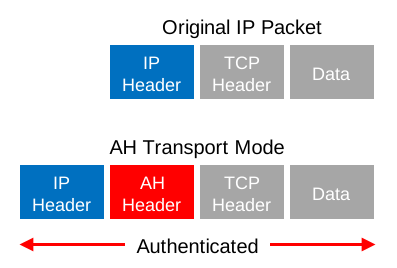
And here’s what that looks like in Wireshark:
Frame 1: 138 bytes on wire (1104 bits), 138 bytes captured (1104 bits) on interface 0
Ethernet II, Src: Cisco_8b:36:d0 (00:1d:a1:8b:36:d0), Dst: Cisco_ed:7a:f0 (00:17:5a:ed:7a:f0)
Internet Protocol Version 4, Src: 192.168.12.1 (192.168.12.1), Dst: 192.168.12.2 (192.168.12.2)
    Version: 4
    Header Length: 20 bytes
    Differentiated Services Field: 0x00 (DSCP 0x00: Default; ECN: 0x00: Not-ECT (Not ECN-Capable Transport))
    Total Length: 124
    Identification: 0x0028 (40)
    Flags: 0x00
    Fragment offset: 0
    Time to live: 255
    Protocol: Authentication Header (51)
    Header checksum: 0x21d3 [validation disabled]
    Source: 192.168.12.1 (192.168.12.1)
    Destination: 192.168.12.2 (192.168.12.2)
    [Source GeoIP: Unknown]
    [Destination GeoIP: Unknown]
Authentication Header
    Next Header: ICMP (0x01)
    Length: 24
    AH SPI: 0xcf54ccdf
    AH Sequence: 30
    AH ICV: aa9cafe5ed06d6c74cb3c671
Internet Control Message Protocol
    Type: 8 (Echo (ping) request)
    Code: 0
    Checksum: 0x7994 [correct]
    Identifier (BE): 8 (0x0008)
    Identifier (LE): 2048 (0x0800)
    Sequence number (BE): 0 (0x0000)
    Sequence number (LE): 0 (0x0000)
    [Response frame: 2]
    Data (72 bytes)
Above you can see the AH header in between the IP header and ICMP header. This is a capture I took of a ping between two routers. You can see that AH uses 5 fields:
- Next Header: this identifies the next protocol, ICMP in our example.
- Length: this is the length of the AH header.
- SPI (Security Parameters Index): this is an 32-bit identifier so the receiver knows to which flow this packet belongs.
- Sequence: this is the sequence number that helps against replay attacks.
- ICV (Integrity Check Value): this is the calculated hash for the entire packet. The receiver also calculates a hash, when it’s not the same you know something is wrong.
Let’s continue with tunnel mode.
Tunnel Mode
With tunnel mode, we add a new IP header on top of the original IP packet. This could be useful when you are using private IP addresses and you need to tunnel your traffic over the Internet. It’s possible with AH but it doesn’t offer encryption:
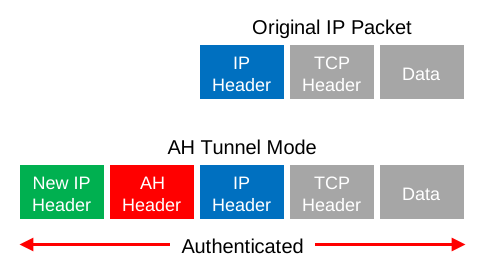
The entire IP packet will be authenticated. Here’s what it looks like in wireshark:
Frame 1: 158 bytes on wire (1264 bits), 158 bytes captured (1264 bits) on interface 0
Ethernet II, Src: Cisco_8b:36:d0 (00:1d:a1:8b:36:d0), Dst: Cisco_ed:7a:f0 (00:17:5a:ed:7a:f0)
Internet Protocol Version 4, Src: 192.168.12.1 (192.168.12.1), Dst: 192.168.12.2 (192.168.12.2)
    Version: 4
    Header Length: 20 bytes
    Differentiated Services Field: 0x00 (DSCP 0x00: Default; ECN: 0x00: Not-ECT (Not ECN-Capable Transport))
    Total Length: 144
    Identification: 0x0215 (533)
    Flags: 0x00
    Fragment offset: 0
    Time to live: 255
    Protocol: Authentication Header (51)
    Header checksum: 0x1fd2 [validation disabled]
    Source: 192.168.12.1 (192.168.12.1)
    Destination: 192.168.12.2 (192.168.12.2)
    [Source GeoIP: Unknown]
    [Destination GeoIP: Unknown]
Authentication Header
    Next Header: IPIP (0x04)
    Length: 24
    AH SPI: 0x646adc80
    AH Sequence: 5
    AH ICV: 606d21406853c0390cfe577
Internet Protocol Version 4, Src: 192.168.12.1 (192.168.12.1), Dst: 192.168.12.2 (192.168.12.2)
    Version: 4
    Header Length: 20 bytes
    Differentiated Services Field: 0x00 (DSCP 0x00: Default; ECN: 0x00: Not-ECT (Not ECN-Capable Transport))
    Total Length: 100
    Identification: 0x003c (60)
    Flags: 0x00
        0... .... = Reserved bit: Not set
        .0.. .... = Don't fragment: Not set
        ..0. .... = More fragments: Not set
    Fragment offset: 0
    Time to live: 255
    Protocol: ICMP (1)
    Header checksum: 0x2209 [validation disabled]
    Source: 192.168.12.1 (192.168.12.1)
    Destination: 192.168.12.2 (192.168.12.2)
    [Source GeoIP: Unknown]
    [Destination GeoIP: Unknown]
Internet Control Message Protocol
Above you can see the new IP header, then the AH header and finally the original IP packet that carries some ICMP traffic.
Let’s continue with ESP…
ESP (Encapsulating Security Payload) Protocol
ESP is the more popular choice of the two since it allows you to encrypt IP traffic. We can use it in transport or tunnel mode, let’s look at both.
Transport Mode
When we use transport mode, we use the original IP header and insert an ESP header. Here’s what it looks like:
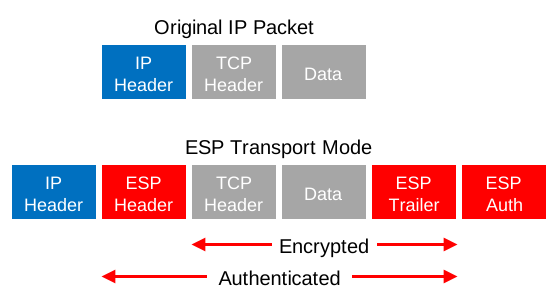
Above you can see that we add an ESP header and trailer. Our transport layer (TCP for example) and payload will be encrypted. It also offers authentication but unlike AH, it’s not for the entire IP packet. Here’s what it looks like in wireshark:
Frame 1: 166 bytes on wire (1328 bits), 166 bytes captured (1328 bits) on interface 0
Ethernet II, Src: Cisco_8b:36:d0 (00:1d:a1:8b:36:d0), Dst: Cisco_ed:7a:f0 (00:17:5a:ed:7a:f0)
Internet Protocol Version 4, Src: 192.168.12.1 (192.168.12.1), Dst: 192.168.12.2 (192.168.12.2)
    Version: 4
    Header Length: 20 bytes
    Differentiated Services Field: 0x00 (DSCP 0x00: Default; ECN: 0x00: Not-ECT (Not ECN-Capable Transport))
    Total Length: 152
    Identification: 0x0042 (66)
    Flags: 0x00
        0... .... = Reserved bit: Not set
        .0.. .... = Don't fragment: Not set
        ..0. .... = More fragments: Not set
    Fragment offset: 0
    Time to live: 255
    Protocol: Encap Security Payload (50)
    Header checksum: 0x219e [validation disabled]
    Source: 192.168.12.1 (192.168.12.1)
    Destination: 192.168.12.2 (192.168.12.2)
    [Source GeoIP: Unknown]
    [Destination GeoIP: Unknown]
Encapsulating Security Payload
    ESP SPI: 0x36cb42df (919290591)
    ESP Sequence: 1
Above, you can see the original IP packet and that we are using ESP. The IP header is in cleartext but everything else is encrypted.
Tunnel Mode
How about ESP in tunnel mode? This is where we use a new IP header which is useful for site-to-site VPNs:
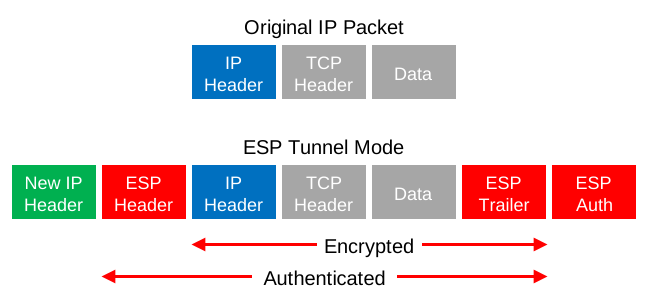
It’s similar to transport mode but we add a new header. The original IP header is now also encrypted.
Here’s what it looks like in wireshark:
Frame 2: 182 bytes on wire (1456 bits), 182 bytes captured (1456 bits) on interface 0
Ethernet II, Src: Cisco_8b:36:d0 (00:1d:a1:8b:36:d0), Dst: Cisco_ed:7a:f0 (00:17:5a:ed:7a:f0)
Internet Protocol Version 4, Src: 192.168.12.1 (192.168.12.1), Dst: 192.168.12.2 (192.168.12.2)
    Version: 4
    Header Length: 20 bytes
    Differentiated Services Field: 0x00 (DSCP 0x00: Default; ECN: 0x00: Not-ECT (Not ECN-Capable Transport))
    Total Length: 168
    Identification: 0x023e (574)
    Flags: 0x00
    Fragment offset: 0
    Time to live: 255
    Protocol: Encap Security Payload (50)
    Header checksum: 0x1f92 [validation disabled]
    Source: 192.168.12.1 (192.168.12.1)
    Destination: 192.168.12.2 (192.168.12.2)
    [Source GeoIP: Unknown]
    [Destination GeoIP: Unknown]
Encapsulating Security Payload
    ESP SPI: 0x8bb181a7 (2343666087)
    ESP Sequence: 5
The output of the capture above is similar to what you have seen in transport mode. The only difference is that this is a new IP header, you don’t get to see the original IP header.
AH and ESP
This one confuses a lot of people, it’s possible to use AH and ESP at the same time. Let’s check it out!
Transport Mode
Let’s start with transport mode, here’s what the IP packet will look like:
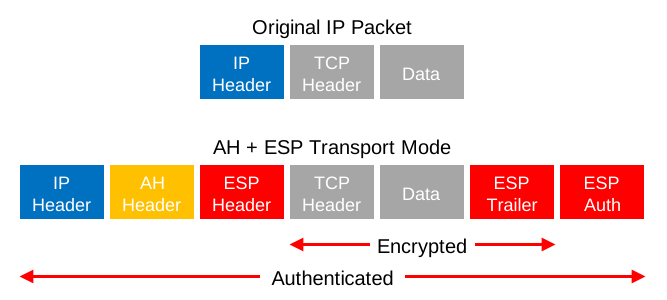
With transport mode we will use the original IP header, followed by an AH and ESP header. The transport layer, payload and ESP trailer will be encrypted.
Because we also use AH, the entire IP packet is authenticated. Here’s what it looks like in wireshark:
Frame 5: 178 bytes on wire (1424 bits), 178 bytes captured (1424 bits) on interface 0
Ethernet II, Src: Cisco_8b:36:d0 (00:1d:a1:8b:36:d0), Dst: Cisco_ed:7a:f0 (00:17:5a:ed:7a:f0)
Internet Protocol Version 4, Src: 192.168.12.1 (192.168.12.1), Dst: 192.168.12.2 (192.168.12.2)
    Version: 4
    Header Length: 20 bytes
    Differentiated Services Field: 0x00 (DSCP 0x00: Default; ECN: 0x00: Not-ECT (Not ECN-Capable Transport))
    Total Length: 164
    Identification: 0x0056 (86)
    Flags: 0x00
    Fragment offset: 0
    Time to live: 255
    Protocol: Authentication Header (51)
    Header checksum: 0x217d [validation disabled]
    Source: 192.168.12.1 (192.168.12.1)
    Destination: 192.168.12.2 (192.168.12.2)
    [Source GeoIP: Unknown]
    [Destination GeoIP: Unknown]
Authentication Header
    Next Header: Encap Security Payload (0x32)
    Length: 24
    AH SPI: 0xa90dc9aa
    AH Sequence: 1
    AH ICV: 157ba6cc340b1a30049ea551
Encapsulating Security Payload
    ESP SPI: 0xd2264f7a (3525726074)
    ESP Sequence: 1
Above, you can see the original IP packet, the AH header, and the ESP header.
Tunnel Mode
What about tunnel mode? We will add a new IP header:
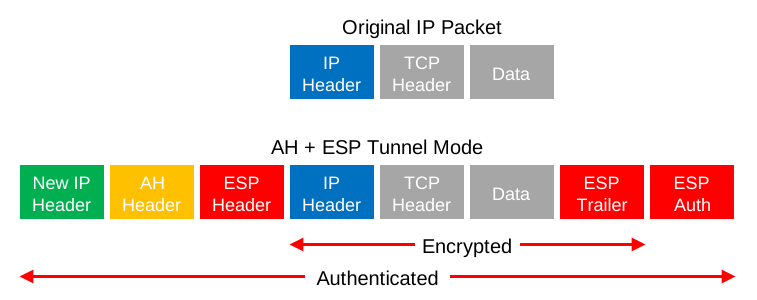
First we will have a new IP header followed by the AH and ESP header. The original IP packet will be completely encrypted and everything will be authenticated thanks to AH. Here’s what it looks like in wireshark:
Frame 5: 194 bytes on wire (1552 bits), 194 bytes captured (1552 bits) on interface 0
Ethernet II, Src: Cisco_8b:36:d0 (00:1d:a1:8b:36:d0), Dst: Cisco_ed:7a:f0 (00:17:5a:ed:7a:f0)
Internet Protocol Version 4, Src: 192.168.12.1 (192.168.12.1), Dst: 192.168.12.2 (192.168.12.2)
    Version: 4
    Header Length: 20 bytes
    Differentiated Services Field: 0x00 (DSCP 0x00: Default; ECN: 0x00: Not-ECT (Not ECN-Capable Transport))
    Total Length: 180
    Identification: 0x0251 (593)
    Flags: 0x00
    Fragment offset: 0
    Time to live: 255
    Protocol: Authentication Header (51)
    Header checksum: 0x1f72 [validation disabled]
    Source: 192.168.12.1 (192.168.12.1)
    Destination: 192.168.12.2 (192.168.12.2)
    [Source GeoIP: Unknown]
    [Destination GeoIP: Unknown]
Authentication Header
    Next Header: Encap Security Payload (0x32)
    Length: 24
    AH SPI: 0xa00ff1c7
    AH Sequence: 1
    AH ICV: 034dde7b6ee7b53c602e73d2
Encapsulating Security Payload
    ESP SPI: 0x233ebd83 (591314307)
    ESP Sequence: 1
Above you can see the new IP header followed by the AH and ESP header.
Where were you when I took my CCNA Security exam long time ago Thanks Rene - Even when I study for the IE exams its always great going back and refining my knowledge of these topics. Great Job !!
Complicated topic, explained in simple words = easy to learn and understand.
but still, i need to reread this
Thanks Rene
Great article Rene
Rene,
That was great! I have one question about main mode verses aggressive mode, does aggressive mode really make a difference to send 3 less messages, is it noticeable to the end user?
Thanks,
Chris
Hi Chris,
Glad to hear you liked it. I wouldn’t use aggressive mode, it has a security risk since the hash is sent in clear text. There are tools that retrieve the PSK when the 3 messages are captured. You almost don’t notice the speed difference…
Rene