

In a previous lesson, I explained the basics of Redistribution. Now it’s time actually to configure some redistribution. In this lesson, we’ll cover redistribution between OSPF and RIP. This is the topology that we will use:
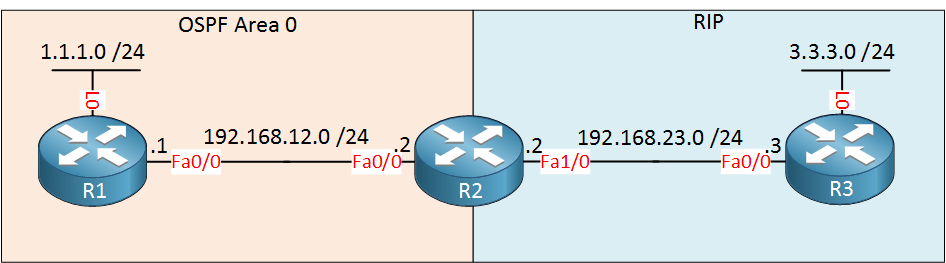
Let’s start with the redistribution between OSPF and RIP.
First, let me show you the router configurations:
R1(config)#router ospf 1
R1(config-router)#network 1.1.1.0 0.0.0.255 area 0
R1(config-router)#network 192.168.12.0 0.0.0.255 area 0R2(config)#router ospf 1
R2(config-router)#network 192.168.12.0 0.0.0.255 area 0R2(config)#router rip
R2(config-router)#version 2
R2(config-router)#no auto-summary
R2(config-router)#network 192.168.23.0R3(config)#router rip
R3(config-router)#version 2
R3(config-router)#network 3.3.3.0
R3(config-router)#network 192.168.23.0Nothing special here, just OSPF and RIP advertising their networks.
R1#show ip route

Gateway of last resort is not set

C    192.168.12.0/24 is directly connected, FastEthernet0/0
     1.0.0.0/24 is subnetted, 1 subnets
C 1.1.1.0 is directly connected, Loopback0R2#show ip route
Gateway of last resort is not set
C 192.168.12.0/24 is directly connected, FastEthernet0/0
1.0.0.0/32 is subnetted, 1 subnets
O 1.1.1.1 [110/2] via 192.168.12.1, 00:11:05, FastEthernet0/0
3.0.0.0/24 is subnetted, 1 subnets
R 3.3.3.0 [120/1] via 192.168.23.3, 00:00:20, FastEthernet1/0
C 192.168.23.0/24 is directly connected, FastEthernet1/0R3#show ip route
Gateway of last resort is not set
3.0.0.0/24 is subnetted, 1 subnets
C 3.3.3.0 is directly connected, Loopback0
C 192.168.23.0/24 is directly connected, FastEthernet0/0You can see router R2 has learned RIP and OSPF information. Time for some redistribution action!
Can we redistribute OSPF one area in to OSPF different area?
Hi Sathmal,
Nope it’s impossible, you can’t redistribute one process into the same process.
Rene
Hi Rene,
I am confused with the following redistribution command: metric-type 1 when redistribute between eigrp into ospf.
Hi Rene,
Thank you for this lesson.
what exactly is the use of the ‘default-metric’ command? While redistributing routes can i use any metric in the command?
Example:
John(config-router)#redistribute ospf 1 metricHi Abhishek,
If you redistribute into EIGRP or RIP then the default metric is set to “infinity”. You can use the default-metric command to set a default metric globally or configure it each time when you use the “redistribute” command.
Rene