

Lesson Contents
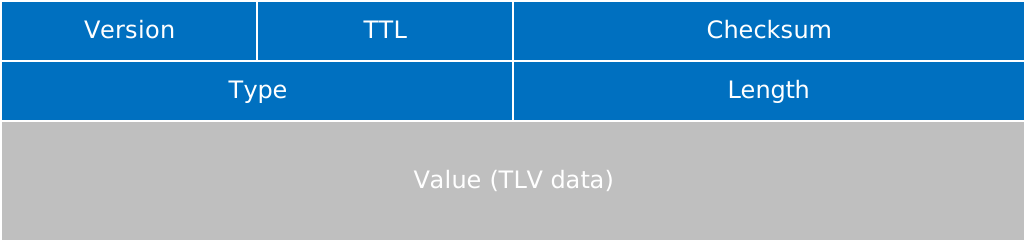
The CDP packet header is a fixed-format 4-byte structure that is used for all Cisco Discovery Protocol (CDP) messages. CDP operates at Layer 2 and is technically a frame, not a packet. In this lesson, we’ll take a look at the purpose of each CDP header and how version compatibility, hop limiting, error detection, and forward compatibility work.
Key Takeaways
- The CDP packet header is a fixed-format preamble that precedes all CDP messages and establishes the foundational structure for device discovery communication.
- The Version field occupies byte 0 and identifies the CDP protocol version, with version 2 being the current standard. This ensures compatibility between devices running different CDP implementations.
- The Time-to-Live (TTL) field occupies byte 1 and specifies the validity period in seconds. Receiving devices retain CDP information for this duration and discard it if no new advertisement is received within that window, with a typical default value of 180 seconds.
- The Checksum field occupies bytes 2 and 3, is calculated across the entire packet using a 16-bit checksum algorithm, and allows receiving devices to detect transmission errors or corruption.
- The 4-byte CDP header is contained within an 802.3 frame with LLC and SNAP encapsulation, followed by Type-Length-Value (TLV) fields that carry device-specific information.
- CDP uses the Cisco-reserved multicast MAC address 01:00:0C:CC:CC:CC at Layer 2, which Cisco switches treat as link-local and do not forward beyond the receiving port.
Prerequisites
You need to understand CDP (Cisco Discovery Protocol) fundamentals, and have basic knowledge of packet structure concepts such as headers, fields, and checksums. Familiarity with the OSI model and Layer 2 concepts will help you understand the context in which the CDP header operates.
Frame Encapsulation
The 4-byte CDP header is embedded in a Layer 2 frame structure that includes Ethernet, LLC, and SNAP headers. Here’s the full CDP frame structure when you use it on Ethernet networks:
| Layer | Key Fields |
|---|---|
| 802.3 Ethernet header | Destination MAC, source MAC, length |
| LLC header | DSAP 0xAA, SSAP 0xAA, Control 0x03 |
| SNAP header | Organization Code 0x00000C, Type 0x2000 |
| CDP header | 4 bytes: Version, TTL, Checksum |
| TLV payload | Device ID, platform, addresses, etc. |
CDP uses the Cisco-reserved multicast MAC address 01:00:0C:CC:CC:CC as the Layer 2 destination. Cisco switches treat this address as link-local and don’t forward it beyond the receiving port.
Components
The CDP packet header is the fixed-format preamble that precedes all CDP messages.
- Version
- Time-to-Live (TTL)
- Checksum
We’ll take a look at each of these.
Version Field
The Version field identifies the CDP protocol version and ensures compatibility between devices running different CDP implementations. It contains:
- Occupies the first octet (byte 0) of the CDP packet header.
- Indicates the CDP protocol version number.
- Allows devices to recognize and validate CDP messages from compatible sources.
- The current standard version is 2.
- CDP versions 1 and 2 share the same 4-byte header structure. The version field identifies which version is in use. CDP version 2 added new TLV types (such as VLAN information) but didn’t change the header itself.
Time-to-Live (TTL) Field
The TTL field specifies the validity period of a CDP advertisement in seconds. It has these items:
- Occupies the second octet (byte 1) of the CDP packet header.
- Measured in seconds, representing the validity period of the CDP packet.
- Receiving devices retain CDP information for this duration and discard it if no new advertisement arrives within that window.
- Prevents stale CDP information from persisting indefinitely in the network.
- The typical default value is 180 seconds.
For example, a CDP packet with a TTL of 180 means receiving devices will keep the information for 180 seconds and discard it if they don’t receive a new advertisement from the same source within that time.
Checksum Field
The Checksum field provides error detection for the entire CDP packet, ensuring data integrity during transmission. Here’s what it contains:
- Occupies bytes 2 and 3 of the CDP packet header.
- Calculated using a 16-bit checksum algorithm (similar to the checksum we use for IP/TCP/UDP) across the entire CDP packet (header and TLV payload).
- Allows receiving devices to detect corruption or transmission errors.
- Packet is discarded if checksum validation fails.
Packet Capture
Let’s look at these headers in action. If you want to follow along:
Packet Capture: Cisco Discovery Protocol (CDP) Version 2
Here is an example of what a CDP packet looks like in Wireshark:
Frame 1: Packet, 394 bytes on wire (3152 bits), 394 bytes captured (3152 bits) on interface eth1, id 0
IEEE 802.3 Ethernet
    Destination: CDP/VTP/DTP/PAgP/UDLD (01:00:0c:cc:cc:cc)
    Source: aa:bb:cc:00:01:10 (aa:bb:cc:00:01:10)
    Length: 380
    [Stream index: 0]
Logical-Link Control
    DSAP: SNAP (0xaa)
    SSAP: SNAP (0xaa)
    Control field: U, func=UI (0x03)
    Organization Code: 00:00:0c (Cisco Systems, Inc)
    PID: CDP (0x2000)
Cisco Discovery Protocol
    Version: 2
    TTL: 180 seconds
    Checksum: 0xf318 [correct]
    [Checksum Status: Good]
    Device ID: R1.lab
        Type: Device ID (0x0001)
        Length: 10
        Device ID: R1.lab
    Software Version
        Type: Software version (0x0005)
        Length: 260
        Software version: Cisco IOS Software [Dublin], Linux Software (X86_64BI_LINUX-ADVENTERPRISEK9-M), Version 17.12.1, RELEASE SOFTWARE (fc5)
        Software version: Technical Support: http://www.cisco.com/techsupport
        Software version: Copyright (c) 1986-2023 by Cisco Systems, Inc.
        Software version: Compiled Thu 27-Jul-23 22:33 by mcpre
    Platform: Linux Unix
        Type: Platform (0x0006)
        Length: 14
        Platform: Linux Unix
    Addresses
        Type: Addresses (0x0002)
        Length: 17
        Number of addresses: 1
        IP address: 192.168.12.1
            Protocol type: NLPID (0x01)
            Protocol length: 1
            Protocol: IP
            Address length: 4
            IP Address: 192.168.12.1
    Port ID: Ethernet0/1
        Type: Port ID (0x0003)
        Length: 15
        Sent through Interface: Ethernet0/1
    Capabilities
        Type: Capabilities (0x0004)
        Length: 8
        Capabilities: 0x00000001
            .... .... .... .... .... .... .... ...1 = Router: Yes
            .... .... .... .... .... .... .... ..0. = Transparent Bridge: No
            .... .... .... .... .... .... .... .0.. = Source Route Bridge: No
            .... .... .... .... .... .... .... 0... = Switch: No
            .... .... .... .... .... .... ...0 .... = Host: No
            .... .... .... .... .... .... ..0. .... = IGMP capable: No
            .... .... .... .... .... .... .0.. .... = Repeater: No
            .... .... .... .... .... .... 0... .... = VoIP Phone: No
            .... .... .... .... .... ...0 .... .... = Remotely Managed Device: No
            .... .... .... .... .... ..0. .... .... = CVTA/STP Dispute Resolution/Cisco VT Camera: No
            .... .... .... .... .... .0.. .... .... = Two Port Mac Relay: No
    Duplex: Full
        Type: Duplex (0x000b)
        Length: 5
        Duplex: Full
    Management Addresses
        Type: Management Address (0x0016)
        Length: 17
        Number of addresses: 1
        IP address: 192.168.12.1
            Protocol type: NLPID (0x01)
            Protocol length: 1
            Protocol: IP
            Address length: 4
            IP Address: 192.168.12.1
    Radio 2 channel: PID:Unix,VID:,SN:1
        Type: Radio2 channel (0x1009)
        Length: 22
        Platform: PID:Unix,VID:,SN:1
Let me explain what you see here. This is a 394-byte frame captured on an Ethernet interface. Let’s break it down layer by layer. The first part is Ethernet:
- IEEE 802.3 Ethernet header:
- The destination MAC address is
01:00:0c:cc:cc:cc, the Cisco-reserved multicast address used by CDP. - Wireshark also labels it CDP/VTP/DTP/PAgP/UDLD since other Cisco protocols share this same address.
- The source MAC is the sending device’s interface address.
- The destination MAC address is
- Logical-Link Control (LLC):
- DSAP and SSAP are both
0xAA, and the Control field is0x03. - These fixed values tell the receiving device that a SNAP header follows.
- DSAP and SSAP are both
- SNAP header:
- The Organization Code
00:00:0cidentifies Cisco Systems. - The PID
0x2000identifies the payload as CDP. - This is how the device knows to hand the rest of the frame to the CDP process.
- The Organization Code
After that comes the part we’ve been focusing on in this lesson, the CDP packet header itself (highlighted in red):
- Version: 2
- This device is running CDPv2.
- TTL: 180 seconds
- This is the default holdtime.
- A neighboring device receiving this advertisement will keep it in its CDP table for 180 seconds.
- The timer resets every time a new advertisement arrives.
- Checksum: 0xf318 [correct]
- Wireshark recalculated the checksum over the header and TLV payload.
- It confirmed the calculated value matches the value in the packet, so the frame wasn’t corrupted in transit.
- The
[Checksum Status: Good]line confirms the same thing.
Everything after the CDP header is the TLV payload, a series of Type-Length-Value fields that make up the rest of the CDP message:
- Device ID (
R1.lab) - Software Version
- Platform
- One or more Addresses
- Port ID, the interface the CDP message was sent from
- Capabilities, here just “Router”
- Duplex mode
- Management Addresses
- A vendor-specific Radio 2 channel TLV
These TLVs are what actually let a neighboring device build a picture of who you are, what you’re running, and how to reach you. The CDP header itself just wraps and validates that information.
Conclusion
You have now learned the structure of the CDP packet header, which consists of three fixed fields:
- Version (byte 0)
- Time-to-Live (byte 1)
- Checksum (bytes 2–3)
The Version field identifies the CDP protocol version for compatibility, the TTL field specifies the validity period with a typical default of 180 seconds, the Checksum field detects transmission errors. The 4-byte header sits within an 802.3 frame with LLC and SNAP encapsulation, uses the multicast MAC address 01:00:0C:CC:CC:CC, and is followed by Type-Length-Value (TLV) fields that carry device-specific information such as device ID, platform, and addresses. For a vendor-neutral alternative to CDP, see Link Layer Discovery Protocol (LLDP).
I hope you enjoyed this lesson. If you have any questions, feel free to leave a comment!